By: Trend Micro June 27, 2023 Read time: 4 min (1183 words)
Organizations face increasingly sophisticated cyber threats and vulnerabilities in today’s rapidly evolving digital landscape. Traditional security models can no longer protect sensitive data and mitigate risks. This is where Zero Trust comes into play, offering a comprehensive approach to security that can help organizations tackle emerging challenges.
In this article, we will explore how Zero Trust can benefit your organization, focusing on its ability to enhance security, secure supply chains, and align with international regulatory frameworks.
How Zero Trust Helps Your Organization
Zero Trust is designed to seek and eliminate shadow IT and inefficiencies within an organization. This approach can help reduce both operational and capital costs, effectively minimizing enterprise risks. Zero Trust also improves data hygiene by identifying systems with higher-than-average data risks, ensuring a more secure data environment.
Implementing Zero Trust also allows organizations to reduce the risk of brand-impacting security incidents and customer-facing outages. Zero Trust ensures uninterrupted business operations. Moreover, it provides fine-grained control over roaming and data sovereignty, granting organizations greater flexibility and security.
Moreover, Zero Trust enables multiple business functions to utilize a single access method. This consolidation improves security measures while reducing customers’ effort to complete transactions, ultimately enhancing the overall customer experience.
Zero Trust can be leveraged in numerous use cases, addressing different organizational security and risk management needs. Its versatility and adaptability make it a practical approach to securing digital environments effectively.
Secure Supply Chain Assurance: Importance and Zero Trust Applications
Zero Trust is crucial in securing the supply chain, as it helps identify revenue-impacting vulnerability chains within an enterprise. These chains can include business processes, security processes, and supply chains, collectively referred to as the attack surface.
Organizations can proactively identify and break potential kill chains within the supply chain by utilizing Zero Trust principles. Attack Surface Mapping and Cyber Asset Attack Surface Mapping (CAASM) enable the scanning and mitigating of current, potential, and near-miss supply chain attacks, reducing the risk of cascading failures.
Attack Surface Mapping involves identifying and mapping all the possible entry points, weaknesses, and exposure areas in an organization’s network, systems, and applications. It provides a comprehensive view of the organization’s attack surface, including external-facing systems and internal assets and connections.
Cyber Asset Attack Surface Mapping (CAASM) focuses explicitly on the assets within an organization’s supply chain. It examines the digital assets and dependencies in the supply chain ecosystem, including third-party vendors, partners, and interconnected systems. By analyzing the attack surface of the supply chain, organizations can identify potential weaknesses and vulnerabilities that attackers could exploit.
These mapping techniques enable organizations to proactively scan and assess their current security posture, identify potential risks, and prioritize mitigation efforts. Organizations can take appropriate measures to strengthen their defenses, patch vulnerabilities, and implement security controls by understanding the attack surface and potential attack vectors.
Zero Trust Frameworks: DISA NSA vs. NIST
Zero Trust frameworks can vary based on organizational needs and security requirements. The DISA NSA Zero Trust Reference Architecture is suitable for large critical infrastructure entities, while the NIST approach caters to entities in the early stages of their security maturity journey.
The DISA NSA framework provides a comprehensive and adaptable blueprint, focusing on Device Trust, User Trust, Data Trust, and Network Trust. Organizations can establish trust across various infrastructure components by implementing rigorous authentication, authorization, and continuous monitoring. This approach enhances risk management accuracy and reduces infrastructure costs, making it suitable for large critical infrastructure entities.
On the other hand, the NIST approach follows a risk-based strategy, emphasizing continuous monitoring, granular access controls, and dynamic policy enforcement. It promotes a “never trust, always verify” mindset, advocating for robust authentication mechanisms, network segmentation, and encryption. This framework offers flexibility and scalability, making it well-suited for organizations at various stages of their security maturity journey.
To leverage the strengths of both frameworks, organizations can incorporate complementary design elements tailored to their specific needs. Organizations can establish a robust Zero Trust architecture that addresses their unique security requirements by combining the DISA NSA and NIST approaches.
Ultimately, implementing Zero Trust principles provides organizations with a proactive and holistic security approach, reducing the risk of breaches, protecting sensitive data, and ensuring the resilience of their infrastructure. By embracing these frameworks, organizations can strengthen their security posture and effectively combat the ever-evolving cyber threats of today’s digital landscape.
Zero Trust and International Regulatory Frameworks
Zero Trust is a security framework that has gained significant attention and adoption in recent years. It aligns with various international regulatory frameworks, ensuring organizations meet stringent data protection, privacy, and security requirements.
General Data Protection Regulation (GDPR)
Zero Trust principles align closely with the core principles of GDPR, which emphasize the protection of personal data, privacy, and accountability. By implementing Zero Trust measures, organizations establish robust security controls, mitigate the risk of data breaches, and protect personal data. Through solid authentication, access controls, data segmentation, and encryption, Zero Trust helps organizations meet GDPR requirements, ensuring compliance with data protection regulations.
California Consumer Privacy Act (CCPA)
The CCPA highlights the importance of safeguarding consumers’ personal information. Zero Trust principles provide valuable contributions to adequate data protection and privacy practices. With strong authentication mechanisms, data segmentation, and encryption, organizations can enhance their data security measures and meet CCPA obligations. Zero Trust’s emphasis on continuous monitoring and granular access controls ensures that organizations maintain control over the processing and sharing of personal information, thus meeting CCPA compliance requirements.
Payment Card Industry Data Security Standard (PCI DSS)
PCI DSS establishes rigorous security measures to protect cardholder data. Zero Trust provides a solid foundation for meeting PCI DSS requirements by focusing on secure access controls, continuous monitoring, and encryption. Zero Trust’s “never trust, always verify” principle aligns with the need for stringent authentication mechanisms and restricted access to cardholder data. Organizations can establish a robust security posture by implementing Zero Trust and maintaining compliance with the PCI DSS standards.
Zero Trust principles offer organizations a powerful approach to achieving compliance with international regulatory frameworks. By aligning with the General Data Protection Regulation (GDPR), California Consumer Privacy Act (CCPA), and Payment Card Industry Data Security Standard (PCI DSS), Zero Trust enhances data protection, privacy, and security practices. Conclusion
In an era of increasing cyber threats and supply chain vulnerabilities, adopting a Zero Trust approach is essential for organizations aiming to strengthen their security measures and ensure the integrity of their supply chains. By implementing Zero Trust principles, organizations can enhance security, streamline business functions, and align with international regulatory frameworks.
The versatility of Zero Trust frameworks, such as DISA NSA and NIST, allows organizations to tailor their security strategies to their specific needs. Embracing Zero Trust is a proactive step towards safeguarding sensitive data and critical operations and a crucial component of building trust with customers and partners in an ever-evolving digital landscape.
Download our comprehensive report on Zero Trust frameworks and their implementation strategies today. Gain valuable insights, practical guidance, and actionable steps to strengthen security measures. Click here to download the report and stay one step ahead in the ever-evolving digital landscape.
CDNs help keep Microsoft 365 fast and reliable for end users. Cloud services like Microsoft 365 use CDNs to cache static assets closer to the browsers requesting them to speed up downloads and reduce perceived end user latency. The information in this topic will help you learn about Content Delivery Networks (CDNs) and how they’re used by Microsoft 365.
What exactly is a CDN?
A CDN is a geographically distributed network consisting of proxy and file servers in datacenters connected by high-speed backbone networks. CDNs are used to reduce latency and load times for a specified set of files and objects in a web site or service. A CDN may have many thousands of endpoints for optimal servicing of incoming requests from any location.
CDNs are commonly used to provide faster downloads of generic content for a web site or service such as Javascript files, icons and images, and can also provide private access to user content such as files in SharePoint Online document libraries, streaming media files, and custom code.
CDNs are used by most enterprise cloud services. Cloud services like Microsoft 365 have millions of customers downloading a mix of proprietary content (such as emails) and generic content (such as icons) at one time. It’s more efficient to put images everyone uses, like icons, as close to the user’s computer as possible. It isn’t practical for every cloud service to build CDN datacenters that store this generic content in every metropolitan area, or even in every major Internet hub around the world, so some of these CDNs are shared.
How do CDNs make services work faster?
Downloading common objects like site images and icons over and over again can take up network bandwidth that can be better used for downloading important personal content, like email or documents. Because Microsoft 365 uses an architecture that includes CDNs, the icons, scripts, and other generic content can be downloaded from servers closer to client computers, making the downloads faster. This means faster access to your personal content, which is securely stored in Microsoft 365 datacenters.
CDNs help to improve cloud service performance in several ways:
CDNs shift part of the network and file download burden away from the cloud service, freeing up cloud service resources for serving user content and other services by reducing the need to serve requests for static assets.
CDNs are purpose built to provide low-latency file access by implementing high performance networks and file servers, and by leveraging updated network protocols such as HTTP/2 with highly efficient compression and request multiplexing.
CDN networks use many globally distributed endpoints to make content available as close as possible to users.
The Microsoft 365 CDN
The built-in Microsoft 365 Content Delivery Network (CDN) allows Microsoft 365 administrators to provide better performance for their organization’s SharePoint Online pages by caching static assets closer to the browsers requesting them, which helps to speed up downloads and reduce latency. The Microsoft 365 CDN uses the HTTP/2 protocol for improved compression and download speeds.
Note
The Microsoft 365 CDN is only available to tenants in the Production (worldwide) cloud. Tenants in the US Government, China and Germany clouds do not currently support the Microsoft 365 CDN.
The Microsoft 365 CDN is composed of multiple CDNs that allow you to host static assets in multiple locations, or origins, and serve them from global high-speed networks. Depending on the kind of content you want to host in the Microsoft 365 CDN, you can add public origins, private origins or both.
Content in public origins within the Microsoft 365 CDN is accessible anonymously, and can be accessed by anyone who has URLs to hosted assets. Because access to content in public origins is anonymous, you should only use them to cache non-sensitive generic content such as Javascript files, scripts, icons and images. The Microsoft 365 CDN is used by default for downloading generic resource assets like the Microsoft 365 client applications from a public origin.
Private origins within the Microsoft 365 CDN provide private access to user content such as SharePoint Online document libraries, sites and proprietary images. Access to content in private origins is secured with dynamically generated tokens so it can only be accessed by users with permissions to the original document library or storage location. Private origins in the Microsoft 365 CDN can only be used for SharePoint Online content, and you can only access assets through redirection from your SharePoint Online tenant.
The Microsoft 365 CDN service is included as part of your SharePoint Online subscription.
Although not a part of the Microsoft 365 CDN, you can use these CDNs in your Microsoft 365 tenant for access to SharePoint development libraries, custom code and other purposes that fall outside the scope of the Microsoft 365 CDN.
Azure CDN
Note
Beginning in Q3 2020, SharePoint Online will begin caching videos on the Azure CDN to support improved video playback and reliability. Popular videos will be streamed from the CDN endpoint closest to the user. This data will remain within the Microsoft Purview boundary. This is a free service for all tenants and it does not require any customer action to configure.
You can use the Azure CDN to deploy your own CDN instance for hosting custom web parts, libraries and other resource assets, which allows you to apply access keys to your CDN storage and exert greater control over your CDN configuration. Use of the Azure CDN isn’t free, and requires an Azure subscription.
Microsoft’s Ajax CDN is a read-only CDN that offers many popular development libraries including jQuery (and all of its other libraries), ASP.NET Ajax, Bootstrap, Knockout.js, and others.
To include these scripts in your project, simply replace any references to these publicly available libraries with references to the CDN address instead of including it in your project itself. For example, use the following code to link to jQuery:
For more information about how to use the Microsoft Ajax CDN, see Microsoft Ajax CDN.
How does Microsoft 365 use content from a CDN?
Regardless of what CDN you configure for your Microsoft 365 tenant, the basic data retrieval process is the same.
Your client (a browser or Office client application) requests data from Microsoft 365.
Microsoft 365 either returns the data directly to your client or, if the data is part of a set of content hosted by the CDN, redirects your client to the CDN URL.a. If the data is already cached in a public origin, your client downloads the data directly from the nearest CDN location to your client.b. If the data is already cached in a private origin, the CDN service checks your Microsoft 365 user account’s permissions on the origin. If you have permissions, SharePoint Online dynamically generates a custom URL composed of the path to the asset in the CDN and two access tokens, and returns the custom URL to your client. Your client then downloads the data directly from the nearest CDN location to your client using the custom URL.
If the data isn’t cached at the CDN, the CDN node requests the data from Microsoft 365 and then caches the data for time after your client downloads the data.
The CDN figures out the closest datacenter to the user’s browser and, using redirection, downloads the requested data from there. CDN redirection is quick, and can save users a lot of download time.
How should I set up my network so that CDNs work best with Microsoft 365?
Minimizing latency between clients on your network and CDN endpoints is the key consideration for ensuring optimal performance. You can use the best practices outlined in Managing Microsoft 365 endpoints to ensure that your network configuration permits client browsers to access the CDN directly rather than routing CDN traffic through central proxies to avoid introducing unnecessary latency.
Is there a list of all the CDNs that Microsoft 365 uses?
The CDNs in use by Microsoft 365 are always subject to change and in many cases there are multiple CDN partners configured in the event one is unavailable. The primary CDNs used by Microsoft 365 are:
CDN
Company
Usage
Link
Microsoft 365 CDN
Microsoft Azure
Generic assets in public origins, SharePoint user content in private origins
There are many factors involved in measuring specific differences in performance between data downloaded directly from Microsoft 365 and data downloaded from a specific CDN, such as your location relative to your tenant and to the nearest CDN endpoint, the number of assets on a page that are served by the CDN, and transient changes in network latency and bandwidth. However, a simple A/B test can help to show the difference in download time for a specific file.
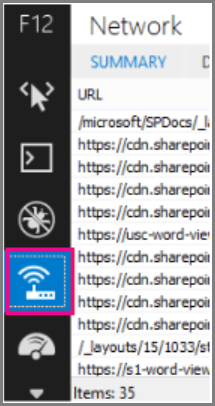
The following screenshots illustrate the difference in download speed between the native file location in Microsoft 365 and the same file hosted on the Microsoft Ajax Content Delivery Network. These screenshots are from the Network tab in the Internet Explorer 11 developer tools. These screenshots show the latency on the popular library jQuery. To bring up this screen, in Internet Explorer, press F12 and select the Network tab, which is symbolized with a Wi-Fi icon.
This screenshot shows the library uploaded to the master page gallery on the SharePoint Online site itself. The time it took to upload the library is 1.51 seconds.
The second screenshot shows the same file delivered by Microsoft’s CDN. This time the latency is around 496 milliseconds. This is a large improvement and shows that a whole second is shaved off the total time to download the object.
Is my data safe?
We take great care to protect the data that runs your business. Data stored in the Microsoft 365 CDN is encrypted both in transit and at rest, and access to data in the Microsoft 365 SharePoint CDN is secured by Microsoft 365 user permissions and token authorization. Requests for data in the Microsoft 365 SharePoint CDN must be referred (redirected) from your Microsoft 365 tenant or an authorization token won’t be generated.
To ensure that your data remains secure, we recommend that you never store user content or other sensitive data in a public CDN. Because access to data in a public CDN is anonymous, public CDNs should only be used to host generic content such as web script files, icons, images and other non-sensitive assets.
Note
3rd party CDN providers may have privacy and compliance standards that differ from the commitments outlined by the Microsoft 365 Trust Center. Data cached through the CDN service may not conform to the Microsoft Data Processing Terms (DPT), and may be outside of the Microsoft 365 Trust Center compliance boundaries.
For in-depth information about privacy and data protection for Microsoft 365 CDN providers, visit the following:
Learn more about Microsoft 365 privacy and data protection at the Microsoft Trust Center
Learn more about Azure privacy and data protection at the Azure Trust Center
How can I secure my network with all these 3rd party services?
Using an extensive set of partner services allows Microsoft 365 to scale and meet availability requirements and enhance the user experience when using Microsoft 365. The 3rd party services Microsoft 365 leverages include both certificate revocation lists; such as crl.microsoft.com or sa.symcb.com, and CDNs; such as r3.res.outlook.com. Every CDN FQDN generated by Microsoft 365 is a custom FQDN for Microsoft 365. If you’re sent to a FQDN at the request of Microsoft 365, you can be assured that the CDN provider controls the FQDN and the underlying content at that location.
For customers that want to segregate requests destined for a Microsoft 365 datacenter from requests that are destined for a 3rd party, we’ve written up guidance on Managing Microsoft 365 endpoints.
Is there a list of all the FQDNs that leverage CDNs?
The list of FQDNs and how they leverage CDNs change over time. Refer to our published Microsoft 365 URLs and IP address ranges page to get up to date on the latest FQDNs that leverage CDNs.
Can I use my own CDN and cache content on my local network?
We’re continually looking for new ways to support our customers’ needs and are currently exploring the use of caching proxy solutions and other on-premises CDN solutions.
Although it isn’t a part of the Microsoft 365 CDN, you can also use the Azure CDN for hosting custom web parts, libraries and other resource assets, which allows you to apply access keys to your CDN storage and exert greater control over your CDN configuration. Use of the Azure CDN isn’t free, and requires an Azure subscription. For more information on how to configure an Azure CDN instance, see Quickstart: Integrate an Azure storage account with Azure CDN.
I’m using Azure ExpressRoute for Microsoft 365, does that change things?
Azure ExpressRoute for Microsoft 365 provides a dedicated connection to Microsoft 365 infrastructure that is segregated from the public internet. This means that clients will still need to connect over non-ExpressRoute connections to connect to CDNs and other Microsoft infrastructure that isn’t explicitly included in the list of services supported by ExpressRoute. For more information about how to route specific traffic such as requests destined for CDNs, see Implementing ExpressRoute for Microsoft 365.
Can I use CDNs with SharePoint Server on-premises?
Using CDNs only makes sense in a SharePoint Online context and should be avoided with SharePoint Server. This is because all of the advantages around geographic location don’t hold true if the server is located on-premises or geographically close anyway. Additionally, if there’s a network connection to the servers where it’s hosted, then the site may be used without an Internet connection and therefore can’t retrieve the CDN files. Otherwise, you should use a CDN if there’s one available and stable for the library and files you need for your site.
Your site needs to have a defined structure because, without it, it’ll just be a random collection of pages and blog posts. Your users need this structure to navigate on your site, to click from one page to another. Google also uses the structure of your site to determine what content is important and what is less relevant. This guide tells you everything you need to know about site structure.
Site structure refers to organizing and arranging a website’s pages and content. It defines the information hierarchy within the site and serves as a roadmap for search engine crawlers. A well-structured site facilitates easy navigation, enhances user experience, and helps search engines like Google understand and effectively index the site’s content. This, in turn, can improve the site’s performance by making it easier for users to find and engage with the content. Ultimately, an optimized site structure helps achieve higher rankings, more traffic, and better conversion rates.
Importance for usability
The structure of your website significantly impacts the experience for your visitors (UX). If visitors can’t find the products and information they’re looking for, they’ll not likely become regular visitors or customers. In other words, you should help them navigate your site. A good site structure will help with this.
Navigating should be easy. You need to categorize and link your posts and products so they are easy to find. New visitors should be able to grasp what you’re writing about or selling instantly.
Importance of your site structure for SEO
A solid site structure vastly improves your chances of ranking in search engines. There are three main reasons for this:
a. It helps Google ‘understand’ your site
The way you structure your site will give Google vital clues about where to find the most valuable content on your site. It helps search engines understand what your site is mainly about or what you’re selling. A decent site structure also enables search engines to find and index content quickly. A good structure should, therefore, lead to a higher ranking in Google.
b. It prevents you from competing with yourself
On your site, you might have blog posts that are quite similar. If, for example, you write a lot about SEO, you could have multiple blog posts about site structure, each covering a different aspect. Consequently, Google won’t be able to tell which of these pages is the most important, so you’ll be competing with your content for high rankings. You should let Google know which page you think is most important. You need a good internal linking and taxonomy structure to do this, so all those pages can work for you instead of against you.
c. It deals with changes on your website
The products you sell in your shop will likely evolve. So does the content you’re writing. You probably add new product lines as old stock sells out. Or you write new articles that make old ones redundant. You don’t want Google to show outdated products or deleted blog posts, so you need to deal with these kinds of changes in the structure of your site.
Are you struggling with setting up your site’s structure? Don’t know the best strategy to link from one post to another? Check out our Site structure training, part of the Yoast SEO academy. Access to Yoast SEO academy is included in the price of Yoast SEO Premium. Before you know it, you’ll be able to improve your rankings by creating the best structure for your site!
How to set up the structure of your site
So, how do you construct a solid site structure? First, we’ll look at an ideal site structure and then explain how to achieve this for your site.
What’s an ideal site structure?
Let’s start by looking at an ideal situation: How should you organize your site if you’re starting from scratch? We think a well-organized website looks like a pyramid with several levels:
Homepage
Categories (or sections)
Subcategories (only for larger sites)
Individual pages and posts
The homepage should be at the top. Then, you have some sections or category pages beneath it. You should be able to file your content under one of these categories. You can divide these sections or categories into subcategories if your site is larger. Beneath your categories or subcategories are your pages and posts.
An ideal site structure looks like a pyramid. On top, you’ll find the homepage and, right below, the main sections or categories, possibly followed by subcategories. On the ground, you’ll find all the individual posts and pages.
Your homepage
On top of the pyramid is the homepage. Your homepage should act as a navigation hub for your visitors. This means, amongst others, that you should link to your most important pages from your homepage. By doing this:
Your visitors are more likely to end up on the pages you want them to end up on;
You show Google that these pages are important.
Further down this article, we’ll help you determine which pages are essential to your business.
Beware not to link too many pages from your homepage, which will cause clutter. And a cluttered homepage doesn’t guide your visitors anywhere. If you want to optimize your homepage further, you can do many other things. Read our article on homepage SEO to find out what.
Navigation
In addition to having a well-structured homepage, it’s also important to create a clear navigation path on your site. Your site-wide navigation consists of two main elements: the menu and the breadcrumbs.
The menu
First, let’s take a look at the menu. The website menu is the most common aid for navigation on your website, and you want to make the best possible use of it. Visitors use your menu to find things on your website. It helps them understand the structure of your website. That’s why the main categories on your site should all have a place in the menu on your homepage.
Furthermore, putting everything in just one menu is not always necessary. If you have a big site with lots of categories, this may clutter your website and makes your main menu a poor reflection of the rest of your site. Where it makes sense, creating a second menu is perfectly fine.
For instance, eBay has one menu at the top of the page – also called the top bar menu – and, in addition to that, a main menu. This top bar menu links to important pages that aren’t categories in the shop, like pages that relate to the visitor’s account on the site. The main menu reflects the most important product categories on eBay.
eBay has multiple ways to start navigating from the homepage
Finally, just like on your homepage, you shouldn’t add too many links to your menu. They will become less valuable for your users and search engines if you do.
Adding breadcrumbs to your pages can make your site’s structure even clearer. Breadcrumbs are clickable links, usually at the top of a page or post. Breadcrumbs reflect the structure of your site. They help visitors determine where they are on your site. They improve your site’s user experience and SEO, as you can read in our guide on breadcrumbs.
You can use one of the many breadcrumb plugins for your WordPress site. You can also use our Yoast SEO plugin, as we’ve implemented a breadcrumb functionality in our plugin as well.
Taxonomies
WordPress uses so-called taxonomies to group content; other CMSs have similar systems. The word ‘taxonomy’ is a fancy term for a group of things — website pages, in this case — that have something in common. This is convenient because people looking for more information on the same topic can find similar articles more easily. You can group content in different ways. The default taxonomies in WordPress are categories and tags.
Categories
You should divide your site’s blog posts or products into several categories. If these categories grow too big, you should divide these categories into subcategories to clear things up again. For example, if you have a clothing store and sell shoes, you can divide this category into subcategories: ‘boots’, ‘heels’, and ‘flats’. These subcategories contain products, in this case, shoes, of that specific type.
Adding this hierarchy and categorizing your pages helps your user and Google make sense of every page you write. Add your main categories to your site’s menu when implementing your category structure.
Your site’s structure will also benefit from adding tags. The difference between a category and a tag mostly concerns structure. Categories are hierarchical: you can have subcategories and even sub-subcategories. Tags, however, don’t have that hierarchy. Tags say: “Hey, this article or product has a certain property that might interest a visitor.” Think of it like this: categories are the table of contents of your website, and tags are the index. A tag for the online clothing store mentioned above could be a brand, for instance, Timberlands.
Try not to create too many tags. You’re not structuring anything if you add a new unique tag to every post or article. Ensure each tag is used at least twice, and your tags group articles that genuinely belong together.
Some WordPress themes display tags with each post, but some don’t. Ensure your tags are available to visitors somewhere, preferably at the bottom of your article or in the sidebar. Google isn’t the only one that likes tags: they are useful for visitors wanting to read more about the same topic.
Site structure is all about grouping and linking the content on your site. Until now, we mostly discussed so-called classifying links: links on your homepage, navigation, and taxonomies. On the other hand, contextual links are internal links within the copy on your pages that refer to other pages within your site. For a link to be contextual, the page you link to should be relevant for someone reading the current page. If you look at the previous paragraph, for instance, we link to a post about tagging, so people can learn more about it if they’re interested.
Your most important pages are often very relevant to mention on several pages across your site, so you’ll link to them most often. Just remember that not only the page you’re linking to is relevant, the context of the link is important as well.
Google uses the context of your links to gather information about the page you’re linking to. It always uses the anchor text (or link text) to understand what the page you’re linking to is about. But the anchor text isn’t the only thing Google looks at. Nowadays, it also considers the content around the link to gather extra information. Google is becoming better at recognizing related words and concepts. Adding links from a meaningful context allows Google to value and rank your pages properly. Yoast SEO Premium makes internal linking a breeze by automatically suggesting relevant content from your site to link to.
Contextual linking for blogs
For blogs, you should write extensively on the topics you want to rank for. You should write some main articles — your cornerstone articles — and write various posts about subtopics of that topic. Then link from these related posts to your cornerstone articles and from the cornerstone articles back to related posts. In this way, you’ll ensure that your most important pages have both the most and most relevant links.
The following metaphor might help you understand this principle:
Imagine you’re looking at a map of a state or country. You’ll probably see many small towns and some bigger cities. All towns and cities will be interconnected somehow. You’ll notice that small towns often have roads leading to the big cities. Those cities are your cornerstones, receiving the most links. The small towns are your posts on more specific topics. Some roads (links) lead to these smaller towns, but not as much as the big cities.
Contextual internal linking works differently on an online store with very few to no pages that are exclusively meant to inform. You don’t explore a specific topic on your product pages: you’re selling a product. Therefore, on product pages, you mostly want to keep people on a page and convince them to buy the product. Consequently, contextual linking is far less prominent in this context. You generally shouldn’t add contextual links to your product descriptions because it could lead to people clicking away from the page.
There are just a couple of meaningful ways of adding contextual links to the product pages for your ecommerce SEO:
link from a product bundle page to the individual products
a ‘related items’ or ‘compare with similar items’ section
a ‘customers also bought’ section
a ‘product bundles’ or ‘frequently bought together’ section.
Landing pages are the pages you want your audience to find when they search for specific keywords you’ve optimized for. For instance, we want people who search for ‘free SEO training’ to end up on the page about our free training called ‘SEO for beginners’. You need to approach the content of your most important landing pages differently than your regular pages.
Here, we’ll discuss two types of landing pages: cornerstone pages and product landing pages. They’re both pages you’d like people to land on from the search engines, but they require quite a different approach. But first, we’ll shortly go into search intent because you have to know what your audience is really looking for.
Search intent
When setting up your site structure, you must consider search intent. It’s about what you think people are looking for when they enter a query into a search engine. What do people want to find? And: what do they expect to find?
Consider different possibilities in search intent, as you might want to cater to different types on your site. Are people just looking for an answer to a question or a definition? Are they comparing products before purchase? Or are they intending to buy something right away? This is often reflected in the type of query they make. You can also use Google’s search results to create great content that fits someone’s needs.
When you have an idea of the search intent, ensuring your landing page fits your audience’s search intent is essential. Pages can answer multiple search intents, but you need a clear view of at least your most important pages.
Cornerstone articles are the most important informational articles on your website. Their focus is to provide the best and most complete information on a particular topic; their main goal is not to sell products.
Because of this focus, we usually think of blogs when discussing cornerstone content. Of course, that doesn’t mean it can only be a blog post. All different kinds of websites have cornerstone articles! Rule of thumb: if an article brings everything you know about a broad topic together, it’s a cornerstone content article.
Product landing pages significantly differ from cornerstone articles. The latter are lengthy, whereas product landing pages shouldn’t be that long. Rather than complete articles, they should be focused. These pages only need to show what your visitors need to know to be convinced. They don’t need to hold all the information.
You want to rank with these pages, meaning they need content. Enough content for Google to understand what the page is about and what keyword it should rank for. Where cornerstone articles could be made up of thousands of words, a couple of hundred could be enough for product landing pages. The main focus of the content should be on your products.
Structuring or restructuring your content doesn’t always have high priority in everything you have to do. Especially when you blog a lot or add other content regularly, it might feel like a chore. Although it isn’t always fun, you must do it, or your website might become messy. To prevent that from happening, you need to fix your site structure and keep an eye on it while adding new content. Site structure should be part of your long-term SEO strategy.
Evaluate your menu
When your business goal or website changes, your menu must also change. Planning things visually will pay off when you start thinking about restructuring your site. Make a flowchart.
Start with your new menu one or two levels deep and see if you can fit in more pages you have created over the years. You’ll find that some pages are still valid but don’t seem relevant to your menu anymore. No problem, just be sure to link to them on related pages and in your sitemaps so that Google and your visitors can still find these pages. The flowchart will also show you any gaps in the site structure.
Creating an overview of your categories, subcategories, and products or posts will also help you to rethink your site’s taxonomy. This could be a simple spreadsheet, but you can use more visual tools like LucidChart or MindNode.
Do your product categories and subcategories provide a logical overview of your product range or your posts and pages? Perhaps you’ve noticed somewhere down the line that one category has been far more successful than others, or you wrote many blog posts on one subject and very few on others.
If one category grows much larger than others, your site’s pyramid could be thrown off balance. Think about splitting this category into different categories. But, if some product lines end up much smaller than others, you might want to merge them. Don’t forget to redirect the ones you delete.
If you have built your HTML sitemap manually, update that sitemap after changing your site structure. In the far more likely event you have an XML sitemap, re-submit it to Google Search Console.
You might be able to update and republish some outdated articles to make them relevant again. If an article is outdated, but no one reads it anyway, you might delete it. This could clean up your site nicely.
What you should know, in that case, is that you should never delete a page or article without thinking. If Google cannot find the page, it serves your user a 404 error page. Both the search engine and your visitor will see this error message saying the page doesn’t exist, and that is a bad experience and, thus, bad for your SEO.
Be smart about this! You need to redirect the URL of the page you’re deleting properly so your user (and Google) lands on a different page that is relevant to them. That could even improve your SEO!
Got some old content to clean up on your site? Sort out hidden pages and dead ends in four easy steps with our orphaned content SEO workout, available in Yoast SEO Premium.
Avoid keyword cannibalization
Your website is about a specific topic, which could be quite broad or rather specific. While adding content, you should be aware of keyword cannibalization. If you optimize your articles for keywords that are all too similar, you’ll be devouring your chances of ranking in Google. If you optimize different articles for similar key terms, you’ll be competing with yourself, making both pages rank lower.
You’ll have some work to do if you suffer from keyword cannibalization. In short, you should research the performance of your content and probably merge and redirect some of it. When merging posts, we recommend creating a new draft by cloning one of the original posts with the free Yoast Duplicate Post plugin. This allows you to work on your merged post without making these changes to a live post. Read the guide by Joost to learn more about keyword cannibalization and how to fix it.
Internal linking with Yoast SEO
Feeling a bit overwhelmed by all this advice? Yoast SEO has some handy tools to make internal linking so much easier.
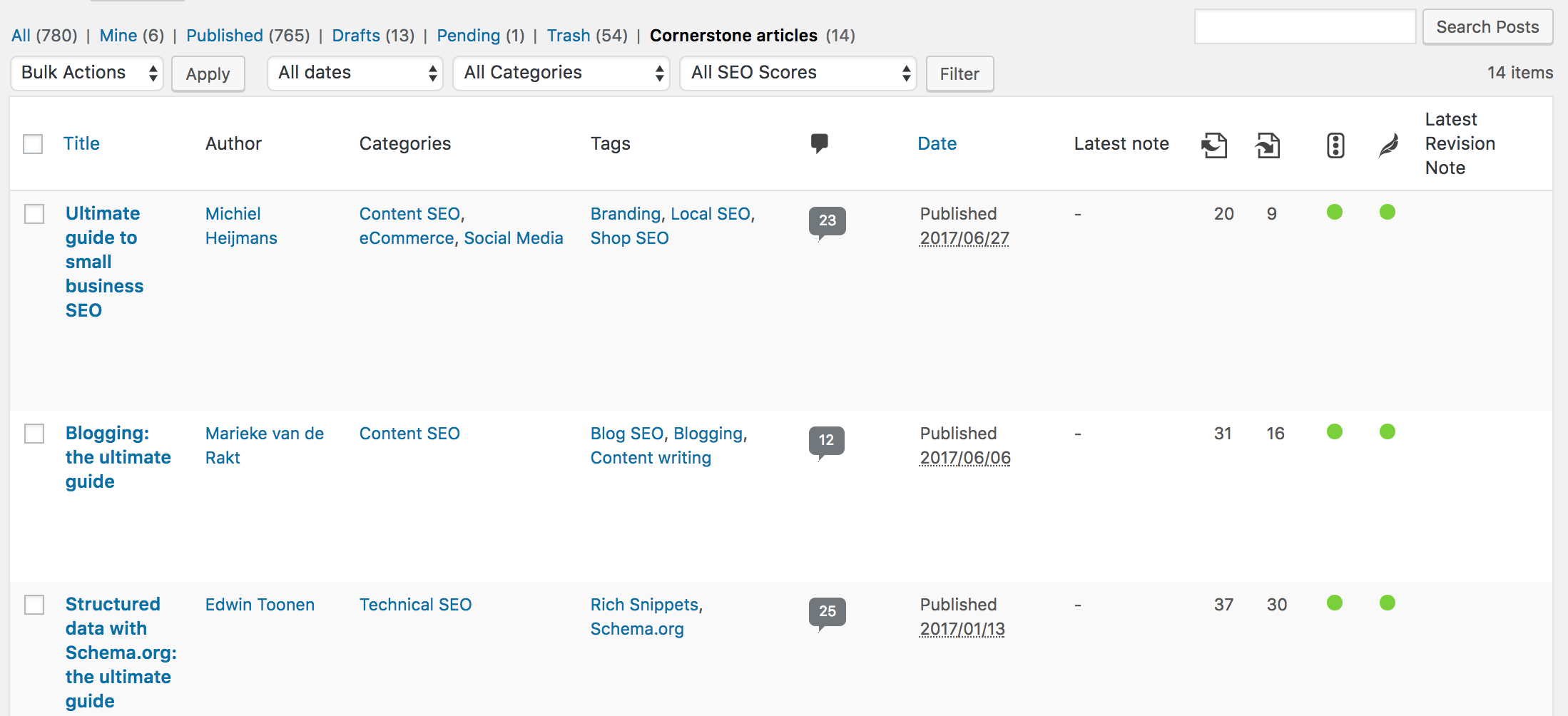
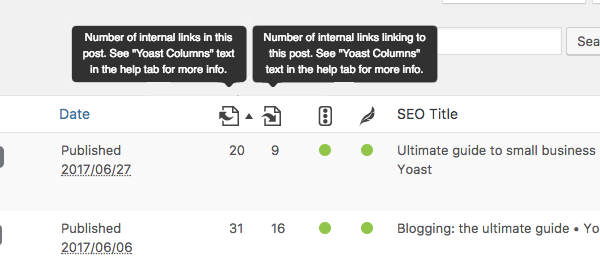
Yoast SEO’s text link counter visualizes your links so you can optimize them. It shows the internal links in a post and the internal links to a post. This tool can enhance your site structure by improving the links between your related posts. Make sure your cornerstones get the most (relevant) links! You can identify your cornerstones by finding them in the column with the pyramid icon.
Quickly see which posts have internal links pointing to them with the text link counter in Yoast SEO
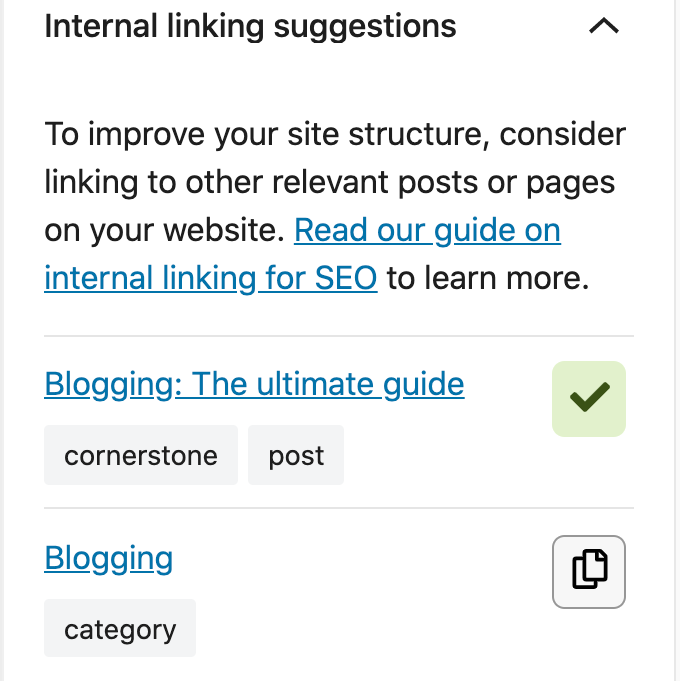
Yoast SEO Premium helps you with your internal linking as well. Our internal linking suggestions tool will show you which articles are related to the one you’re writing, so you can easily link to them: just by dragging the link into your editor!
The internal linking suggestions even include other content types
Moreover, our tool allows you to indicate which articles you consider cornerstone content on your site. Those articles will be shown at the top of the internal linking suggestions. You’ll never forget to link to them again.
As we have seen, there are several reasons why site structure is important. A good site structure helps both your visitors and Google navigate your site. It makes it easier to implement changes and prevents competing with your content. So use the tips and pointers in this guide to check and improve your site structure. That way, you’ll stay on top and keep your website from growing out of control!
Want to improve your site structure but don’t know where to start? Get Yoast SEO Premium and get loads of helpful tools and guidance, including free access to Yoast SEO Academy, our Site structure training, and our SEO workouts!
Marieke was head of strategy and former CEO at Yoast. After the sale of Yoast to Newfold Digital in 2021 she is no longer active at Yoast in 2023. Marieke, together with her husband Joost, actively invests in and advises several startups through their company Emilia Capital.
In SEO, there are on-page factors and off-page factors. On-page SEO factors are aspects of your website that you can optimize for better search rankings. It’s about improving things like your technical set-up, your content, and how user-friendly your site is. In this post, we’ll explain all about on-page SEO and how it differs from off-page SEO, and we’ll talk about some on-page optimizations that can help you to rank better.
On-page and off-page SEO: what’s the difference?
Every SEO strategy is focused on ranking as high as possible in the search engines. To do this, we all try to design and develop a website that Google’s algorithm — and people! — will love. That’s basically what SEO is about. The factors in Google’s algorithm can be divided into two categories that will determine the ranking of your website: on-page factors and off-page factors.
On-page SEO factors all have to do with elements on your website. For instance, things you work on to improve your E-E-A-T also fall in this category. Some of the most important on-page SEO factors are:
Your site set-up and technical features, site speed in particular
The quality of your content and use of keywords
How do you use additional media, such as images and videos
Your site structure and internal linking
Structured data and search appearance
Your URL structure
User experience
Meanwhile, off-page SEO looks at what happens away from your website. Some off-page SEO factors include:
Relevant links from other websites leading to your site
Social media activity
Business and map listings
External marketing activities
Pro tip: Find out more about on-page SEO with our front-end SEO inspector! You can use the front-end inspector tool in Yoast SEO Premium to explore the SEO data, metadata and schema output for pages on your site. It’s a great way to get to grips with your on-page SEO.
Importance of on-page SEO
On-page SEO consists of all the elements of SEO that you have control over. If you own a website, you can control the technical issues and the quality of your content. We believe you should be able to tackle all of these factors as they’re in your own hands. Remember: if you create an excellent website, it will start ranking.
Focusing on on-page SEO will also increase the chance that your off-page SEO strategy will be successful. Link building with a crappy site is very tough. Nobody wants to link to poorly written articles or sites that don’t work correctly.
How to optimize on-page SEO factors
1. Make sure search engines can crawl and index your site
If you’re unfamiliar with crawlability and indexing, here’s a quick explanation of what it is and what it has to do with Google. To show your page in the search results, Google must first know about that page. It has to be indexed by Google, meaning that this page has been stored in their index. And for that to be possible, you must ensure you’re not blocking Google from indexing your post or your whole site. So check if you’re not unintentionally doing that (we still see this happening!), and ensure your site is indexed.
Although this isn’t technically a ranking factor, getting your site into the search results requires it, so we thought it should be included here.
2. Invest time in creating quality content based on solid keyword research
Why do you think people visit your site? Most likely because it contains the information they’re looking for. Therefore it’s essential to write excellent content that corresponds with their needs. Search engines like Google also read your text. Which site ranks highest for a specific search term is primarily based on a website’s content. That’s why your content should be informative, easy to read, and focused on the right keywords that your audience uses.
Aside from creating quality content, you must remove or remedy low-quality pages. So-called thin content can harm your SEO. Take time to find these pages and do something with them occasionally to keep your content in good shape.
A significant on-page ranking factor is site speed. Users don’t want to wait for pages to load, so Google tends to rank fast-loading sites higher. If you’re unsure how fast (or slow) your site is, check out your Core Web Vital scores using the report in Google Search Console. This helpful tool will point out areas where your site speed can be improved so you know what to work on.
If you’re tech-savvy, you can probably handle this on your own. If you’re unsure where to start, our Technical SEO training can help you.
4. Get your site structure and internal linking right
A good site structure helps Google (and users) understand your site and navigate your content. And when it comes to making that site structure, internal linking is the way to do it. Firstly, you must channel many internal links to your most important content. We call those pages cornerstone content. Secondly, you should tidy up pages that aren’t getting many (if any) internal links. Those pages are what we refer to as orphaned content. It would be best if you decided whether to improve those pages and add more internal links pointing to them or remove them altogether.
Yoast SEO Premium has two SEO workouts to help you improve your site structure and internal linking. Using the workouts can help you to make big improvements quickly, so give them a go!
5. Optimize your use of images and videos
You’ll want to include images on your site to make it attractive, and maybe some videos too. Doing that wrong can harm your SEO, but doing it correctly comes with some SEO benefits.
High-quality images are usually large files that can slow your site down, and that’s a problem. Using smaller image files and giving them descriptive names, captions, and alt tags will favor your SEO. Plus, there are additional benefits. For one, you’ll make your site more accessible, so it’s helpful for a wider audience. And for another thing, you’ll have a chance of your images ranking in the Google Image search results. Read more about these topics in our posts about image SEO and alt tags.
Adding videos to your site is a bit more complicated than images. And ranking your videos on Google (or YouTube) comes with its own set of challenges. We’ve got a great series of posts all about video SEO, if you’d like to learn more about optimizing in this area. There’s also a dedicated Yoast Video SEO plugin, if you’re serious about getting your videos ranking.
6. Create a persuasive search appearance
How your site looks in the search results is vital for SEO. While the search results aren’t part of your site, the things you do to optimize your search appearance are. Therefore, we consider SEO titles, meta descriptions, and structured data part of on-page SEO.
Optimize your SEO title and meta description, and then add structured data for results that stand out
Optimizing the text for your search snippets is fairly straightforward. Adding structured data can be trickier. Good to know: Yoast SEO can help with all these tasks. With checks and previews to help you, getting your SEO titles and meta descriptions right couldn’t be easier. And when it comes to structured data, Yoast does all the hard work for you — all you need to do is select the content type and fill in the blanks.
7. Make your URLs SEO-friendly
A well-crafted URL structure helps your on-page SEO — it’s like giving your web pages a good road map. Think of it as a friendly address that guides search engines and invites users to explore your content. Creating SEO-friendly URLs makes it easier for humans and search engines to understand what your page is all about. Opt for concise and descriptive URLs that include relevant keywords, as they provide a clear signpost. A clean and organized URL structure enhances navigation, making it easier for everyone to understand your website. Don’t forget to keep it short and readable.
8. Design an excellent user experience
The last thing we want to mention is user experience. Simply put, users need to understand your website easily. They should be able to find what they want in a heartbeat. They should know where to click and how to navigate through your site. And your site should be fast! A beautifully designed website is nice, but you should make it your top priority to create a user-friendly website first.
If you want to learn more about combining SEO and UX to get more people to your site, we’d advise you to look at our other articles on user experience. Or check out our all-around SEO training course.
To conclude
We’ve talked about the most important on-page SEO factors. First, ensure that your website works correctly and that your technical SEO is up to par. Secondly, create content that is user-centered and focused on the right keywords. Thirdly, work on the usability and speed of your site to help users and search engines around your website.
As these factors are all a part of your site, you can work on them to ensure your on-page SEO is top-notch! That being said, do remember to also work on your off-page SEO. Although you may not have total control over these factors, you can still put some effort into creating that exposure on other sites too!
This post explains everything you need to know about cornerstone content – or evergreen content, as it’s also known. You’ll learn what it is, why it’s important for SEO, how to write this kind of content and how you should link from your posts to your cornerstone articles.
What is cornerstone content?
Cornerstone content is the core of your website. It consists of the best, most important articles on your site; the pages or posts you want to rank highest in the search engines. Cornerstone articles are usually relatively long, informative articles, combining insights from different blog posts and covering everything that’s important about a certain topic.
Their focus is to provide the best and most complete information on a particular topic, rather than to sell products. Still, they should reflect your business or communicate your mission perfectly.
Cornerstone content can be either a blog post or a page. But whichever they are, you should make sure they’re very well written, update them often, and aim to get them to rank for your most competitive keywords.
Why are cornerstone articles so important for SEO?
Cornerstone content plays a significant role in any SEO strategy. It can be hard to rank for search terms that are very popular, but a cornerstone approach can help you tackle those competitive search terms. If you write a lot of pages on similar subjects, you need to tell Google which of them is the most important. If you don’t, you’ll be eating away your own chances to rank well in the search results. Providing the correct internal link structure between your posts tells Google which article is the most important.
Link structure for cornerstones
Cornerstone articles should have a prominent place on your website. Ideally, someone should be able to click straight from your homepage to your cornerstone articles. Also, all your other posts about similar topics should link back to their corresponding cornerstone article, so its importance is clear from your site structure. As your site develops, you will write tons of new blog posts approaching that topic from other angles, each one linking back to your cornerstone article. This internal linking structure will increase the chance of your cornerstone content pages ranking in Google searches.
The following metaphor might help you understand this principle: imagine you’re looking at a map of a state or country. Small towns and big cities will all be interconnected somehow. But the big cities will have many more roads leading towards them than the small towns. Those cities are your cornerstones, receiving the most links. The small towns are your posts on more specific topics. There are some roads (links) leading to them, but not as many as to the big cities.
A more concrete example: at Yoast, we write a lot of different posts about SEO copywriting, each looking at a different aspect of SEO copywriting. The cornerstone article for this topic is the ultimate guide to SEO Copywriting, and whenever we write a new post on SEO copywriting, we add a link to that cornerstone article. In doing so, I’ll make clear to Google that the ultimate guide is the most important article about SEO Copywriting on our site, thereby increasing its chances to rank.
Which articles are my cornerstones?
Choose your cornerstones carefully. Think of the four or five pages you would like someone to read when they first visit your website. These articles should be the cornerstones of your site. Which articles are most important to you? Which are the most complete and authoritative? Do these target the keywords you most want to rank for?
It might be tempting to think of your homepage as a cornerstone article, but that’s not really what your homepage does. Although it does have lots of links leading back to it, content-wise it doesn’t really do what a cornerstone should do. A cornerstone article should target a specific topic, with lots of in-depth content talking about that topic. Your homepage will be much more general than this, so it doesn’t give you the same opportunity to rank for your target keywords. That being said, of course, it is important to spend time optimizing your homepage.
If your website is enormous, you’ll have more cornerstones than if your website is small. You’ll probably write about more than one topic, so be sure to choose a cornerstone article from each category.
Give your cornerstones extra attention
The concept of cornerstone content is so important, that our Yoast SEO for WordPress plugins and Yoast SEO for Shopify app include an option to indicate whether or not a page is cornerstone content. If you mark pages as cornerstone content, Yoast SEO helps you write kick-ass content and build a solid internal linking structure.
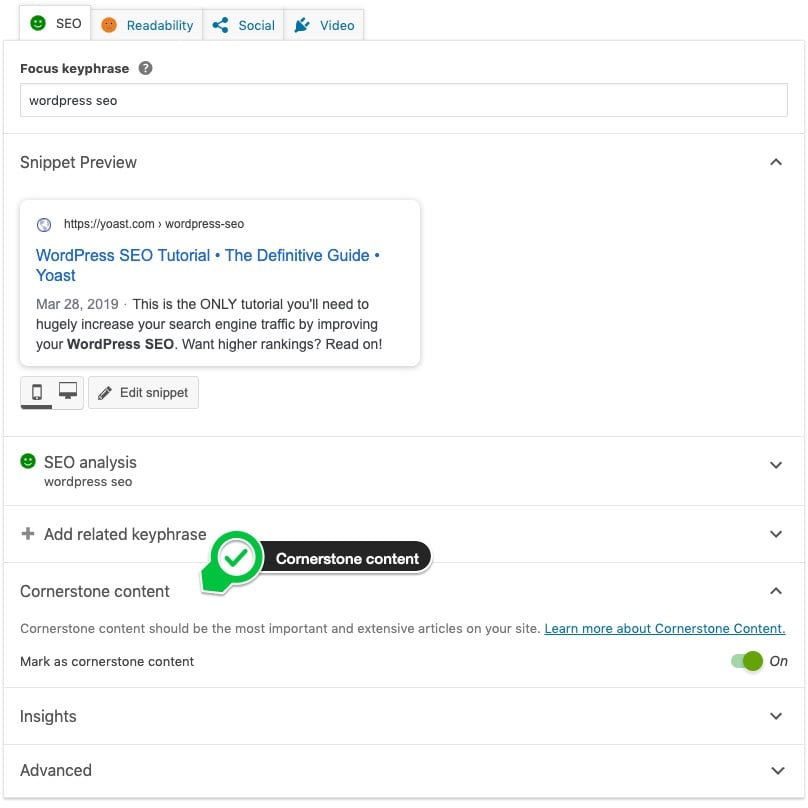
In the classic editor, the Yoast meta box has a Cornerstone content toggle. The block editor has one in the sidebar
Marking your cornerstone articles means you can create a list of them in your post overview, so you can easily work on improving them. And, most importantly, the link suggestion tool in Yoast SEO Premium will give priority to the articles that you mark as cornerstone content, so you’ll never forget to link to your best article on a certain topic if you write about something related.
Optimizing your cornerstones with Yoast SEO
Yoast SEO offers a specific cornerstone content analysis that helps you optimize your cornerstone content. Yoast SEO for WordPress also includes a text link counter, and – in Premium – even internal linking suggestions, in which cornerstone articles get priority over other posts.
If you really want to make your cornerstone articles great, you need specific content analysis for cornerstones. Content marked as cornerstone will be judged more strictly than usual on SEO and readability in the content analysis, as you want this article to be longer, have excellent content, keep the reader’s attention and rank high. Read how this analysis helps you optimize your cornerstones in Yoast SEO for WordPress and Yoast SEO for Shopify.
Text link counter
With Yoast SEO for WordPress you can filter your cornerstone articles in the post overview to see how many internal links a post has pointing to it and how many posts it links to. This text link counter is extremely useful because you can see at a glance if your cornerstone content has enough links from other, related posts:
Internal linking suggestions
Yoast SEO Premium has an internal linking feature. We analyze what you write and use the most prominent words in your text to determine which articles are related – and therefore which you should link to. Cornerstone articles are treated differently in our calculation of internal linking suggestions because they are more important and have a higher value. To give these articles more prominence, we place the cornerstone articles at the top of the list of the internal linking suggestions. That makes it much easier for you to link to your critical articles.
5 steps to a killer cornerstone approach
Ideally, you should do extensive keyword research, which will help you to produce really awesome, long, informative and beautifully written cornerstone articles. But what if you don’t have that much time? And what if you’ve already written tons of articles? Follow these five steps to make killer cornerstone content.
Step 1: Think about your keywords
You have to decide on the essential keywords you want to rank for. Your cornerstone articles should be optimized for the ‘head’ or most competitive keywords, so be sure to carry out some keyword research.
Step 2: Choose the best post
Go through the posts that are optimized for keywords surrounding the most important keywords. Which post do you think is the best? That’ll be your cornerstone from now on!
Step 3: Rewrite it
Rewrite your cornerstone article. Make it awesome and SEO-friendly. As cornerstone articles are usually lengthy, pay extra attention to readability. Make sure you use plenty of headings. An index at the beginning of a long cornerstone article is also a great idea. Expand your article and make sure it’s totally up to date. And don’t forget to rewrite and update that article regularly.
Step 4: Optimize your other posts on long tail variants
The other blog posts about similar topics as your cornerstone article should be optimized for long tail variants of the ‘head’ keyword you’re attacking in your cornerstone article.
Step 5: Linking from tail to head
You have to tell Google that your new cornerstone article is the most important article on that topic on your site. Don’t forget to link from all the long tail articles to your cornerstone article!
Quick wins!
In real life, perhaps you do not have the time to develop such an elaborate structure. Still, writing an article about a specific topic often leads to inspiration to write an article about a similar topic. You should then try to optimize this second post for a slightly different focus keyword and link these posts internally.
Every time you write a post, you should think about similar posts you have written and link to these. Do you already have an important article about this, even though it is not entirely awesome yet? If you use Yoast SEO Premium, keep an eye on the internal linking tool to see what comes up.
Also, make sure you set up the right linking structure. This does not take a lot of your time and could really help to rank your most important article. Take a look at all the posts on the topic you have already written about and add links to your most important article from all of your (less awesome) posts about that specific topic. You can use the Yoast text link counter to regularly check if there are enough internal links to your important articles.
Do our SEO workout: the cornerstone content approach
Want to build a fantastic cornerstone content strategy in WordPress? Do our SEO workout: the cornerstone content approach to quickly power up your internal linking. With the workout, you’ll get all the guidance you need to make sure that your most important articles have enough internal links pointing to them. You can find the tools you need right there in the workout — all you need to do is follow the steps. Give it a go!
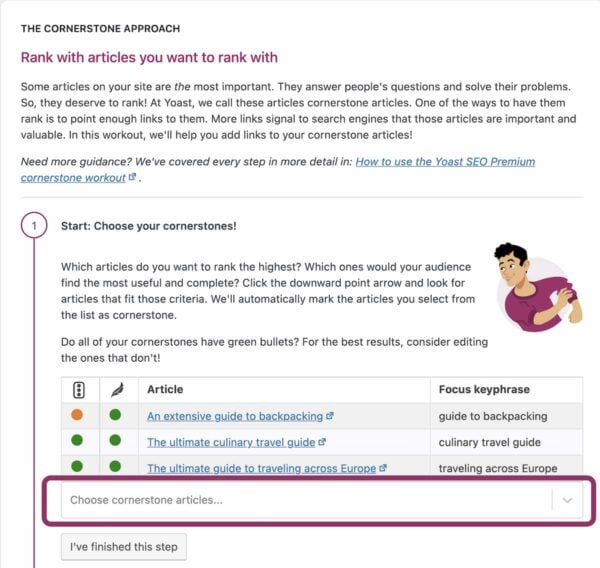
The first step in the cornerstone content SEO workout in Yoast SEO Premium
Yoast’s plans for cornerstone content
Site structure is important for SEO. Having a solid site structure means both search engines and visitors can easily navigate your site to find what they want. To help you achieve this, we are continually working on many more features in Yoast SEO that’ll improve the structure of your website.
On your site, you’ll probably have a few articles that are most dear to your heart. Articles you desperately want people to read. Articles you want people to find in Google. At Yoast, we call these articles your cornerstone articles. How does the Yoast SEO plugin help you set up a cornerstone content strategy? We’ll tell you all about that in this blog post. Plus, find out how our new SEO workout can make the whole process much easier!
What is a cornerstone content strategy?
Cornerstone content consists of those articles that you’re most proud of, that are most important to you. The posts that make people come back to your site or buy your stuff. The articles that reflect the mission of your company perfectly, and the ones you definitely want to rank highest. In general, cornerstone articles are lengthy, and they tend to be informative.
In a nutshell, a cornerstone content strategy means choosing your best content and channeling the most internal links towards it from other relevant pages on your site.
What does Yoast SEO do with cornerstone content?
There are three aspects to a successful cornerstone content approach:
Cornerstone content should be lengthy, well-written, and well-optimized.
Cornerstone articles should have a prominent place in your site’s structure.
You should keep your cornerstones fresh and up to date.
Without a doubt, the most common question we are asked is: “how do I make my site rank for keyword X?”. What most people don’t realize, is that they’re asking the wrong question. You see, sites don’t rank: individual pages rank. If you want to rank for a particular keyword, you’ll need to determine which specific page you want to rank for that keyword.
Adding a keyword to the title of every page is not helpful; you should use a focus keyphrase only once. What also won’t work is writing 200 articles around variations of a keyphrase without giving these a proper linking structure. You need one page that is the center of the content about that topic – a “hub” page if you will. That’s where cornerstone content comes in. But how do you make sure your cornerstone content articles start ranking in the search engines?
To rank with these articles, you need to make sure they’re the best articles you can write. You also need a kickass internal linking structure. Luckily, Yoast is there to help! In this post, we’ll explain just what cornerstone content is and how to rank with these articles. Are you struggling with implementing cornerstone content? Check out our Internal linking SEO workout: the cornerstone approach!
How to set up a cornerstone content strategy with Yoast SEO
Step 1: Choose which pages will be your cornerstones
Your cornerstone content pages will need to be 100% awesome in every way. You need to think about keyword research, headlines, first-class content and more. This article just covers what to do with those pages once they’re created, so if your pages aren’t ready, go and make some now! Not sure where to begin? Check out our detailed post on what type of articles should be your cornerstone content.
Which keywords to target with cornerstone articles?
Your cornerstone articles should be optimized for your most ‘head’ or most competitive keywords. Of course, you should still be realistic when determining these head keywords. But, your internal linking structure will help your cornerstone pages rank (more on that below), which is why these articles should aim to rank for your most competitive keywords.
Positioning that new cornerstone content on your site
Now let’s talk about where to place that content on your site. Important content deserves a place within your core site structure, not a news item or blog post drifting around somewhere. It should be easily found in a few clicks. This also means you should not create other pages within your site that target the exact same keyword! And you really don’t have to, as there are many ways to use keyword variations for these other pages and use these in your site structure.
Step 2: Mark those pages as cornerstone content using the toggle button
Once you’ve put together a list of the pages that will be your cornerstone content, you need to go to each of those pages and make sure this button is toggled to ‘On’:
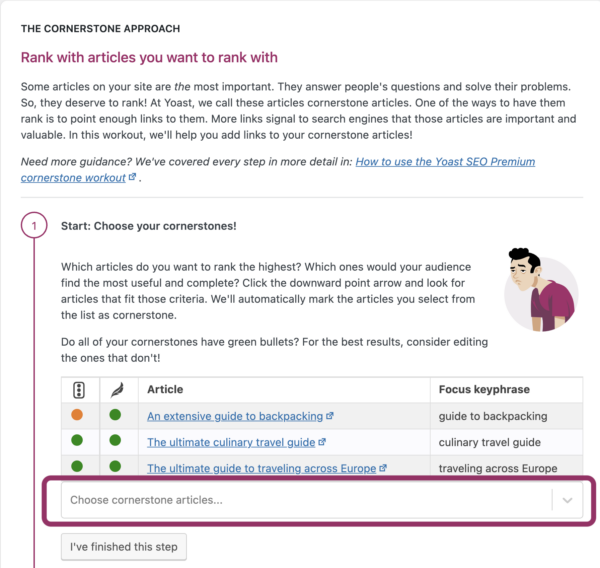
Alternatively, you can head straight over to our SEO workout: the cornerstone content approach and take a look at the overview in the first step. If there are any missing that you want to add, just look them up using the search box and click to add them to the list.
Our SEO analysis will help you optimize your blog post for the search engines. For cornerstone content, you have to go the extra mile, so indicating that an article is cornerstone content will make the SEO analysis and the readability analysis a bit more strict. For example, if a post is cornerstone content, we urge you to write at least 900 words, instead of the 300 words for a normal post.
Make sure you use your focus keyphrase enough, mention it in a few headings, and optimize your images. Readability is equally important, though. Our readability analysis helps you to, for instance, use enough headings and to write in short, easy-to-read sentences and paragraphs.
Step 3: Check that all your cornerstone content pages are marked
You’ll want to make sure all of your chosen pages are marked as cornerstone content at this point (otherwise you might need to double back later and redo some steps). It can help you to keep track if you make a note next to each page on your list once you’ve toggled the cornerstone content button to ‘On’.
If you’re a Yoast SEO Premium user you can access our new Internal linking SEO workout and quickly check which pages are marked as ‘cornerstone content’ in the overview provided:
Again, if anything is missing from this overview, you can easily add it using the search box below the list.
Step 4: Make sure your cornerstone content pages have the most incoming internal links
You have to link to your cornerstone articles to make them rank high in the search engines. By linking to your favorite articles the most often, you’ll tell Google that these are the ones that are most important. Think of it as a map: big cities have considerably more roads leading towards them than small towns. Those cities are your cornerstones. They should receive the most links. The small towns are your posts on more specific topics. If you build your site structure like this, you won’t be competing with your own content for a place in the search engines.
The text link counter allows you to see all the internal links you’ve put in a post and all internal links to a post from your other pages. This tool provides you with a clear overview of the distribution of your internal links. Make sure to check (and keep checking) if your cornerstone articles receive enough internal links!
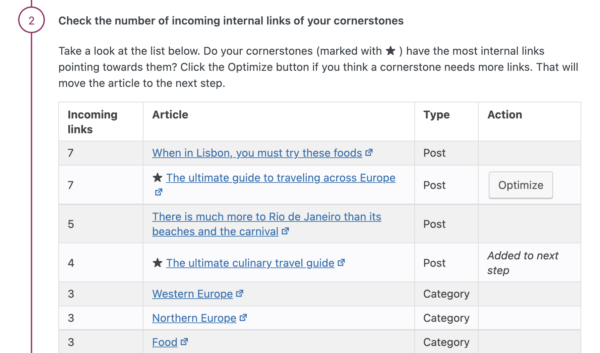
If you’re using the Premium Internal linking SEO workout to set up your cornerstone content strategy, you can see all the incoming links of your posts and pages in one simple overview, instead. If any are lacking enough internal links, you can click to add them to the next step of the workout where you will add more.
Step 5: Add text links (in context) from relevant pages on your website
When you’re adding links to your cornerstones, use the keyword you’re targeting as the anchor text for that link, if possible. But most importantly, link from within the content. Don’t just add some site-wide sidebar/footer links. The reason for this is simple: links from within content are way more valuable than links from sidebars.
In addition to that, you need to make sure that you’re linking to your cornerstones from pages that actually are about related topics. Contextual links are the ones that’ll help you rank. Adding hand-picked, relevant links that are useful for someone visiting your website is the best way of achieving this. Automation will not give you quality results. That means that building a decent linking strategy can be a lot of work, especially if your site is large.
If you use our Premium plugin, you can use our internal linking tool. This tool will make linking suggestions for other posts based on the words you’re using in your post. The posts you’ve marked as cornerstone content articles – as described previously – will always appear on top of our list of suggestions. That way, whenever you’re writing about a specific topic, you’ll find the right cornerstone article to link to.
Using our internal linking tool will remind you to link to your cornerstones whenever you’re writing a new post. As a result, your cornerstones will stay on top of your linking structure. And that’s what they need to get ranking!
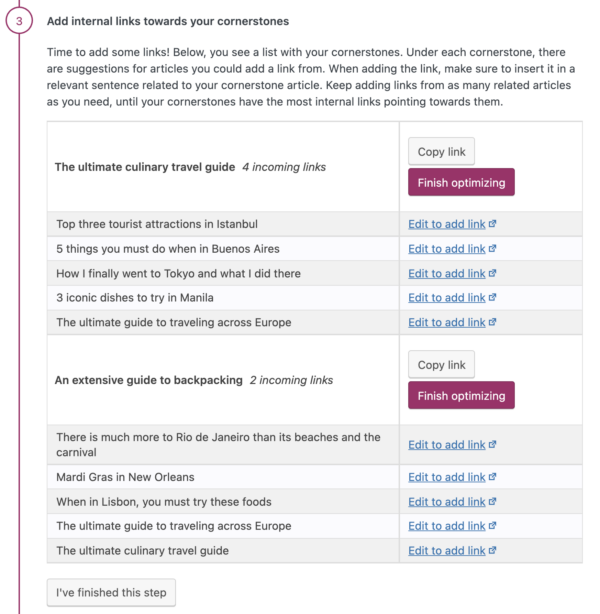
Once again, the Internal linking SEO workout can make this step a whole lot easier. We’ve added a tool that shows you your cornerstone articles (with a link you can copy) as well as relevant pages from your site that you can visit to add that link right away!
This means you can manage the whole thing from one page — plus you can immediately see whether you’ve added enough links or not. If you still need more after you’ve added all the relevant suggested links, just refresh the SEO workout and you’ll get more suggestions to add!
Step 6: Monitor and maintain!
Don’t start neglecting your cornerstone content strategy once everything is set up — as you add more pages to your website, you’ll need to keep making sure your cornerstone content is getting enough links. You probably don’t need to check this weekly, but if you leave it for more than a year then your website could change a lot in that time. Keep on top of your links to keep your cornerstone content strategy healthy and effective.
Regularly updating your cornerstone content is important for your cornerstone strategy, too. After all, your cornerstones should be timeless, and therefore, always contain the latest insights. If you have Yoast SEO Premium installed, you’ll have an additional feature to help you keep your cornerstones up to date. The stale cornerstone content filter allows you to see at a glance which of your cornerstones need updating. It works in both your post overview, and your pages overview. Neat, right?
Of course, at Yoast, we practice what we preach, so you’ll find no stale content here 😉
Don’t forget to promote your cornerstone content
If well-written, your cornerstone content should be something to be proud of! Something that others willingly share and thereby also something that will attract links. Don’t be afraid to reach out to other people who have written about related topics: show them what you have created and that it might be worthwhile for their visitors to see. You might even want to offer to write a guest post for them on the topic, linking back to your article.
Cornerstone content strategy made simple with Yoast SEO
The cornerstone content approach is a powerful strategy that channels your internal links toward the content that matters. Your cornerstone articles deserve special attention. They need to be written carefully, to be the most complete and authoritative. They should also be easy to find on your site! Cornerstones need many contextual links pointing towards them to make Google see that they are the most important articles. That’ll make them rank in the search engines. That’ll get them the traffic they’re worthy of!
Our Yoast SEO plugin comes with an array of tools to help you set up and maintain your cornerstone content and your internal links. Upgrade to Yoast SEO Premium and the benefits get even better. Try our Internal linking SEO workout today and give your cornerstone content the treatment it deserves!
At Fastly we often highlight our powerful POPs and modern architecture when asked how we’re different, and better than the competition. Today we’re excited to give you another peek under the hood at the kind of innovation we can achieve on a modern network that is fully software-defined.
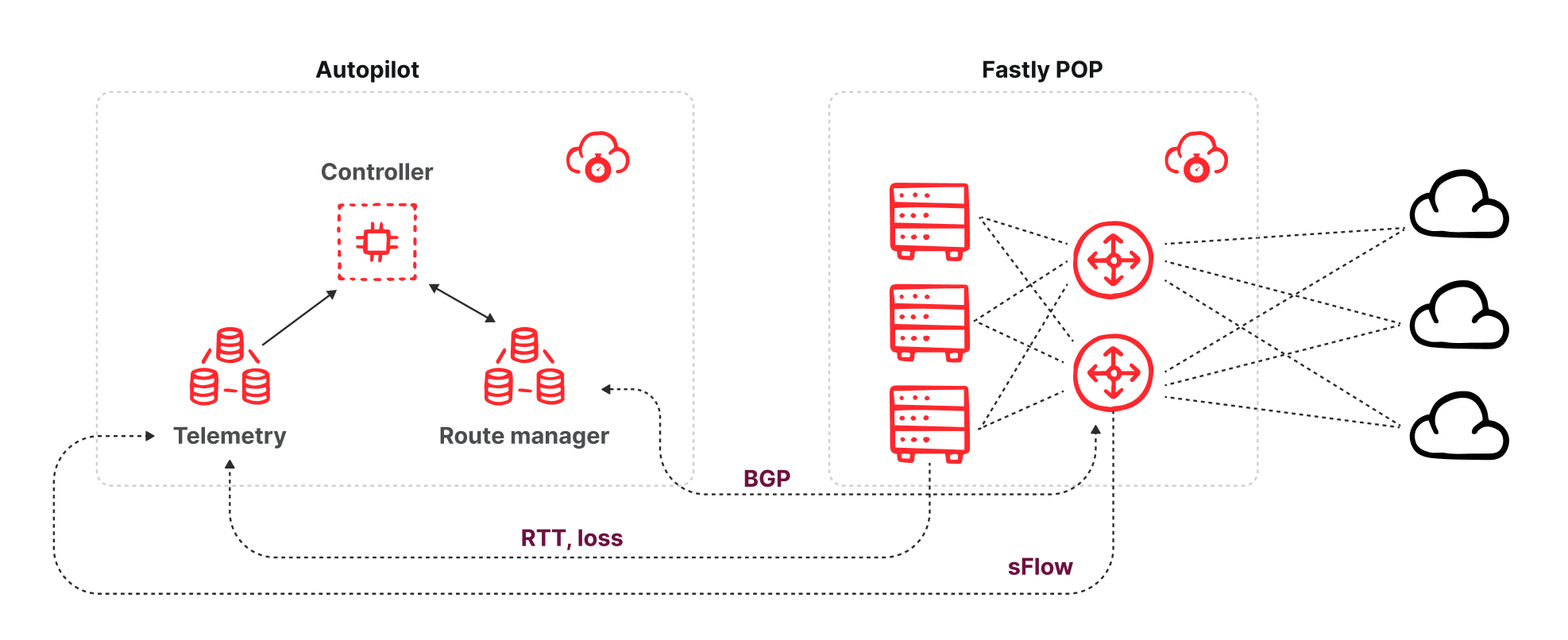
This past February, Fastly delivered a new record of 81.9 Tbps of traffic during the Super Bowl, and absolutely no one had to do anything with egress policies to manage that traffic over the course of the event thanks to Autopilot. Autopilot is our new zero-touch egress traffic engineering automation system, and because it was running, no manual interventions were required even for this record-breaking day of service. This means that for the first time ever at Fastly we set a new traffic record for the Fastly network while reducing the number of people who were needed to manage it. (And we notably reduced that number all the way to zero.) It took a lot of people across different Fastly teams, working incredibly hard, to improve the self-managing capabilities of our network, and the result is a network with complete automation that can react quickly and more frequently to failures, congestion, and performance degradation with zero manual intervention.
Autopilot brings many benefits to Fastly, but it is even better for our customers who can now be even more confident in our ability to manage events like network provider failures or DDoS attacks and unexpected traffic spikes — all while maintaining a seamless and unimpacted experience for their end users. Let’s look at how we got here, and just how well Autopilot works. (Oh, but if you’re not a customer yet, get in touch or get started with our free tier. This is the network you want to be on.)
Getting to this result required a lot of effort over several years. Exactly three years ago, we shared how we managed the traffic during the 2020 Super Bowl. At that time, an earlier generation of our traffic engineering automation would route traffic around common capacity bottlenecks while requiring operators to deal with only the most complex cases. That approach served us well for the traffic and network footprint we had three years ago, but it still limited our ability to scale our traffic and network footprint because, while we had reduced human involvement, people were still required to deal reactively with capacity. This translates to hiring and onboarding becoming a bottleneck of its own as we would need to scale the number of network operators at least at the same rate of the expansion of our network. On top of that, while we can prepare and be effective during a planned event like a Super Bowl, human neurophysiology is not always at its peak performance when woken up in the middle of the night to deal with unexpected internet weather events.
Achieving Complete automation with Autopilot and Precision Path
The only way forward was to remove humans from the picture entirely. This single improvement allows us to scale easily while also greatly improving our handling of capacity and performance issues. Manual interventions have a cost. They require a human to reason about the problem at hand and make a decision. This cannot be performed infinite times, so that requires us to preserve energy and only act when the problem is large enough to impact customer performance. It also means that when a human-driven action is taken, it normally moves a larger amount of traffic to avoid having to deal with the same issue again soon, and to minimize the amount of human interventions needed.
A modern CDN gives you huge improvements in caching, SEO, performance, conversions, & more.
With complete automation the cost of making an action is virtually 0, allowing very frequent micro-optimizations whenever small issues occur, or are about to occur. The additional precision and reactivity provided by full automation makes it possible to safely run links at higher utilization and rapidly move traffic around as necessary.
Figure: Egress interface traffic demand over capacity. Multiple interfaces had a demand that exceeded three times the physical capacity available during the Super Bowl, triggering automated traffic engineering overrides, which enabled continued efficient delivery without negative consequences to the network.
The graph above shows an example where Autopilot detected traffic demand exceeding physical link capacity. During the Super Bowl this demand exceeded 3 times the available capacity in some cases. Without Autopilot the peaks in traffic demand would have overwhelmed those links, requiring a lot of human intervention to prevent failure, but then to manage all of the downstream impacts of those interventions in order to get the network operating at top efficiency again. With Autopilot the network deflected traffic onto secondary paths automatically and we were able to deliver the excess demand without any performance degradation.
This post sheds light on the systems we built to scale handling large traffic events without any operator intervention.
Technical problem
Figure – Fastly POP is interconnected to the Internet via multiple peers and transit providers
The Fastly network of Points of Presence (POPs) is distributed across the world. Each POP is “multihomed”, i.e., it is interconnected to the Internet via a number of different networks, which are either peers or transit providers, for capacity and reliability purposes. With multiple routing options available, the challenge is how to select the best available path. We need to ensure that we pick the best performing route (in any given moment), and quickly move traffic away from paths experiencing failures or congestion.
Network providers use a protocol called Border Gateway Protocol (BGP) to exchange information about the reachability of Internet destinations. Fastly consumes BGP updates from its neighbors, and learns which neighbor can be used to deliver traffic to a given destination. However, BGP has several limitations. First, it is not capacity or performance aware: it can only be used to communicate whether an Internet destination can be reached or not, but not whether there is enough capacity to deliver the desired amount of traffic or what the throughput or latency would be for that delivery. Second, BGP is slow at reacting to remote failures: if a failure on a remote path occurs, it typically takes minutes for updates to be propagated, during which time blackholes and loops may occur.
Solving these problems without creating new ones is challenging, especially when operating at the scale of tens of Terabits per second (Tbps) of traffic. In fact, while it is desirable to rapidly route around failures, we need to be careful in those processes as well because rerouting large amounts of traffic erroneously can move traffic away from a well performing path onto a worse performing one and create congestion downstream as a result of our action, resulting in poor user experience. In other words, if decisions are not made carefully, some actions that are taken to reduce congestion will actually increase it instead – sometimes significantly.
Fastly’s solution to the problem is to use two different control systems that operate at different timescales to ensure we rapidly route around failures while keeping traffic on most performing paths.
The first system, which operates at a timescale of tens of milliseconds (to make a few round trips), monitors the performance of each TCP connection between Fastly and end users. If the connection fails to make forward progress for a few round trip times it reroutes that individual connection onto alternate paths until it resumes progress. This is the system underlying our Precision Path product for protecting connections between Fastly and end users, and it makes sure we rapidly react to network failures by surgically rerouting individual flows that are experiencing issues on these smaller timescales.
The second system, internally named Autopilot, operates over a longer timescale. Every minute it estimates the residual capacity of our links and the performance of network paths collected via network measurements. It uses that information to ensure traffic is allocated to links in order to optimize performance and prevent links from becoming congested. This system has a slower reaction time, but makes a more informed decision based on several minutes of high resolution network telemetry data. Autopilot ensures that large amounts of traffic can be moved confidently without downstream negative effects.
These two systems working together, make it possible to rapidly reroute struggling flows onto working paths and periodically adjust our overall routing configuration with enough data to make safe decisions. These systems operate 24/7 but had a particularly prominent role during the Super Bowl where they rerouted respectively 300 Gbps and 9 Tbps of traffic which would have otherwise been delivered over faulty, congested or underperforming paths.
This approach to egress traffic engineering using systems operating at different timescales to balance reactivity, accuracy, and safety of routing decisions is the first of its type in the industry to the best of our knowledge. In the remainder of this blog post, we are going to cover how both systems work but we’ll need to first make a small digression to explain how we route traffic out of our POPs, which is unusual and another approach where we’re also industry leaders.
Figure – Amount of traffic (absolute and percentage of total traffic) delivered by Precision Path and Autopilot respectively during the Super Bowl
Fastly network architecture
Figure – Fastly POP architecture
A typical Fastly POP comprises a layer of servers that are interconnected with all peers and transit providers via a tier of network switches. The typical approach to build an edge cloud POP consists in using network routers, which have a large enough memory to store the entire Internet routing table. In contrast, Fastly started designing a routing architecture that pushed all routes to end hosts in order to build a more cost-effective network, but we quickly realized and embraced the powerful capabilities that this architecture made possible. Endpoints that have visibility into the performance of flows now also have the means to influence their routing. This is one of the key reasons Fastly’s networking capabilities, programmability, flexibility, and ease of use continue to exceed the competition.
Here’s how our routing architecture works: Both switches and servers run routing daemons, which are instances of the BIRD Internet Routing Daemon with some proprietary patches applied to it. The daemons running on switches learn all routes advertised by our transits and peers. However, instead of injecting those routes in the routing table of the switches, they propagate them down to the servers which will then inject them into their routing tables. To make it possible for servers to then route traffic to the desired transit or peer, we use the Multiprotocol Label Switching (MPLS) protocol. We populate each switch with an entry in their MPLS lookup table (Label Forwarding Information Base [LFIB]) per each egress port and we tag all BGP route announcements propagated down to the servers with a community encoding the MPLS label that is used to route that traffic. The servers use this information to populate their routing table and use the appropriate label to route traffic out of the POP. We discuss this more at length in a scientific paper we published at USENIX NSDI ‘21.
Quickly routing around failures with Precision Path
Our approach of pushing all routes to the servers, giving endpoints the ability to reroute based on transport and application-layer metrics, made it possible to build Precision Path. Precision Path works on a timeframe of tens of milliseconds to reroute individual flows in cases of path failures and severe congestion. It’s great at quickly routing away from failures happening right in the moment, but it’s not aware or able to make decisions about proactively selecting the best path. Precision Path is good at steering away from trouble, but not zooming out and getting a better overall picture to select an optimized new route. The technology behind our precision path product is discussed in this blog post and, more extensively in this peer-reviewed scientific paper, but here’s a brief explanation.
Figure – Precision path rerouting decision logic for connections being established (left) and connections already established (right).
This system is a Linux kernel patch that monitors the health status of individual TCP connections. When a connection fails to make forward progress for some Round Trip Time (RTT), indicating a potential path failure, it is rerouted onto a randomly chosen alternate path until it resumes forward progress. Being able to make per-flow rerouting decisions is made possible by our host-based routing architecture where servers select routes of outgoing traffic by applying MPLS labels. End hosts can move traffic rapidly on a per-flow granularity because they have both visibility into the progress of connections, and the means to change network route selection. This system is remarkably effective at rapidly addressing short-lived failures and performance degradation that operators or any other telemetry-driven traffic engineering would be too slow to address. The downside is that this system only reacts to severe performance degradations that are already visible in the data plane and moves traffic onto randomly selected alternate paths, just to select non-failing paths, but they might not be the best and most optimal paths.
Making more informed long-term routing decision with Autopilot
Autopilot complements the limitations of Precision Path because it’s not great at responding as quickly, but it makes more informed decisions based on knowledge of which paths are able to perform better, or are currently less congested. Rather than just moving traffic away from a failed path (like Precision Path), it moves larger amounts of traffic *toward* better parts of a network. Autopilot has not been presented before today, and we are excited to detail it extensively in this post.
Autopilot is a controller that receives network telemetry signals from our network such as packet samples, link capacity, RTT, packet loss measurements, and availability of routes for each given destination. Every minute, the Autopilot controller collects network telemetry, uses it to project per-egress interface traffic demand without override paths, and makes decisions to reroute traffic onto alternate paths if one or more links are about to reach full capacity or if the currently used path for a given destination is underperforming its alternatives.
Figure – Autopilot architecture diagram
Autopilot’s architecture is comprised of three components (shown above):
A route manager, which peers with each switch within a POP and receives all route updates the switch received from its neighbors over a BGP peering session. The route manager provides an API that allows consumers to know what routes are available for a given destination prefix. The route manager also offers the ability to inject route overrides via its API. This is executed by announcing a BGP route update to the switch with a higher local preference value than routes learned from other peers and transit providers. This new route announcement will win the BGP tie-breaking mechanism and be inserted into servers’ routing tables and used to route traffic.
A telemetry collector, which receives sFlow packet samples from all the switches of a POP which allow an estimation of the volume of traffic broken down by destination interface and destination prefix as well as latency and packet loss measurements for all the traffic between Fastly POPs over all available providers from servers.
A controller, which consumes (every minute) the latest telemetry data (traffic volumes and performance) as well as all routes available for the prefixes currently served by the POP, and then computes whether to inject a BGP route override to steer traffic over alternate paths.
Making Precision Path and Autopilot work together
One challenge of having multiple control systems operating on the same inputs and outputs is having them work collaboratively to select the overall best options rather than compete with each other. Trying to select the best option from the limited vantage point of each separate optimization process could actually lead to additional disruption and do more harm than good. To the best of our knowledge, we are the first in the industry using this multi-timescale approach to traffic engineering.
The key challenge here is that once a flow is being rerouted by Precision Path, it no longer responds to BGP routing changes, including those triggered by Autopilot. As a result, Autopilot needs to account for the amount of traffic currently controlled by Precision Path in its decisions. We addressed this problem in two ways: first we tuned Precision Path to minimize the amount of traffic it reroutes, and by making that traffic observable by Autopilot so that it can be factored into Autopilot decisions.
When we first deployed Precision Path, we fine-tuned its configuration to minimize false positives. False positives would result in traffic being rerouted away from an optimal path that is temporarily experiencing a small hiccup, and onto longer paths with worse performance, which could in turn lead to a worse degradation by impacting the performance of affected TCP connections. We reported extensively on our tuning experiments in this paper. However, this is not enough, because even if we make the right decision at the time of rerouting a connection, the originally preferred path may recover a few minutes after the reroute, and this is typically what happens when BGP eventually catches up with the failure and withdraws routes through the failed path. To make sure we reroute connections back onto the preferred path when recovered, Precision Path probes the original path every five minutes after the first reroute, and if the preferred path is functional, it moves the connection back onto it. This mechanism is particularly helpful for long-lived connections, such as video streaming, which would otherwise be stuck on a backup path for their entire lifetime. This also minimizes the amount of traffic that Autopilot cannot control, giving it more room to maneuver.
The problem of making the amount of traffic routed by Precision Path visible to Autopilot is trickier. As we discuss earlier in this post, Autopilot learns the volume of traffic sent over each interface from sFlow packet samples emitted by switches. These samples report, among other things, over what interface the packets were sent to and which MPLS label it carried but do not report any information about how that MPLS label was applied. Our solution was to create a new set of alternate MPLS labels for our egress ports and allocate them for exclusive usage by Precision Path. This way, by looking up an MPLS label in our IP address management database, we can quickly find out if that packet was routed according to BGP path selection or according to Precision Path rerouting. We expose this information to the Autopilot controller which treats Precision Path as “uncontrollable”, i.e., traffic that will not move away from its current path even if the preferred route for its destination prefix is updated.
Making automation safe
Customers trust us with their business to occupy a position as a middleman between their services and their users, and we take that responsibility very seriously. While automating network operations allows for a more seamless experience for our customers, we also want to provide assurances to its reliability. We design all our automation with safety and operability at its core. Our systems fail gracefully when issues occur and are built so that network operators can always step in and override their behaviors using routing policy adjustments. The last aspect is particularly important because it allows operators to use tools and techniques learned in environments without automation and apply them here. Minimizing cognitive overhead by successfully automating more and more of the problem is particularly important to reduce the amount of time needed to solve problems when operating under duress. These are some of the approaches we used to make our automation safe and operable:
Standard operator tooling: both Precision Path and Autopilot can be controlled using standard network operator tools and techniques.
Precision Path can be disabled on individual routes by injecting a specific BGP community on an individual route announcement, which is a very common task that network engineers typically perform for a variety of reasons. Precision Path can also be disabled on an individual TCP session by setting a specific forwarding mark on the socket, which makes it possible to run active measurements without Precision Path kicking in and polluting results.
Autopilot route reselection is based on BGP best path selection, i.e., it will try to reroute traffic onto the second best path according to BGP best path selection. As a result, operators can influence which path Autopilot will fail over to by applying BGP policy changes such as altering MED or local pref values, and this is also a very common technique.
Finally, data about whether connections were routed on paths selected by precision path or autopilot is collected by our network telemetry systems, which allows us to reconstruct what happens
Data quality auditing: We audit the quality of data fed into our automation and have configured our systems to avoid executing any change if input data is inconsistent. In the case of Autopilot, for example, we compare egress flow estimation collected via packet samples against an estimation collected via interface counters, and if they diverge beyond a given threshold it means at least one of the estimations must be wrong, and we do not apply any change. The graph below shows the difference between those two estimations during the Super Bowl on one North American POP.
Figure – Difference between link utilization estimates obtained via interface counters and packet samples. The +/- 5% thresholds represent the acceptable margins of error
What-if analysis and control groups: in addition to monitoring input data we also audit the decisions made by systems and step in to correct them if they misbehave. Precision Path uses treatment and control groups. We randomly select a small percentage of connections to be part of a control group for which Precision Path is disabled and then monitor their performance compared to the others where precision path is enabled. If control connections perform better than treatment connections our engineering team is alerted, and steps in to investigate and remediate. Similarly, in Autopilot, before deploying a configuration change to our algorithm, we run it in “shadow” mode where the new algorithm makes decisions, but they are not applied to the network. The new algorithm will only be deployed if it performs at least as well as the one that is currently running.
Fail-static: when a failure occurs at any component of our systems, rather than failing close or open, they fail static, i.e., leave the network in the last known working configuration and alert our engineering team to investigate the problem.
Conclusions
This blog post is a view into how Fastly automates egress traffic engineering to make sure our customers’ traffic reaches their end users reliably. We continue to innovate and push the boundaries of what is possible while maintaining a focus on performance that is unrivaled. If you are thinking that you want your traffic to be handled by people who are not only experts, but also care this much, now is a great time to get in touch. Or if you’re thinking you want to be a part of innovation like this, check out our open listings here: https://www.fastly.com/about/careers/current-openings.
Open Source Software
The automation built into our network was made possible by open source technology. Open source is a part of Fastly’s heritage — we’re built on it, contribute to it, and open source our own projects whenever we can. What’s more, we’ve committed $50 million in free services to Fast Forward, to give back to the projects that make the internet, and our products, work. To make our large network automation possible, we used:
goBGP – BGP routing daemon library, used to build the Autopilot route collector/injector
BIRD – BGP routing daemon running on our switches and servers.
We did our best to contribute back to the community by submitting to their maintainers improvements and bug fixes that we implemented as part of our work. We are sending our deepest gratitude to the people that created these projects. If you’re an open source maintainer or contributor and would like to explore joining Fast Forward, reach out here.
Lorenzo Saino is a director of engineering at Fastly, where he leads the teams responsible for building the systems that control and optimize Fastly’s network infrastructure. During his tenure at Fastly, he built systems solving problems related to load balancing, distributed health checking, routing resilience, traffic engineering and network telemetry. Before joining Fastly he received a PhD from University College London. His thesis investigated design issues in networked caching systems.
Jeremiah Millay is a Principal Engineer on the Network Systems team at Fastly where he spends most of his time focused on network automation and writing software with the goal of improving network operations at Fastly. Prior to Fastly he spent a number of years as a Network Engineer for various regional internet service providers.
Paolo Alvarado is a Senior Manager of Technical Operations at Fastly. Paolo has over 10 years of experience working with content delivery networks in customer-facing and behind-the-scenes roles. Paolo joined Fastly to help build out the Fastly Tokyo office before moving into network operations. Currently, he manages a team of Network and System Operation engineers to meet the challenges of building and running a large scale network.
VP of Engineering leading Network Systems Organization
Hossein Lotfi is VP of Engineering leading Network Systems Organization at Fastly. Hossein has over 20 years of experience building networks and large-scale systems ranging from startups to hyper-scale cloud infrastructure. He has scaled multiple engineering organizations geared towards rapid, novel innovation development and innovations that are informed and inspired by deep involvement with the operational challenges of global scale systems. At Fastly, Hossein is responsible for building reliable, cost-effective, and low-latency systems to connect Fastly with end-users and customer infrastructures. The Network Systems Organization teams include Kernel, DataPath (XDP), L7 Load Balancing, TLS Termination, DDoS Defence, Network Architecture, Network Modeling and Provisioning Systems, Traffic Engineering, Network Telemetry, DNS, Hardware Engineering, Pre-Production Testing and Fastly’s Edge Delivery platform.
Small and medium-sized businesses (SMBs) are increasingly becoming targets for cyber attacks. According to Verizon, about 61 percent of SMBs reported at least one cyber attack in 2021. Worse, Joe Galvin, chief research officer at Vistage, reported that about 60 percent of small businesses fold within six months of a cyber attack.
To protect your network from potential threats, you need a reliable and effective firewall solution. This tool will act as the first line of defense against unauthorized access and can help prevent malicious attacks from infiltrating a business’s network.
We reviewed the top SMB firewall solutions to help you determine the best one for your business.
Founded in 2018, Perimeter 81 is a cloud and network security company that provides organizations with a secure and unified platform for accessing and managing their applications and data.
It provides many security solutions, including firewall as a service (FWaaS), secure web gateway (SWG), zero trust network access (ZTNA), malware protection, software-defined perimeter, VPN-alternative and secure access service edge (SASE) capabilities, to ensure that data is secure and accessible to authorized personnel. It also provides centralized management and user access monitoring, enabling organizations to monitor and control user activity across the network.
Perimeter 81 provides granular access control policies that enable organizations to define and enforce access rules for their network resources based on the user’s identity, device type, and other contextual factors—making it easy for employees to access the company’s resources without compromising security.
Pricing
Pricing plans
Minimum users
Cost per month, plus gateway cost
Cost per year, plus gateway cost
Cloud firewall
Agentless application access
Device posture check
Essential
10
$10 per user, plus $50 per month per gateway
$8 per user, plus $40 per month per gateway
No
2 applications
No
Premium
10
$12 per user, plus $50 per month per gateway
$15 per user, plus $40 per month per gateway
10 policies
10 applications
3 profiles
Premium Plus
20
$16 per user, plus $50 per month per gateway
$20 per user, plus $40 per month per gateway
100 policies
100 applications
20 profiles
Enterprise
50
Custom quotes
Custom quotes
Unlimited
Unlimited
Unlimited
Features
Identity-based access for devices and users.
Network segmentation.
OS and application-level security and mutual TLS encryption.
Enable traffic encryption enforcement, 2FA, Single Sign-On, DNS filtering, and authentication.
Pros
Provides visibility into the company network.
Allows employee access from on-premise.
Automatic Wi-Fi security.
30-day money-back guarantee.
Cons
Low and mid-tiered plans lack phone support.
Limited support for Essential, Premium, and Premium Plus.
pfSense
Best open-source-driven firewall
pfSense is an open-source firewall/router network security solution based on FreeBSD. Featuring firewall, router, VPN, and DHCP servers, pfSense is a highly customizable tool that can be used in various network environments, from small home networks to large enterprise networks.
The tool supports multiple WAN connections, failover and load balancing, and traffic shaping, which can help optimize network performance. pfSense can be used on computers, network appliances, and embedded systems to provide a wide range of networking services.
Pricing
pfSense pricing varies based on your chosen medium—cloud, software, or hardware appliances.
For pfSense cloud:
pfSense on AWS: Pricing starts from $0.01 per hour to $0.40 per hour.
pfSense on Azure: Pricing starts from $0.08 per hour to $0.24 per hour.
The tool’s open-source version support is limited to community or forum. It lacks remote login support, private login support, a private support portal, email, telephone, and tickets.
Complex initial setup for inexperienced users.
Comodo Free Firewall
Best for Windows PCs
Comodo Firewall is a free firewall software designed to protect computers from unauthorized access and malicious software by monitoring all incoming and outgoing network traffic.
The firewall features packet filtering, intrusion detection and prevention, and application control. It also includes a “sandbox” feature that allows users to run potentially risky applications in a protected environment without risking damage to the underlying system.
The software works seamlessly with other Comodo products, such as Comodo Antivirus and Comodo Internet Security.
Pricing
Comodo is free to download and use. The vendor recommends adding its paid antivirus product (Comodo Internet Security Pro) to its firewall for added security. The antivirus costs $29.99 per year for one PC or $39.99 per year for three PCs.
Features
Auto sandbox technology.
Cloud-based behavior analysis.
Cloud-based allowlisting.
Supports all Windows OS versions since Windows XP (Note: Windows 11 support forthcoming).
Website filtering.
Virtual desktop.
Pros
Monitors in/out connections.
Learn user behavior to deliver personalized protection.
Real-time malware protection.
Cons
Lacks modern user interface.
Pop-up notifications—some users may find the frequent alerts generated by the software annoying and intrusive.
ManageEngine Firewall Analyzer
Best for log, policy, and firewall configuration management
It provides real-time visibility into network activity and helps organizations identify network threats, malicious traffic, and policy violations. It supports various firewalls, including Cisco ASA, Palo Alto, Juniper SRX, Check Point, SonicWall, and Fortinet.
Firewall Analyzer helps monitor network security, analyze the security posture of the network, and ensure compliance with security policies. It also provides reports, dashboards, and automated alerting to ensure the network remains secure.
Pricing
The amount you will pay for this tool depends on the edition you choose and the number of devices in your organization.
You can download the enterprise edition’s 30-day free trial to test-run it and learn more about its capabilities. It’s available in two versions: Windows OS or Linux. You can also download it for mobile devices, including iPhone devices and Android phones or tablets.
Standard Edition: Starts at $395 per device, up to 60 devices.
Professional Edition: Starts at $595 per device, up to 60 devices.
Enterprise Edition: Starts at $8,395 for 20 devices, up to 1,200 devices.
Regulatory compliance with standards such as ISO, PCI-DSS, NERC-CIP, SANS, and NIST.
Network behavioral anomaly alert.
Security reports for viruses, attacks, spam, denied hosts, and event summaries.
Historical configuration change tracking.
Bandwidth report for live bandwidth, traffic analyzer, URL monitor, and employee internet usage.
Compatible with over 70 firewall versions.
Pros
Excellent technical support.
Users praise its reporting capability.
In-depth auditing with aggregated database entries capability.
VPN and security events analysis.
Cons
Complex initial setup.
Users reported that the tool is occasionally slow.
Fortinet FortiGate
Best for hybrid workforces
Fortinet FortiGate is a network security platform that offers a broad range of security and networking services for enterprises of all sizes. It provides advanced threat protection, secure connectivity, and secure access control. It also provides advanced firewall protection, application control, and web filtering.
Business owners can use Fortinet’s super-handy small business product selector to determine the best tool for their use cases.
Small and mid-sized businesses may find the following FortiGate’s model suitable for their needs:
IPS
NGFW
Threat Protection
Interfaces
Series
FortiGate 80F
1.4 Gbps
1 Gbps
900 Mbps
Multiple GE RJ45 | Variants with PoE, DSL,3G4G, WiFi and/or storage
Multiple GE RJ45 | Variants with internalstorage | WiFi variants
FG-60F, FG-61F, FWF-60F, and FWF-61F
FortiGate 40F
1 Gbps
800 Mbps
600 Mbps
Multiple GE RJ45 | WiFi variants
FG-40F, FG-40F-3G4G, FWF-40F, FWF-40F-3G4G
Fortinet FortiGate is compatible with several operating systems and can easily be integrated into existing networks.
Pricing
Unfortunately, Fortinet doesn’t publish their prices. Reseller prices start around $335 for the FortiGate 40F with no support. Contact Fortinet’s sales team for quotes.
Features
Offers AI-powered security services, including web, content, and device security, plus advanced tools for SOC/NOC.
Continuous risk assessment.
Threat protection capability.
Pros
Top-rated firewall by NSS Labs.
Intrusion prevention.
Cons
According to user reviews, the CLI is somewhat complex.
Complex initial setup.
SonicWall TZ400 Security Firewall
Best for advanced threat protection
The SonicWall TZ400 is a mid-range, enterprise-grade security firewall designed to protect small to midsize businesses. It supports up to 150,000 maximum connections, 6,000 new connections per second, and 7×1-Gbe.
The TZ400 features 1.3 Gbps firewall inspection throughput, 1.2 Gbps application inspection throughput, 900 Mbps IPS throughput, 900 Mbps VPN throughput, and 600 Mbps threat prevention throughput.
Pricing
This product’s pricing is not available on the Sonicwall website. However, resellers such as CDW, Staples, and Office Depot typically sell it in the $1,000–$1,500 range. You can request a quote for your particular use case directly from Sonicwall.
Fast performance with gigabit and multi-gigabit Ethernet interfaces.
Protects against intrusion, malware, and ransomware.
High-performance IPS, VPN, and threat prevention throughput.
Efficient firewall inspection and application inspection throughput.
Cons
Support can be improved.
It can be difficult to configure for inexperienced users.
Cisco Meraki MX68
Best for small branches with up to 50 users
The Cisco Meraki MX68 is a security appliance designed for SMBs. It’s part of the Cisco Meraki MX series of cloud-managed security appliances that provide network security, content filtering, intrusion prevention, and application visibility and control.
The MX68 is equipped with advanced security features such as a stateful firewall, VPN, and intrusion prevention system (IPS) to protect your network from cyber attacks. The MX68 has a variety of ports and interfaces, including LAN and WAN ports and a USB port for 3G/4G failover. It also supports multiple WAN uplinks, providing redundancy and failover options to ensure your network remains online and available.
Pricing
The Cisco Meraki MX68 pricing isn’t listed on the company’s website, but resellers typically list it starting around $640. You can request a demo, free trial, or quotes by contacting the Cisco sales team.
Features
Centralized management via web-based dashboard or API.
Intrusion detection and prevention (IDS/IPS).
Next-generation layer 7 firewalls and content filtering.
SSL decryption/inspection, data loss prevention (DLP), and cloud access security broker (CASB).
Instant wired failover with added 3G/4G failover via a USB modem.
Pros
Remote browser isolation, granular app control, and SaaS tenant restrictions.
Support for native IPsec or Cisco AnyConnect remote client VPN.
Provides unified management for security, SD-WAN, Wi-Fi, switching, mobile device management (MDM), and internet of things (IoT)
Cons
The license cost is somewhat high.
Support can be improved.
Sophos XGS Series
Best for remote workers
Sophos XGS Series Desktop is a range of network security appliances designed to provide comprehensive protection for SMBs. These appliances combine several security technologies, including firewall, intrusion prevention, VPN, web filtering, email filtering, and application control, to provide a robust and integrated security solution.
Here’s a comparison table of the Sophos XGS series firewalls:
Firewall
TLS inspection
IPS
IPSEC VPN
NGFW
Firewall IMIX
Threat protection
Latency (64 byte UDP)
XGS Desktop Models
3,850 Mbps
375 Mbps
1,200 Mbps
3,000 Mbps
700 Mbps
3,000 Mbps
280 Mbps
6 µs
XGS 107 / 107w
7,000 Mbps
420 Mbps
1,500 Mbps
4,000 Mbps
1,050 Mbps
3,750 Mbps
370 Mbps
6 µs
XGS 116 / 116w
7,700 Mbps
650 Mbps
2,500 Mbps
4,800 Mbps
2,000 Mbps
4,500 Mbps
720 Mbps
8 µs
126/126w
10,500 Mbps
800 Mbps
3,250 Mbps
5,500 Mbps
2,500 Mbps
5,250 Mbps
900 Mbps
8 µs
136/136w
11,500 Mbps
950 Mbps
4,000 Mbps
6,350 Mbps
3,000 Mbps
6,500 Mbps
1,000 Mbps
8 µs
The Sophos XGS Series Desktop appliances are available in several models with varying performance capabilities, ranging from entry-level models suitable for small offices to high-performance models suitable for large enterprises. They are designed to be easy to deploy and manage, with a user-friendly web interface and centralized management capabilities.
Pricing
Sophos doesn’t advertise the pricing for their XGS Series Desktop appliances online, but they typically retail starting at about $520 from resellers.
Potential customers are encouraged to request a free trial and pricing information by filling out a form on the “Get Pricing” page of their website.
Features
Centralized management and reporting.
Wireless, SD-WAN, application aware routing, and traffic shaping capability.
SD-WAN orchestration.
Advanced web and zero-day threat protection.
Pros
Zero-touch deployment.
Lateral movement protection.
Users find the tool scalable.
Cons
Performance limitations.
Support can be improved.
Protectli Vault – 4 Port
Best for building your own OPNsense or pfSense router and firewall
The Protectli Vault is a small form-factor network appliance designed to act as a firewall, router, or other network gateway. The 4-Port version has four gigabit Intel Ethernet NIC ports, making it ideal for SMB or home networks.
The device is powered by a low-power Intel processor and can run a variety of open-source firewall and router operating systems, such as pfSense, OPNsense, or Untangle. It comes with 8GB DDR3 RAM and up to 32GB DDR4 RAM.
The Protectli Vault is designed to be fanless, silent, and compact, making it ideal for use in the home or office environments where noise and space may be an issue. It’s also designed to be energy-efficient, consuming only a few watts of power, which can save businesses considerable amounts of money on energy costs over time.
Pricing
The amount you will pay for this tool depends on the model you select and your desired configuration. The rates below are starting prices; your actual rate may vary based on your configuration. Note that all these items ship free to U.S. addresses.
VP2410 – 4x 1G Port Intel J4125: Starts at $329.
VP2420 – 4x 2.5G Port Intel J6412: Starts at $379.
FW4B – 4x 1G Port Intel J3160: Starts at $269.
FW4C – 4x 2.5G Port Intel J3710: Starts at $289.
Features
Solid-state and fanless tool.
Provides 2.5 GB ports unit.
AES-NI, VPN, and coreboot options.
Pros
A 30-day money-back guarantee.
Transparent pricing.
Coreboot support.
CPU supports AES-NI.
Cons
Steep learning curve.
OPNSense
Best for flexibility
OPNsense is a free and open-source firewall and routing platform based on the FreeBSD OS. It was forked from the popular pfSense and m0n0wall project in 2014 and was officially released in January 2015.
OPNsense provides a modular design that allows users to easily add or remove functionality based on their needs.
OPNsense is popular among IT professionals and network administrators who need a flexible and customizable firewall and routing platform that they can tailor to their specific needs. It’s also a good choice for small businesses and home users who want to improve their networks’ security without spending a lot of money on commercial solutions.
VPN (site-to-site and road warrior, IPsec, OpenVPN, and legacy PPTP support).
Built-in reporting and monitoring tools, including RRD Graphs.
Pros
Free, open source.
Traffic shaper.
Support for plugins.
Multi-language support, including English, Czech, Chinese, French, German, Italian, Japanese, Portuguese, Russian, and Spanish.
Cons
Reporting capability can be improved.
The interface can be improved.
Key features of SMB firewalls
Firewalls designed for SMBs share many of the same characteristics as their enterprise-grade cousins—such as firewall rule and policy configuration, content filtering, reporting and analytics—while placing additional emphasis on affordability and ease of use.
Firewall rules and policies
Administrators should be able to set up firewall rules and policies that control traffic flow and block or permit traffic based on various criteria, such as source/destination IP addresses, ports, and protocols.
These rules and policies can be used to control the types of applications, services, and data that are allowed to traverse the network, as well as create restrictions on access.
Firewall rules and policies are essential to the security of a network, as they provide the first line of defense against malicious attacks.
Content filtering
Content filtering is the process of blocking or restricting certain types of content from entering or leaving a network. It can be used to block websites, applications, or data that may contain malicious or unwanted content, such as malware, viruses, or pornographic material.
Content filtering is typically implemented using a combination of hardware and software solutions. Hardware solutions, such as routers and switches, can be configured to block certain types of traffic or data or to restrict access to certain websites or applications. Software solutions, such as firewall rules and policies, can also be used to block or restrict certain types of content.
Reporting and analytics
Reporting and analytics are essential for any business network, as they provide important insights into the health and security of the network. Firewall reporting and analytics features allow network administrators to identify trends, detect potential threats, and analyze the performance of the network over time.
Reporting and analytics can also be used to identify any areas of the network that may be vulnerable to attack, as well as identify any areas where the network may not be performing optimally.
Affordability
For SMBs, affordability is a key factor when it comes to purchasing a firewall. SMB firewalls are typically more affordable than enterprise firewalls and can be purchased for as little as a few hundred dollars, so it is important to consider your budget when selecting a firewall.
Some SMB firewalls offer additional features for a fee, so consider what features are necessary for your network and the ones you can do without, as this will help you decide on the most cost-effective firewall solution. At the same time, be careful not to cut corners—your business’s data is too important to be insufficiently protected.
Ease of use and support
For SMBs, finding a firewall solution that is easy to use and has good support is essential. Firewalls should be easy to configure and manage so the network administrator can quickly and easily make changes as needed.
Additionally, good support should be available for any issues or questions that arise. This support should include an online knowledge base and access to technical support staff that can assist with any questions or problems, ideally 24/7.
How to choose the best SMB firewall software for your business
When shopping for the best SMB firewall software for your business, look for software that offers the features you need, easy installation and management, scalability to grow with your business, minimal impact on network performance, and an affordable price.
It’s also important to choose a vendor with a good reputation in the industry, backed up by positive reviews and customer feedback.
Frequently asked questions (FAQs)
What is an SMB firewall?
An SMB firewall is a type of network security device that is designed specifically for small and medium-sized businesses. It’s used to protect networks from unauthorized access, malicious attacks, and other security threats.
What features should I look for in an SMB firewall?
Above all you need a solution with a strong security profile. Look for specific security measures such as:
Intrusion prevention
Content filtering
Malware protection
Application control
Traffic shaper
Other factors to consider include ease of management, scalability, and cost.
Do small businesses need a firewall?
Yes, small businesses need a firewall. It provides an essential layer of network security that helps protect against unauthorized access, malware, and other security threats. Without a firewall, small businesses are vulnerable to attacks that could compromise sensitive data, cause network downtime, and damage their reputation.
How much does a firewall cost for SMBs?
The cost of an SMB firewall can vary widely depending on the features, capabilities, and brand of the firewall. Generally, SMB firewalls can range in price from a few hundred to several thousand dollars.
How many firewalls do you need for a small business?
The number of firewalls needed for a small business will depend on the size and complexity of the network. In many cases, a single firewall may be sufficient to protect the entire network. However, in larger networks, it may be necessary to deploy multiple firewalls to provide adequate protection.
Factors such as network segmentation, geographic location, and compliance requirements may also influence the number of firewalls needed. It’s best to consult with a network security expert to determine the appropriate number of firewalls for your small business.
Methodology
We analyzed dozens of SMB firewall software and narrowed down our list to the top ten. We gathered primary data—including pricing details, features, support, and more—from each tool provider’s website, as well as third-party reviews. We selected each software based on five key data points: security, ease of use, affordability, quality of service, and user satisfaction.
Bottom line: Choosing an SMB firewall
The solutions we evaluated are some of the best SMB firewalls currently available on the market. They are designed to provide SMBs with advanced security features, easy management, and scalability at affordable rates.
In the fast-paced realm of cyberspace where threats continue to multiply, firewall software represents a critical line of defense for businesses of all sizes.
Such programs function as digital gatekeepers, regulating the flow of inbound and outbound network traffic according to a set of rules defined by the user.
With the continued rise of data breaches, investing in the best firewall software isn’t a mere consideration; it’s a necessity.
That’s why we researched, analyzed, and selected the best firewall software solutions for 2023:
Norton is a household name in cybersecurity that has long been delivering top-tier firewall software that signifies its wealth of experience in the sector.
The standout attribute of Norton is its comprehensive security suite, going beyond basic firewall protection to incorporate a smart firewall and intrusion prevention system (IPS), antivirus capabilities, identity theft protection, and even a VPN offering.
All that adds up to a holistic solution for businesses desiring a single-stop security software.
Pricing
Norton’s Smart Firewall is included in Norton 360, whose pricing plans at the time of writing are:
Deluxe: $49.99 for the first year for 5 PCs, Macs, tablets, or phones.
Select + LifeLock: $99.99 for the first year for 10 PCs, Macs, tablets, or phones.
Advantage + LifeLock: $191.88 for the first year for 10 PCs, Macs, tablets, or phones.
Ultimate Plus + LifeLock: $299.88 for the first year for unlimited PCs, Macs, tablets, or phones.
Features
Advanced smart firewall with customizable rules, allowing businesses to modify access based on their specific needs, thus providing a higher level of personalized security.
Integrated VPN for safe browsing ensures users can access the internet securely without worrying about potential threats or privacy breaches.
Identity theft protection is another vital feature, which helps safeguard sensitive personal and business data from potential hackers.
SafeCam feature prevents unauthorized access to your webcam, thwarting any potential spying or privacy intrusions.
Automatic updates ensure that your protection is always up-to-date, reinforcing defenses against new and evolving threats.
Pros
Norton offers a comprehensive security suite, providing a broad spectrum of protective measures beyond the typical firewall, creating a fortified line of defense against a myriad of cyber threats.
The interface is easy to navigate, making the process of setting up and managing the firewall less complex and more user-friendly, even for those with limited technical knowledge.
It provides 24/7 customer support, ensuring that you’ll have access to assistance whenever you need it, regardless of the hour or day.
Cons
While perfect for small to mid-sized businesses, Norton might not be as scalable for larger businesses with a vast network of devices, potentially limiting its effectiveness in such an environment.
Depending on your requirements, the subscription can become expensive with add-ons, which might be a drawback for businesses on a tight budget.
Fortinet
Best for scalability
Fortinet is a well-regarded player in the cybersecurity arena and its firewall software exemplifies its commitment to delivering high-quality solutions. FortiGate, Fortinet’s firewall offering, is recognized for its advanced firewall solutions that are scalable and robust.
Particularly useful for growing businesses, FortiGate brings forward top-notch features that can effortlessly adapt to the needs of expanding network infrastructures.
Pricing
Fortinet offers a variety of solutions priced broadly to accommodate all business sizes—from $250 for home office to $300,000 for large enterprises. Contact Fortinet for accurate pricing information.
Features
FortiGate offers an advanced firewall with extensive protection against incoming threats, thus maintaining the security of your network.
With scalability at its core, FortiGate can adapt and grow along with your business, addressing increasing security demands seamlessly.
Smooth integration with other Fortinet security solutions, enabling a comprehensive security ecosystem for your business.
FortiGate Cloud-Native Firewall offers high resiliency to ease security delivery across cloud networks and availability zones at scale.
Automatic updates keep the firewall current and equipped to deal with the latest threats, ensuring your network’s protection remains robust.
Pros
Fortinet’s robust firewall features deliver comprehensive security for your network, providing the necessary defenses to ward off potential threats.
With a strong focus on scalability, Fortinet is an ideal choice for rapidly growing businesses that need a security solution to match their expanding network.
The software’s high-performance nature means that it delivers robust security without hampering your network’s speed or efficiency.
Cons
Despite (or because of) offering a wealth of features, Fortinet’s interface may not be as user-friendly as some other options, potentially causing difficulties for those without substantial technical knowledge.
While Fortinet offers a range of pricing options, the cost can quickly escalate for larger networks or when additional features are included, which may not suit budget-conscious businesses.
Pricing information is not transparent and requires negotiation. Your mileage may vary.
GlassWire
Best for user-friendly interface
GlassWire is an elegant and visually appealing firewall software that provides comprehensive network monitoring capabilities.
It uniquely combines a network monitor and firewall, offering users a clear visual representation of their network activity. This functionality helps users to understand their online behavior and potential threats in a way that’s easy to interpret.
Pricing
GlassWire offers a tiered pricing model:
Free: provides limited features, perfect for individual users or small businesses.
Premium: Starts at $2.99 per month per license, paid annually. Its premium tier plans suitable for business range between 10 and 200 licenses.
Features
Real-time and detailed visualization of your current and past network activity, offering an intuitive and easy-to-understand representation of what’s happening on your network.
Built-in firewall that allows users to easily monitor applications using the network and block any suspicious activity, providing a comprehensive network security solution.
A unique “Incognito” mode for users who do not want certain network activities to appear on the network graph, ensuring user privacy.
Firewall profiles to instantly switch between different environments, such as public and private networks.
The network time machine feature allows users to go back in time up to 30 days to see what their computer or server was doing in the past.
Pros
GlassWire offers a beautifully designed, user-friendly interface that presents complex network security information in a visually appealing and understandable way.
Its comprehensive network monitoring capability allows users to understand their online behavior, identify patterns and detect anomalies.
The software’s built-in firewall offers users the flexibility to control which applications can access the network, enhancing the overall security of their systems.
Cons
The software requires a moderate amount of system resources to run efficiently, which might be an issue for systems with limited resources.
Although GlassWire’s visualizations are beautiful and informative, some users may find them overwhelming and would prefer a more traditional interface.
Cisco Secure Firewall Management Center
Best for centralized management and control
The Cisco Secure Firewall Management Center provides a comprehensive solution for centralized control and management of security policies. It enhances the overall efficiency of network administration by offering a unified platform to manage multiple Cisco security appliances.
Businesses that use a variety of Cisco security tools will find this a valuable addition to streamline operations and enhance control.
Pricing
Cisco Secure Firewall Management Center’s pricing depends on the scale of operations and the specific needs of a business. For detailed and customized pricing information, you can directly contact Cisco or its partners.
Features
A unified management console that can control a wide range of Cisco security appliances, reducing the complexity associated with managing multiple devices.
Advanced threat detection and analysis capabilities, enabling administrators to swiftly identify and respond to security incidents.
Flexible deployment options, including on-premises, virtual and cloud-based solutions, catering to various operational needs and preferences.
Comprehensive policy management, allowing administrators to efficiently establish and enforce security policies across their Cisco security infrastructure.
Integration with other Cisco security tools, such as Cisco Threat Response, provides a cohesive and powerful security solution.
Pros
The ability to manage multiple Cisco security appliances from a single platform is a significant advantage, especially for larger enterprises managing complex security infrastructures.
Cisco Secure Firewall Management Center offers advanced threat detection and analysis capabilities, aiding in swift and efficient incident response.
Its flexible deployment options cater to diverse operational needs, providing convenience and ease of setup to businesses of all sizes.
Cons
Although powerful, the platform may require a steep learning curve, particularly for those who are new to Cisco’s ecosystem.
Some users have reported a desire for more customization options within the management interface to meet their specific operational needs.
Pricing information is not transparent and requires negotiation. Your mileage may vary.
pfSense: Best open source solution
pfSense is an open-source firewall software solution that is highly customizable, suitable for tech-savvy businesses that prefer having the flexibility to tailor their firewall to specific needs. It’s built on the FreeBSD operating system, offering a comprehensive range of features for network management and security.
Pricing
As an open-source platform, pfSense is free to download and use. However, Netgate, the company behind pfSense, offers paid support and services, including hardware solutions integrated with pfSense software.
Features
A wide array of networking functionalities, including firewall, VPN, and routing services, ensuring comprehensive network protection.
Being open-source, it offers extensive customization options, allowing businesses to tailor the software to their specific needs.
Supports a large selection of third-party packages for additional features, granting more flexibility in expanding its capabilities.
Detailed network monitoring and reporting tools, allowing for granular insight into network traffic and potential security threats.
It has a community-backed development model, ensuring continuous improvements and updates to its features.
Pros
pfSense’s open-source nature allows for extensive customization, giving businesses control over how they want to configure their firewall.
The software provides a comprehensive set of features, ensuring thorough network protection and management.
Its support for third-party packages allows for the addition of further functionalities, enhancing its overall capabilities.
Cons
The configuration of pfSense can be quite complex, particularly for users without a strong technical background, which could pose a challenge for some businesses.
The user interface, while functional, may not be as polished or intuitive as some commercial firewall solutions.
As with many open-source projects, while there’s a supportive community, professional customer service might not be as accessible as with commercial solutions.
Sophos Firewall
Best for cloud-based management
Sophos Firewall brings a fresh approach to the way you manage your firewall and how you can detect and respond to threats on your network.
Offering a user-friendly interface and robust features, this product provides businesses with an effective and efficient solution for their network security needs. It’s a versatile solution that not only offers traditional firewall capabilities but also integrates innovative technologies to ensure all-round security.
Pricing
Sophos does not publicize pricing information, because their solutions are provided by resellers and can vary depending on the business’s size, needs, and location. You can contact them directly for accurate pricing information.
Features
All-in-one solution by integrating advanced threat protection, IPS, VPN, and web filtering in a single comprehensive platform, thereby providing robust security for your network.
Deep learning technology and threat intelligence, both of which work in synergy to identify and respond to threats before they can cause damage, offering advanced protection against malware, exploits, and ransomware.
User-friendly interface that simplifies configuration and management tasks, making it easier for users to set up security policies and monitor network activities.
Synchronized Security technology that facilitates communication between your endpoint protection and your firewall, creating a coordinated defense against cyber threats.
The Sophos Firewall comes with an effective cloud management platform, allowing administrators to remotely manage the system, configure settings, and monitor network activity.
Pros
A user-friendly interface that simplifies the process of setting up and managing network security policies, making it suitable for businesses with limited technical expertise.
It integrates advanced protection capabilities, such as threat intelligence and deep learning technology, to provide robust defense against sophisticated cyber threats.
This firewall software’s unique Synchronized Security feature offers a coordinated and automated response against threats, enhancing the overall effectiveness of your network security.
Cons
Some users have reported that while the user interface is intuitive, it might take some time to navigate due to the depth of features available.
The initial setup and configuration might require technical expertise, although Sophos provides comprehensive resources and customer support to guide users.
Although Sophos’ site advertises “Simple Pricing,” their costs are not in fact transparent and will require negotiating a quote. Your mileage may vary.
ZoneAlarm
Best for personal use
ZoneAlarm is an excellent choice for personal use and small businesses due to its simplicity and effectiveness.
With a robust set of features and an intuitive interface, it provides robust protection without requiring extensive technical knowledge. Its reputation as a reliable firewall solution makes it an attractive choice for users seeking to safeguard their systems from various threats.
Pricing
ZoneAlarm offers both free and premium versions of their firewall software. The free version provides basic protection, while the Pro Firewall version, which comes at a yearly subscription fee starting from $22.95 for 1 PC, offers advanced features such as zero-day attack protection and full technical support.
Features
Robust two-way firewall protection, preventing unauthorized access to your network while also stopping malicious applications from sending out your data.
Advanced privacy protection feature that protects your personal information from phishing attacks.
Unique ID Lock feature that keeps your personal information safe.
ZoneAlarm boasts an Anti-Phishing Chrome Extension that detects and blocks phishing sites, protecting your information online.
The premium version offers advanced real-time antivirus protection, ensuring that your system is continuously protected from threats.
Pros
ZoneAlarm offers a straightforward interface and setup process, making it an ideal choice for users who lack advanced technical skills.
The software provides a comprehensive suite of features, including robust firewall protection, advanced privacy tools and real-time antivirus capabilities.
ZoneAlarm’s ID Lock feature is a standout, helping to ensure the security of personal data.
Cons
While ZoneAlarm offers robust features, its protection level may not be adequate for large enterprises or businesses with complex network architectures.
Some users have reported that the software can be resource-intensive, potentially slowing down system performance.
Key features of firewall software
When choosing the best firewall software for your business, there are key features you should consider. These range from the extent of the security suite to scalability and cloud-based management, all of which play a significant role in how effectively the software will serve your needs.
Comprehensive security suite
A comprehensive security suite is more than just a basic firewall. It includes additional layers of security like antivirus capabilities, identity theft protection, and a VPN.
The best firewall software solutions should deliver this kind of comprehensive coverage, protecting against a wide variety of threats and helping you maintain the security of your entire network. Norton, Cisco, and Sophos firewalls excel in this area.
Scalability
Scalability is particularly important for businesses that are growing or plan to grow. As the size of your network increases, your security needs will change and become more complex.
Firewall software like FortiGate and pfSense are designed with scalability in mind, allowing them to adapt to the increasing security demands of your expanding network.
User-friendly interface
A user-friendly interface is crucial, especially for those who may not have a lot of technical expertise. Firewall software should be easy to navigate and manage, making the process of setting up and adjusting the firewall less daunting.
Norton excels in this area, with an intuitive interface that is straightforward to use. GlassWire, while not as intuitive, also offers an attractive and convenient interface.
Robust features
Having robust features in firewall software is key to ensuring comprehensive protection. This includes an advanced firewall with extensive customizable rules, IPS, and threat detection capabilities.
The most robust firewall solutions include Norton, FortiGate, Cisco, and Sophos, as well as pfSense, although you’ll have to do some legwork to program the latter in particular.
Cloud-based management
Cloud-based management is a significant advantage in today’s digital landscape. It allows for the remote configuration and monitoring of your firewall, making it easier to manage and adjust as needed. This feature is particularly beneficial for businesses with remote workers or multiple locations.
Norton, FortiGate, Cisco, Sophos, and ZoneAlarm all provide this capability.
Advanced firewall protection
Advanced firewall protection includes capabilities like deep packet inspection, which examines data packets to detect malware that could otherwise bypass standard firewalls. This kind of advanced protection is vital to secure your network from sophisticated threats. Most of the firewalls in this list offer advanced, next-generation capabilities.
Integration
Integration capabilities are crucial as they allow your firewall software to work in harmony with other security solutions you might have in place. Cisco firewalls, as you might expect, integrate seamlessly with other Cisco solutions, but can falter when trying to integrate with third-party solutions. On the other hand, thanks to its open-source nature, pfSense can be configured to integrate very broadly.
By considering these features when choosing your firewall software, you can ensure that you select a solution that meets the specific needs of your business, provides comprehensive protection and offers room for growth and adaptation as your business evolves.
Benefits of working with firewall software
Employing robust firewall software within your network infrastructure brings along a myriad of benefits that contribute to the overall security and efficiency of your business operations, from enhanced network security and data protection to reduced downtime and regulatory compliance.
Enhanced network security
Perhaps the most fundamental advantage of using firewall software is the enhanced network security it provides. Firewall software acts as the first line of defense against potential threats, including hackers, viruses, and other cyberattacks.
By monitoring and controlling incoming and outgoing network traffic based on predetermined security rules, firewall software ensures that only safe connections are established, thus protecting your network.
Data protection
With the increasing incidence of data breaches and cyber theft, data protection is more crucial than ever. Firewall software plays a pivotal role in safeguarding sensitive data from being accessed or stolen by unauthorized users.
By blocking unauthorized access, it ensures the safety of important information and reduces the risk of data breaches.
Traffic management
Firewall software is not only about protection but also about managing and optimizing the network traffic. Features like bandwidth management can be leveraged to allocate network resources effectively and ensure the smooth functioning of your online operations.
Real-time security updates
With the constantly evolving threat landscape, maintaining up-to-date security measures is vital. Firewall software frequently receives real-time security updates, which help to protect your network against the latest threats. This ensures that your network remains secure against even the most recent forms of cyberattacks.
Reduced downtime
Downtime can be a significant issue for any business, leading to financial losses and damage to reputation. By proactively identifying and preventing potential threats, firewall software can significantly reduce the risk of system outages, leading to increased uptime and reliability.
Scalability
As your business grows, so does the complexity and the scope of your network. Scalable firewall software grows with your business, adjusting to the increased demands and providing consistent protection despite the expanding network size. This makes it a cost-effective solution that can support your business in the long term.
Regulatory compliance
Many industries have regulations in place requiring businesses to protect sensitive data. Firewall software helps meet these regulatory requirements by providing robust security measures that prevent data breaches and protect client and customer information.
Incorporating firewall software into your network infrastructure is a critical step towards securing your business in an increasingly digital world. The benefits it offers are invaluable, providing not just enhanced protection, but also efficiency and adaptability that can significantly contribute to your business’s success.
How to choose the best firewall software for your business
Choosing the best firewall software for your business involves a careful examination of your specific needs and security requirements.
Size and security level: The size and nature of your business, the sensitivity of your data, and the extent of your network operations are crucial factors that determine what kind of firewall software will be the most beneficial.
Comprehensive features: Moreover, you should consider firewall solutions that offer a comprehensive suite of security features, such as VPN services, antivirus protection, and advanced threat detection capabilities.
Scalability: The scalability of a firewall software solution is important, particularly for growing businesses. Opt for software that can seamlessly adapt to the expanding needs of your network, providing reliable protection irrespective of your business size.
Interface: Unless you have a robust, well-trained IT department, the interface of your chosen software will need to be user-friendly and easily manageable, even for those with minimal technical expertise.
Cloud-based management: Features that allow for remote configuration and monitoring are highly beneficial in the current era of remote work. These features offer the flexibility of managing your network’s security from any location, improving overall efficiency.
Integration: Your chosen software should integrate smoothly with your existing security infrastructure to create a comprehensive, effective security system.
Support: Solid customer support from the vendor is also crucial to navigating any issues that may arise during setup or throughout the software’s lifespan.
Choosing firewall software is an investment in your business’s security, so take the time to evaluate each option thoroughly.
Frequently Asked Questions (FAQs)
Who should use firewall software?
Any individual, business, or organization that uses a network or the internet should consider using firewall software. Whether you’re a small business owner, a large corporation, or a home user, a firewall can provide essential protection against unauthorized access and various cyber threats.
Where are firewalls located on a network?
Firewalls are typically located at the edge of a network, serving as a barrier between a trusted internal network and an untrusted external network, such as the internet. They can also be positioned between different parts of an organization’s networks to control access.
Are there any downsides to using a firewall?
While firewalls are essential for network security, they can occasionally block legitimate traffic if the security settings are too restrictive. Additionally, managing and maintaining a firewall can require technical expertise. However, the benefits of using a firewall far outweigh these potential challenges.
How often should a firewall be updated?
Firewall software should be updated regularly to ensure it can protect against the latest threats. Many firewall providers release updates regularly and many firewalls are set to update automatically. However, it’s a good idea to check for updates manually periodically to ensure your firewall is up-to-date.
What is firewall software’s role in regulatory compliance?
For many businesses, especially those in regulated industries like healthcare or finance, firewall software plays a critical role in meeting compliance requirements. Regulations like the Health Insurance Portability and Accountability Act (HIPAA) or the General Data Protection Regulation (GDPR) require robust data protection measures, which includes network security provided by a firewall.
Can firewall software protect against all cyber threats?
While firewall software provides a strong layer of protection, it’s not a panacea for all cyber threats. Some sophisticated threats, like targeted phishing attacks or insider threats, require additional security measures. It’s essential to have a comprehensive security strategy in place that includes firewall software, antivirus software, strong access controls, and user education about safe online practices.
Methodology
To deliver this list, we based our selection on an examination of firewall software features and overall reputation in addition to their ease of use, quality of customer support, and value for money.
This information is available in user reviews as well as official product pages and documentation. Nonetheless, we encourage you to conduct your own research and consider your unique requirements when choosing a firewall software solution.
Bottom line: Choosing the best firewall software for your business
The evolving threat landscape necessitates a robust and reliable firewall solution for both personal use and businesses of all sizes. Based on the products listed, it’s evident that several excellent options exist in the market, each with its own unique strengths and capabilities.
Choosing the best firewall software ultimately depends on your requirements, the nature of the network environment, and the budget at hand. It’s essential to consider each product’s features, pros, and cons, and align them with your individual or business needs.
The chosen solution should provide comprehensive protection, be user-friendly, and ideally offer scalability for future growth. Whether it’s for personal use or to protect a multilayered enterprise network, there’s a firewall solution out there that fits the bill.
Also see
Firewalls come in all shapes and sizes. Here’s a look at eight different types of firewalls.
And once you’ve selected your firewall, make sure you define and implement a clear, strong firewall policy to back it up—as well as setting robust firewall rules to govern the software.
Enterprise firewall software is an essential component of network security infrastructure for organizations. These firewalls are designed to provide high availability and scalability to meet the needs of large and complex networks because they can handle high traffic volumes and accommodate the growth of network infrastructure.
By exploring the following top firewall solutions, enterprises can make an informed decision to fortify their network defenses and safeguard critical assets from ever-evolving cyber threats.
Palo Alto is a leading network security provider of advanced firewall solutions and a wide range of network security services.
The company offers various firewall solutions for various enterprise use cases, including cloud next generation firewalls, virtual machine series for public and private clouds, container series for Kubernetes and container engines like Docker, and its PA-series appliances designed for data centers, network edge, service providers, remote branches and retail locations, and harsh industrial sites.
These firewalls provide enhanced visibility, control, and threat prevention capabilities to protect networks from various cyber threats, including malware, viruses, intrusions, and advanced persistent threats (APTs).
Pricing
Palo Alto doesn’t advertise its product pricing on its website. Our research found that the Palo Alto PA-series price range from $2,900 to $200,000 (more or less). To get the actual rates for your enterprise, contact the company’s sales team for custom quotes.
Standout features
Advanced threat prevention.
Advanced URL filtering.
Domain name service (DNS) security.
Medical IoT security.
Enterprise data loss prevention (DLP).
Up to 245 million IPv4 OR IPv6 sessions.
Pros
Provides visibility across IoT and other connected devices.
Provides visibility across physical, virtualized, containerized and cloud environments.
Offers a variety of products for different business sizes, from small businesses to large enterprises.
Easy-to-navigate dashboard and management console.
Cons
Complex initial setup.
Some users reported that the Palo Alto license is pricey.
Check Point Quantum
Best for connected devices
Check Point is an Israeli multinational company that develops and sells software and hardware products related to network, endpoint, cloud, and data security.
Check Point Quantum is designed to protect against advanced cyber threats, targeting Gen V cyber attacks. This solution encompasses various components to safeguard networks, cloud environments, data centers, IoT devices, and remote users.
Check Point’s SandBlast technology employs advanced threat intelligence, sandboxing, and real-time threat emulation to detect and prevent sophisticated attacks, including zero-day exploits, ransomware, and advanced persistent threats.
Pricing
Check Point does not publicly post pricing information on its website. Data from resellers shows that Check Point products can range from around $62 for a basic solution to over $50,000 for an enterprise-level solution. Contact the Check Point sales team for your actual quotes.
Standout features
URL filtering.
DLP.
Full active-active redundancy.
Zero-trust protection for IoT devices.
Check Point Quantum protects against GenV attacks.
Advanced threat protection.
Pros
24/7 customer service and support.
Easy to setup and use.
Management platform with automation features.
Sandblast protection for testing malware.
Cons
Users reported that the Check Point firewall is expensive.
Documentation can be improved.
Fortinet FortiGate
Best for flexibility and scalability
Fortinet offers various firewall products for different organization sizes, from home offices to large enterprises.
The FortiGate 7000 series (FG-7121F, FG-7081F, FG-7081F-2, FIM-7921F, FIM-7941F, and FPM-7620F) is an enterprise firewall product that provides high-performance network security. It is designed for organizations with high network traffic volumes and that have to manage large network infrastructures.
This firewall series is powered by a Security Processing Unit (SPU) of up to 520Gbps and also includes the latest NP7 (Network Processor 7) and CP9 (Content Processor 9).
Pricing
Fortinet’s FortiGate firewall tool pricing is available upon request. Pricing will depend on various factors, including the size of the network, the number of users, and the types of security features needed. Contact a Fortinet representative for pricing and product information.
Standout features
Protects IT, IIoT, and OT devices against vulnerability and device-based attack tactics.
FortiGate 7000F series provides NGFW, segmentation, secure SD-WAN, and mobile security for 4G, 5G, and IoT.
Offers various types of firewalls, including container firewalls, virtual firewalls and hardware firewall appliances.
Zero Touch Integration with Fortinet’s Security Fabric Single Pane of Glass Management.
Pros
Integrations with over 500 third-party services.
AI-powered capabilities.
Users reported that the tool is user-friendly.
Cons
Support can be improved.
Its reporting feature can be improved.
Juniper Networks
Best for logging and reporting capability
Juniper Networks’ firewall helps enterprises protect their network edge, data center, and cloud applications.
The company is also known for its Junos operating system (OS), a scalable network OS that powers Juniper Networks devices. Junos provides advanced routing, switching, and security capabilities and allows for seamless integration with third-party software and applications.
Juniper Networks vSRX virtual firewall provides enhanced security for Amazon Web Services (AWS), Microsoft Azure, Google Cloud Platform, IBM Cloud, and Oracle Cloud environments, while its cSRX Container Firewall offers advanced security services to secure applications running in containers and microservices. The company’s SRX firewalls series is designed for various organization sizes, from small to large enterprises.
Pricing
Juniper Network pricing is available on request. However, they offer different license methods, including Pay-As-You-Go (PAYG) and Bring-Your-Own-License (BYOL) options for public clouds. Contact the company’s sales team for custom quotes.
Standout features
Juniper Network has various types of firewalls, including container firewalls, virtual firewalls and hardware firewall appliances.
Public cloud workload protection, including AWS, Microsoft Azure, and Google Cloud Platform.
Logging and reporting capability.
Supports VMware ESXi, NSX, and KVM (Centos, Ubuntu).
Pros
Advanced threat prevention capability.
Deployable on-premises and cloud environments.
Cons
Support can be improved.
Users report that some Juniper Networks firewall products are expensive.
Cisco Secure Firewall
Best for centralized management
Cisco Secure Firewall combines firewall capabilities with advanced security features to protect networks from various threats, including unauthorized access, malware, and data breaches.
Cisco Secure Firewall integrates with Cisco Talos, a threat intelligence research team. This collaboration enables the firewall to receive real-time threat intelligence updates, enhancing its ability to identify and block emerging threats.
Cisco Secure Firewall can be centrally managed through Cisco Firepower Management Center (FMC). This management console provides a unified interface for configuration, monitoring, and reporting, simplifying the administration of multiple firewalls across the network.
Pricing
Contact Cisco’s sales team for custom quotes.
Standout features
IPS to protect against known threats.
Web filtering.
Network segmentation.
Centralized management.
Pros
Provides comprehensive visibility and control.
Efficient support team.
Highly scalable tool.
Cons
Support can be improved.
Complex initial setup.
Zscaler
Best for businesses with cloud network infrastructure
The Zscaler firewall provides cloud-based security for web and non-web traffic for all users and devices. Zscaler inspects all user traffic, including SSL encrypted traffic, with elastically scaling services to handle high volumes of long-lived connections.
One of the key advantages of Zscaler’s cloud-based approach is that it eliminates the need for on-premises hardware or software installations. Instead, organizations can leverage Zscaler’s infrastructure and services by redirecting their internet traffic to the Zscaler cloud. This makes scaling and managing security easier across distributed networks and remote users.
Pricing
Zscaler doesn’t advertise its rates on its website. However, data from resellers shows that its pricing starts from about $72 per user per year. For your actual rate, contact the Zscaler sales team for quotes.
Standout features
Centralized policy management.
Fully-integrated security services.
Real-time granular control, logging, and visibility.
User-aware and app-aware threat protection.
Adaptive IPS security and control.
File transfer protocol (FTP) control and network address translation (NAT) support.
Pros
Easy to use and manage.
AI-powered cyberthreat and data protection services.
Always-on cloud intrusion prevention system (IPS).
AI-powered phishing and C2 detection.
Cons
Complex initial setup.
Documentation can be improved.
pfSense
Best open-source firewall
pfSense is an open-source firewall and routing platform based on FreeBSD, an open-source Unix-like OS. It is designed to provide advanced networking and security features for small and large networks.
pfSense can be deployed as a physical appliance or as a virtual machine. pfSense offers many capabilities, including firewalling, VPN connectivity, traffic shaping, load balancing, DNS and DHCP services, and more.
Pricing
For pfSense cloud:
pfSense on AWS: Pricing starts from $0.01 per hour to $0.40 per hour.
pfSense on Azure: Pricing starts from $0.08 per hour to $0.24 per hour.
For pfSense software:
pfSense CE: Open source version available to download for free.
pfSense+ Home or Lab: Available at no cost for evaluation purposes only.
pfSense+ W/TAC LITE: Currently available at no charge, but the vendor may increase the rate to $129 per year in the future.
pfSense+ W/TAC PRO: $399 per year.
pfSense+ W/TAC ENT: $799 per year.
pfSense offers three hardware appliances tailored to the needs of large enterprises.
Netgate 8200: Cost $1,395. It has 18.55 Gbps IPERF3 and 5.1 Gbps IMIX traffic speed.
Netgate 1537: Cost $2,199. It has 18.62 Gbps(10k ACLs) IPERF3 and 10.24 Gbps (10k ACLs) IMIX traffic speed.
Netgate 1541: Cost $2,899. It has 18.64 Gbps(10k ACLs) IPERF3 and 12.30 Gbps(10k ACLs) IMIX traffic speed.
Standout features
NAT mapping (inbound/outbound).
Captive portal guest network.
Stateful packet inspection (SPI).
Pros
Free open-source version.
Community support.
Anti-spoofing capability.
Cons
Steep learning curve for administrators with limited experience.
GUI is old-fashioned and could be simplified.
Key features of enterprise firewall software
There’s a wide variety of capabilities that enterprise firewall software can provide, but some of the key features to look for include packet filtering, stateful inspection, application awareness, logging and reporting capabilities, and integration with your existing security ecosystem.
Packet filtering
Firewall software examines incoming and outgoing network packets based on predefined rules and policies. It filters packets based on criteria such as source/destination IP addresses, ports, protocols, and packet attributes. This feature enables the firewall to block or allow network traffic based on the configured rules.
Stateful inspection
Enterprise firewalls employ stateful inspection to monitor network connections’ state and analyze traffic flow context. By maintaining information about the state of each connection, the firewall can make more informed decisions about which packets to allow or block.
Application awareness
Modern firewall software often includes application awareness capabilities. It can identify specific applications or protocols within network traffic, allowing organizations to enforce granular policies based on the application or service used. This feature is handy for managing and securing web applications and controlling the use of specific services or applications.
Logging and reporting
Firewall software logs network events, including connection attempts, rule matches, and other security-related activities. Detailed logging enables organizations to analyze and investigate security incidents, track network usage, and ensure compliance with regulatory requirements. Reporting capabilities help generate comprehensive reports for auditing, security analysis, and compliance purposes.
Integration with the security ecosystem
Firewall software is typically part of a broader security ecosystem within an organization. Integration with other security tools and technologies, such as antivirus software, threat intelligence platforms, Security Information and Event Management (SIEM) systems, and network access control (NAC) solutions, allows for a more comprehensive and coordinated approach to network security.
Benefits of working with enterprise firewalls
Key advantages of enterprise firewall solutions include enhanced network security, threat mitigation, and access control, as well as traffic analytics data.
Network security: Firewalls act as a protective barrier against external threats such as unauthorized access attempts, malware, and other malicious activity. Enforcing access control policies and modifying network traffic helps prevent unauthorized access and protect critical data.
Threat mitigation: By combining intrusion prevention techniques, deep packet monitoring, and threat intelligence, a firewall can detect and block suspicious traffic, reducing the risk there that the network will be corrupted and damaged so
Access control: Firewall software allows administrators to restrict or allow access to network resources, applications, and services based on specific user roles, departments, or needs. This ensures that only authorized people or systems can access the screen and its accessories.
Traffic data and analytics: In addition to protecting your network, firewalls can also provide granular information about traffic and activity passing through your network, as well as its overall performance.
How do I choose the best enterprise firewall solution for my business?
When choosing the best enterprise firewall software for your business, consider the following factors.
Security: Assess your organization’s specific security needs and requirements.
Features: Evaluate the features and capabilities of firewall solutions, such as packet filtering, application awareness, intrusion prevention, VPN support, centralized management, and scalability. Consider the vendor’s reputation, expertise, and support services.
Compatibility: Ensure compatibility with your existing network infrastructure and other security tools.
Hands-on tests: Conduct a thorough evaluation of different firewall solutions through demos, trials, or proofs of concept to assess their performance, ease of use, and effectiveness in meeting your organization’s security goals.
Total cost of ownership (TCO): Consider the cost, licensing models, and ongoing support and maintenance requirements.
By considering these factors, you can make an informed decision and select the best enterprise firewall software that aligns with your business needs and provides robust network security.
Frequently Asked Questions (FAQ)
Is an enterprise firewall different from a normal firewall?
Although they share many characteristics, an enterprise firewall is not the same as a consumer-grade firewall. Enterprise firewalls are designed to meet large organizations’ security needs and network infrastructure challenges. They are robust, scalable, and can handle high network traffic volumes and sophisticated threats, compared to generic firewalls for home or small office environments.
What is the strongest type of firewall?
A firewall’s strength depends on various factors, and no universally dependable firewall exists. A firewall’s effectiveness depends on its materials, configuration, and how well it fits into the organization’s security needs.
That said, next-generation firewalls (NGFWs) provide improved security capabilities and are often considered the ideal firewall solution in today’s enterprise. NGFWs combine traditional firewall features with additional functionality such as application awareness, intrusion prevention, deep packet monitoring, and user-based policies. They provide advanced protection against modern threats with greater visibility and control over network traffic.
How do you set up an enterprise firewall?
Setting up an enterprise firewall involves several steps:
We recommend engaging network security experts or reviewing vendor documentation and support materials for specific guidance in installing and configuring your enterprise firewall.
Methodology
The firewall solutions mentioned in this guide were selected based on extensive research and industry analysis. Factors such as industry reputation, customer reviews, infrastructure, and customer support were considered.
We also assessed the features and capabilities of the firewall solutions, including packet filtering, application awareness, intrusion prevention, DLP, centralized management, scalability, and integration with other security tools.