Researchers Find Potential Way to Run Malware on iPhone Even When it’s OFF

A first-of-its-kind security analysis of iOS Find My function has identified a novel attack surface that makes it possible to tamper with the firmware and load malware onto a Bluetooth chip that’s executed while an iPhone is “off.”

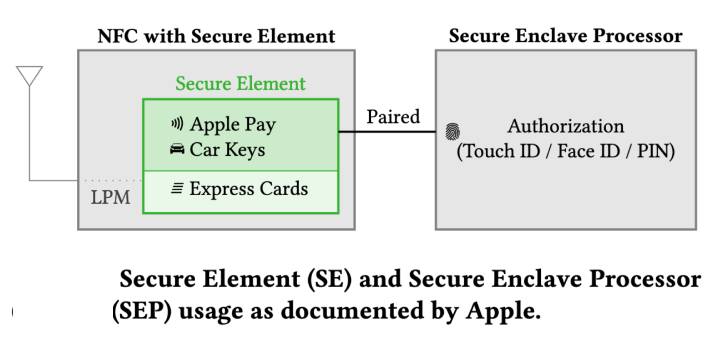
The mechanism takes advantage of the fact that wireless chips related to Bluetooth, Near-field communication (NFC), and ultra-wideband (UWB) continue to operate while iOS is shut down when entering a “power reserve” Low Power Mode (LPM).

While this is done so as to enable features like Find My and facilitate Express Card transactions, all the three wireless chips have direct access to the secure element, academics from the Secure Mobile Networking Lab (SEEMOO) at the Technical University of Darmstadt said in a paper entitled “Evil Never Sleeps.”

“The Bluetooth and UWB chips are hardwired to the Secure Element (SE) in the NFC chip, storing secrets that should be available in LPM,” the researchers said.

“Since LPM support is implemented in hardware, it cannot be removed by changing software components. As a result, on modern iPhones, wireless chips can no longer be trusted to be turned off after shutdown. This poses a new threat model.”

The findings are set to be presented at the ACM Conference on Security and Privacy in Wireless and Mobile Networks (WiSec 2022) this week.

The LPM features, newly introduced last year with iOS 15, make it possible to track lost devices using the Find My network even when run out of battery power or have been shut off. Current devices with Ultra-wideband support include iPhone 11, iPhone 12, and iPhone 13.

A message displayed when turning off iPhones reads thus: “iPhone remains findable after power off. Find My helps you locate this iPhone when it is lost or stolen, even when it is in power reserve mode or when powered off.”
Malware

Calling the current LPM implementation “opaque,” the researchers not only sometimes observed failures when initializing Find My advertisements during power off, effectively contradicting the aforementioned message, they also found that the Bluetooth firmware is neither signed nor encrypted.

By taking advantage of this loophole, an adversary with privileged access can create malware that’s capable of being executed on an iPhone Bluetooth chip even when it’s powered off.

However, for such a firmware compromise to happen, the attacker must be able to communicate to the firmware via the operating system, modify the firmware image, or gain code execution on an LPM-enabled chip over-the-air by exploiting flaws such as BrakTooth.

Put differently, the idea is to alter the LPM application thread to embed malware, such as those that could alert the malicious actor of a victim’s Find My Bluetooth broadcasts, enabling the threat actor to keep remote tabs on the target.

“Instead of changing existing functionality, they could also add completely new features,” SEEMOO researchers pointed out, adding they responsibly disclosed all the issues to Apple, but that the tech giant “had no feedback.”

With LPM-related features taking a more stealthier approach to carrying out its intended use cases, SEEMOO called on Apple to include a hardware-based switch to disconnect the battery so as to alleviate any surveillance concerns that could arise out of firmware-level attacks.

“Since LPM support is based on the iPhone’s hardware, it cannot be removed with system updates,” the researchers said. “Thus, it has a long-lasting effect on the overall iOS security model.”

“Design of LPM features seems to be mostly driven by functionality, without considering threats outside of the intended applications. Find My after power off turns shutdown iPhones into tracking devices by design, and the implementation within the Bluetooth firmware is not secured against manipulation.”

Source :
https://thehackernews.com/2022/05/researchers-find-way-to-run-malware-on.html
Europe Agrees to Adopt New NIS2 Directive Aimed at Hardening Cybersecurity

The European Parliament announced a “provisional agreement” aimed at improving cybersecurity and resilience of both public and private sector entities in the European Union.

The revised directive, called “NIS2” (short for network and information systems), is expected to replace the existing legislation on cybersecurity that was established in July 2016.

The revamp sets ground rules, requiring companies in energy, transport, financial markets, health, and digital infrastructure sectors to adhere to risk management measures and reporting obligations.

Among the provisions in the new legislation are flagging cybersecurity incidents to authorities within 24 hours, patching software vulnerabilities, and readying risk management measures to secure networks, failing which can incur monetary penalties.

“The directive will formally establish the European Cyber Crises Liaison Organization Network, EU-CyCLONe, which will support the coordinated management of large-scale cybersecurity incidents,” the Council of the European Union said in a statement last week.

The development closely follows the European Commission’s plans to “detect, report, block, and remove” child sexual abuse images and videos from online service providers, including messaging apps, prompting concerns that it may undermine end-to-end encryption (E2EE) protections.

The draft version of NIS2 explicitly spells out that the use of E2EE “should be reconciled with the Member States’ powers to ensure the protection of their essential security interests and public security, and to permit the investigation, detection and prosecution of criminal offenses in compliance with Union law.”

It also stressed that “Solutions for lawful access to information in end-to-end encrypted communications should maintain the effectiveness of encryption in protecting privacy and security of communications, while providing an effective response to crime.”

That said, the directive will not apply to organizations in verticals such as defense, national security, public security, law enforcement, judiciary, parliaments, and central banks.

As part of the proposed agreement, the European Union member states are mandated to incorporate the provisions into their national law within a period of 21 months from when the directive goes into force.

“The number, magnitude, sophistication, frequency and impact of cybersecurity incidents are increasing, and present a major threat to the functioning of network and information systems,” the Council noted in the draft.

“Cybersecurity preparedness and effectiveness are therefore now more essential than ever to the proper functioning of the internal market.”

Source :
https://thehackernews.com/2022/05/europe-agrees-to-adopt-new-nis2.html

Apple releases iOS 15.5 with enhancements to Apple Cash and Podcasts app

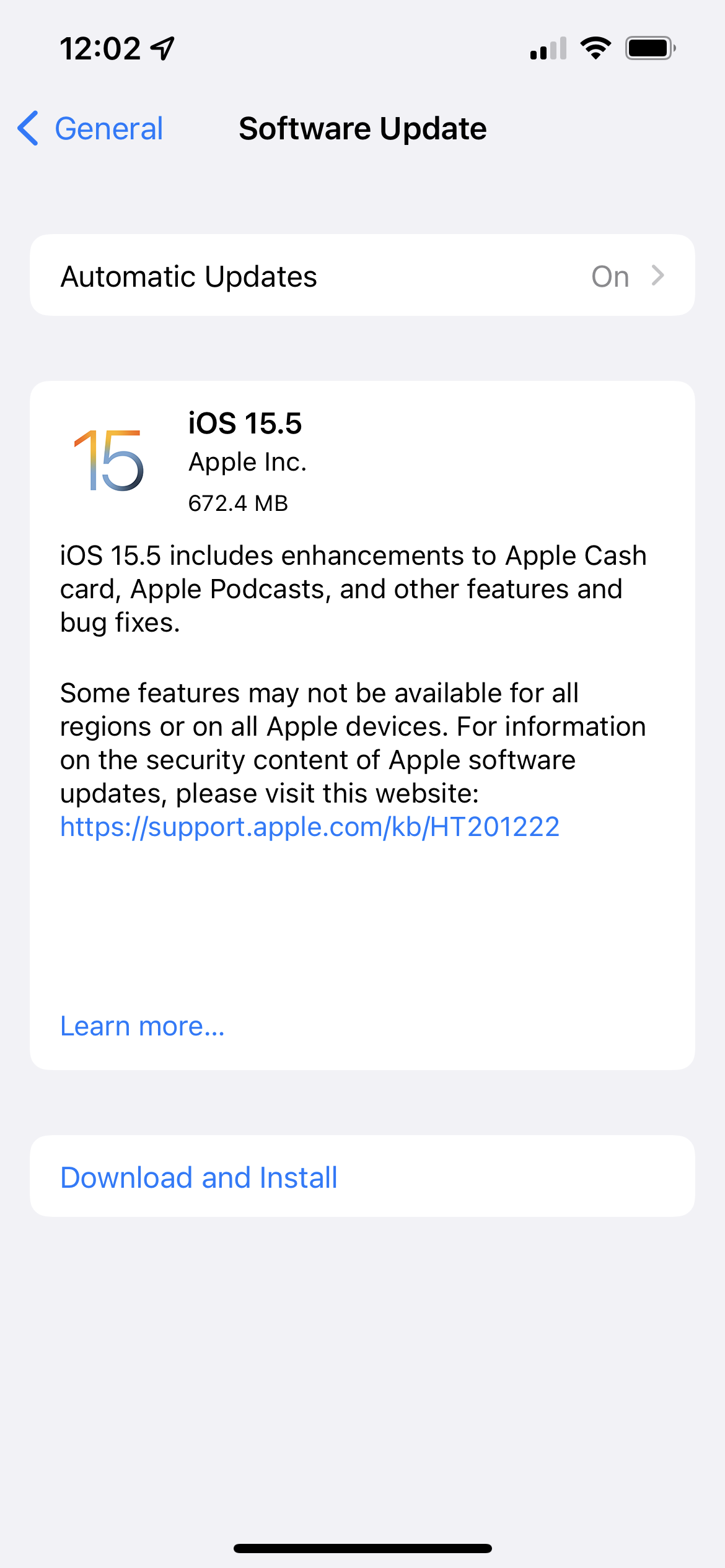
Apple on Monday released iOS 15.5 and iPadOS 15.5 to the public following the release of the RC build last week. The update doesn’t bring significant changes, but it does improve the Apple Cash and Podcasts app.

iOS 15.5 new features

Apple says that iOS 15.5 makes enhancements to Apple Cash, with support for more easily requesting and sending money from the Apple Cash card in the Wallet app. There’s also a new feature in Apple Podcasts to help preserve your iPhone’s storage space and some bug fixes for HomeKit. 

Here are the full release notes for iOS 15.5 according to Apple: 

iOS 15.5 includes the following improvements and bug fixes:

  • Wallet now enables Apple Cash customers to send and request money from their Apple Cash card
  • Apple Podcasts includes a new setting to limit episodes stored on your iPhone and automatically delete older ones
  • Fixes an issue where home automations, triggered by people arriving or leaving, may fail

Here are some other changes in iOS 15.5 we’ve spotted so far, not mentioned in Apple’s release notes: 

You can update your devices by going to the Settings app, then General > Software Update. Check out Apple’s website for more details about the security patches included with iOS 15.5.

It’s unclear whether this update will be the last before the first iOS 16 beta, which should arrive shortly after WWDC 2022 in June.

Source :
https://9to5mac.com/2022/05/16/apple-releases-ios-15-5-with-enhancements-to-the-apple-cash-and-podcasts-app/

USB-C iPhone 15 in the works, claims Kuo, following supply-chain survey

The only examples of a USB-C iPhone we’ve seen to date have been DIY versions, but Ming-Chi Kuo claims that Apple will make the switch from Lightning to USB-C next year, in the iPhone 15.

The report comes as something of a surprise, as although Apple has adopted USB-C for Mac and iPad, it had seemed the company planned to stick with Lightning until it switches to a completely portless phone …

Background

Apple began its adoption of USB-C for Macs back in 2015, with the 12-inch MacBook. It then went all-in with the 2016 MacBook Pro, before backtracking a little last year by restoring MagSafe, HDMI and SD card slots.

The iPad made the switch from Lightning to USB-C in 2018, with the 11-inch and 12.9-inch iPad Pro models.

That left the iPhone as the sole core Apple product with a Lightning socket. Since the iPhone retained the older connector for years after the Mac and iPad adoption of USB-C, the consensus view appeared to be that it would continue to do so until the first portless model.

USB-C iPhone 15 report

Apple analyst Ming-Chi Kuo tweeted today that Apple will make the switch to USB-C for iPhone in the second half of next year, which is to say the iPhone 15.

My latest survey indicates that 2H23 new iPhone will abandon Lightning port and switch to USB-C port. USB-C could improve iPhone’s transfer and charging speed in hardware designs, but the final spec details still depend on iOS support.

It’s expected to see existing USB-C-related suppliers of Apple’s ecosystem (e.g., IC controller, connector) become the market’s focus in the next 1-2 years, thanks to vast orders from iPhones and accessories’ adoption of USB-C ports.

The reference to USB-C suppliers benefiting for ‘1-2 years’ may indicate that Kuo then anticipates Apple will drop the port altogether.

9to5Mac’s Take

This is a somewhat odd report. Apple made the switch to USB-C iPads in back 2018, so if it planned to do with the iPhone too, we would have expected that to have happened by now.

It should be noted that although Kuo has a decent track record, he has more recently taken to tweeting simply thoughts or opinions about what Apple might do, rather than anything based on evidence. However, this tweet does specifically say that it’s based on his ‘latest survey,’ which means talking to suppliers.

Supply-chain reports can be of varying reliability. Apple likes to have multiple suppliers wherever possible, to allow it to negotiate better prices, and to reduce risk. If, for example, a major supplier of Lightning ports were to report Apple was planning to cut orders next year, that could mean nothing more than a rejigging of competing suppliers.

Similarly, USB-C suppliers talking about expecting a major boost in orders next year might again simply be Apple or other companies increasing orders with some suppliers while reducing them with others.

Kuo does seem confident in his interpretation of what he’s hearing from suppliers. It’s entirely possible that he’s right, but we wouldn’t count on it yet.

Source :
https://9to5mac.com/2022/05/11/usb-c-iphone-15/

SonicWall Releases Patches for New Flaws Affecting SSLVPN SMA1000 Devices

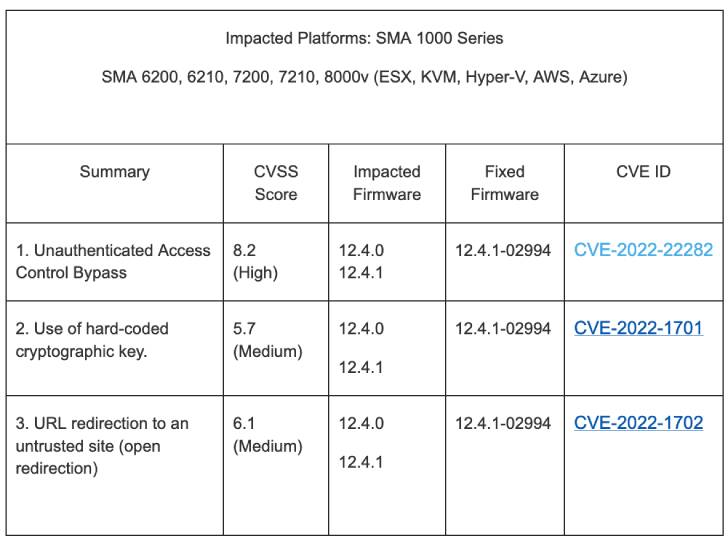
SonicWall has published an advisory warning of a trio of security flaws in its Secure Mobile Access (SMA) 1000 appliances, including a high-severity authentication bypass vulnerability.

The weaknesses in question impact SMA 6200, 6210, 7200, 7210, 8000v running firmware versions 12.4.0 and 12.4.1. The list of vulnerabilities is below –

  • CVE-2022-22282 (CVSS score: 8.2) – Unauthenticated Access Control Bypass
  • CVE-2022-1702 (CVSS score: 6.1) – URL redirection to an untrusted site (open redirection)
  • CVE-2022-1701 (CVSS score: 5.7) – Use of a shared and hard-coded cryptographic key

Successful exploitation of the aforementioned bugs could allow an attacker to unauthorized access to internal resources and even redirect potential victims to malicious websites.

Tom Wyatt of the Mimecast Offensive Security Team has been credited with discovering and reporting the vulnerabilities.

SonicWall noted that the flaws do not affect SMA 1000 series running versions earlier than 12.4.0, SMA 100 series, Central Management Servers (CMS), and remote access clients.

SonicWall

Although there is no evidence that these vulnerabilities are being exploited in the wild, it’s recommended that users apply the fixes in the light of the fact that SonicWall appliances have presented an attractive bullseye in the past for ransomware attacks.

“There are no temporary mitigations,” the network security company said. “SonicWall urges impacted customers to implement applicable patches as soon as possible.”

Source :
https://thehackernews.com/2022/05/sonicwall-releases-patches-for-new.html

Enjoy the Speed and Safety of TLS 1.3 Support

SonicWall NGFWs offer full TLS 1.3 support — ensuring your network can handle the latest encryption protocols.

The best products tend to stick around for a while. In the first two years that the Ford Mustang was manufactured, 1965 and 1966, roughly 1.3 million cars rolled off assembly lines in Dearborn, Mich.; Metuchen, N.J.; and Milpitas, Calif. Of those, a remarkable 350,000 are still on the road today — and with proper care, still getting from Point A to Point B just as well as they did during the Johnson Administration.

But aesthetics aside, does that make them a good choice for a daily driver today? In a crash test with any modern vehicle (or a race with any of today’s Mustangs), the first-generation Mustang would be completely overwhelmed. Safety features we take for granted, such as airbags, lane-keep assist, blind spot detection and anti-lock brakes, are absent. These cars might do fine for the occasional Sunday spin around town. But would you put your family in one?

When a product forms the boundary between something precious and grave disaster, you want that product to be as safe as possible. This also holds true for another Milpitas innovation: SonicWall firewalls. To know whether your current choice is still the right choice, it helps to look at what innovations have occurred since then, and whether they were incremental improvements or giant leaps forward. In the case of TLS 1.3 encryption support, it’s unquestionably the latter.

TLS 1.3 is the latest version of transport layer security, which offers reliable encryption for digital communications over the internet. And as with the Mustang before it, modern innovations have led to sizeable leaps in two areas: safety and performance.

TLS 1.3: Safety First

Since the original SSL technology was introduced in 1994, each new version has worked to solve the problems of the previous versions while also maintaining compatibility with those versions. But, unfortunately, maintaining backward compatibility meant leaving in many unnecessary or vulnerable ciphers.

These legacy ciphers made the encryption susceptible to attack, offering attackers a vector through which to circumvent newer security advances in favor of older and weaker protection. A few of the ciphers that persisted up through TLS 1.2 were so weak that they allow an attacker to decrypt the data’s contents without having the key.

TLS 1.3 represents a fundamental shift in this philosophy. Due to a sharp increase in attacks, such as Lucky13, BEAST, POODLE, Logjam and FREAK, which depend on such vulnerabilities for transmission, the Internet Engineering Task Force (IETF) opted to remove these ciphers altogether — and the resulting TLS 1.3 is vastly more secure because of it.

It’s also more private. In previous versions, including 1.2, digital signatures weren’t used to ensure a handshake’s integrity — they only protected the part of the handshake after the cipher-suite negotiation, allowing attackers to manipulate the negotiation and access the entire conversation.

In TLS 1.3, the entire handshake is encrypted, and only the sender and the recipient can decrypt the traffic. This not only makes it virtually impossible for outsiders to eavesdrop on client/server communications and much harder for attackers to launch man-in-the-middle attacks, it also protects existing communications even if future communications are compromised.

TLS 1.3: Safety Fast

With TLS 1.3, the handshake process isn’t just more secure — it’s faster, too. The four-step handshake required with TLS 1.2 necessitated two round-trip exchanges between systems, introducing latency and taking up bandwidth and power.

These slowdowns especially affected the growing class of Internet of Things (IoT) devices, which have trouble handling connections requiring lots of bandwidth or power, but also tend to need encryption most due to weak onboard security.

However, with just a single key exchange and significantly fewer supported ciphers, TLS 1.3 uses considerably less bandwidth. And because it requires just one round trip to complete the handshake, it’s significantly faster. TLS 1.3’s zero round trip time (0-RTT) feature is even quicker: On subsequent visits, it offers a latency time equal to that of unencrypted HTTP.

Is Your Firewall Up to the Task?

Experts estimate that 80-90% of all network traffic today is encrypted. But many legacy firewalls lack the capability or processing power to detect, inspect and mitigate cyberattacks sent via HTTPs traffic at all, let alone using TLS 1.3 — making this a highly successful avenue for hackers to deploy and execute malware.

According to the 2022 SonicWall Cyber Threat Report, from 2020 to 2021, malware sent over HTTPS rose a staggering 167%. All told, SonicWall recorded 10.1 million encrypted attacks in 2021 — almost as many as in 2018, 2019 and 2020 combined.

https://e.infogram.com/e3c6d4f2-5828-4326-8c3d-b5bb992a1321?parent_url=https%3A%2F%2Fblog.sonicwall.com%2Fen-us%2F2022%2F05%2Fenjoy-the-speed-and-safety-of-tls-1-3-support%2F&src=embed#async_embed

With an average of 7% of customers seeing an encrypted attack in a given month, the odds your organization will be targeted by an attack this year are enormous. But if your firewall cannot inspect encrypted traffic — and increasingly, if it cannot inspect TLS 1.3 — you’ll never know it until it’s too late.

SonicWall Supports TLS 1.3 Encryption

SonicWall Gen 7 firewalls bring a lot to the table: They combine higher port density and greater threat throughput with comprehensive malware analysis, unmatched simplicity and industry-leading performance. But among the biggest game-changers in Gen 7 (and its predecessors capable of running SonicOS Gen 6.5) is its support for TLS 1.3 encryption.

SonicWall NGFWs with SonicOS Gen 6.5 and later offer full TLS inspection, decrypting data, checking it for potential threats, and then re-encrypting it for secure transmission — all while ensuring you retain optimal performance and comprehensive visibility.

After all, as in the case of the classic Mustang, there’s no blind spot detection for firewalls that can’t handle today’s encrypted traffic — and these legacy solutions are easily outclassed when going head-to-head. Don’t let yesterday’s firewalls leave unprotected gaps in your network: Upgrade to SonicWall Gen 7 today.

Source :
https://blog.sonicwall.com/en-us/2022/05/enjoy-the-speed-and-safety-of-tls-1-3-support/

Anti-Ransomware Day: What Can We Do to Prevent the Next WannaCry?

This Anti-Ransomware Day, SonicWall looks at how cybersecurity has changed since WannaCry — and what we can do to ensure we never see such a widespread, devastating and preventable attack again.

On May 12, 2017, attackers identified a vulnerability in a Windows device somewhere in Europe — and in the process, set off an attack that would ultimately impact roughly 200,000 victims and over 300,000 endpoints across 150 countries. The devastation wrought by WannaCry caused financial losses of roughly $4 billion before the strain was halted by an unlikely hero just hours later. But perhaps most devastating of all was that it was completely preventable.

To help raise awareness about ransomware strains like WannaCry and the steps needed to combat them, INTERPOL in 2020 teamed up with cybersecurity firm Kaspersky to declare May 12 Anti-Ransomware Day. By taking a few important steps, organizations can help stop the next major ransomware attack, averting the potential for downtime, reputational damage, fines and more.

“Cybercrime and cybersecurity may seem like a complex issue that is difficult to understand unless you are an expert in the field — this is not the case. INTERPOL’s campaign aims to demystify these cyberthreats and offer simple, concrete steps which everybody can take to protect themselves,” INTERPOL’s Director of Cybercrime Craig Jones said.

What’s Changed Since WannaCry?

In the years since the infamous attack, ransomware has continued to grow. In 2021, SonicWall Capture Labs threat researchers recorded 623.3 million ransomware attempts on customers globally. This represents an increase of 105% from 2020’s total and a staggering 232% since 2019.

And while ransomware was a hot topic worldwide due to attacks such as WannaCry and NotPetya, which would begin its own savage trek across the globe just six weeks later, ransomware volume in 2017 was less than a third of what it was in 2021.

Weakened, but Still Wreaking Havoc

While variants such as Ryuk, SamSam and Cerber made up 62% of the ransomware attacks recorded by SonicWall in 2021, WannaCry lives on — and in surprising numbers. By now, five years on, the number of vulnerable Windows systems should be virtually zero. A patch for the EternalBlue vulnerability exploited by WannaCry was released two months prior to the attack, and Microsoft later took the unusual step of also releasing patches for Windows systems that were old and no longer supported.

But in 2020, SonicWall observed 233,000 instances of WannaCry, and in 2021, 100,000 hits were observed — indicating that there are still vulnerable Windows systems in the wild that need to be patched.

We Can Worry … Or Get to Work

What made WannaCry so successful was that many organizations at the time took a set-it-and-forget-it approach to IT, leaving vulnerable hundreds of thousands of endpoints that could otherwise have been patched prior to the attack. But while patching is a crucial part of any cybersecurity strategy, it can’t work alone — there are still a number of other steps organizations need to take to bolster their odds against the next big ransomware attack.

  • Update: Whenever possible, enable automatic updates on applications and devices on your network — both for operating systems and for any other apps in your ecosystem.
  • Upgrade: The older an operating system gets, the more malware and other threats are created to target them. Retire any software or hardware that is obsolete or no longer supported by the vendor.
  • Duplicate: All important data should be backed up to a place inaccessible by attackers. Having adequate and up-to-date backups on hand significantly eases recovery in the event of a ransomware attack.
  • Educate: A staggering 91% of all cyberattacks start with someone opening a phishing email. Teach employees to be wary any time they receive an email, particularly one with an attachment or link.
  • Safeguard: By taking the above steps, most attacks can be prevented, but not all. They’re called “best practices” and not “universal practices” for a reason: If any are allowed to lapse — or new methods are found to circumvent them — organizations will need a strong last line of defense. An advanced, multi-layer platform that includes endpoint security, next-gen firewall services, email security and secure mobile access can work to eliminate blind spots and eradicate both known and unknown threats.

“In the past two years, we have seen how cybercriminals have become bolder in using ransomware. Organizations targeted by such attacks are not limited to corporations and governmental organizations — ransomware operators are ready to hit essentially any business regardless of size,” Jones said. “To fight them, we need to educate ourselves on how they work and fight them as one. Anti-Ransomware Day is a good opportunity to highlight this need and remind the public of how important it is to adopt effective security practices.”

Source :
https://blog.sonicwall.com/en-us/2022/05/anti-ransomware-day-what-can-we-do-to-prevent-the-next-wannacry/

UI Expands Lab With Anechoic Chambers to Deliver Products Faster

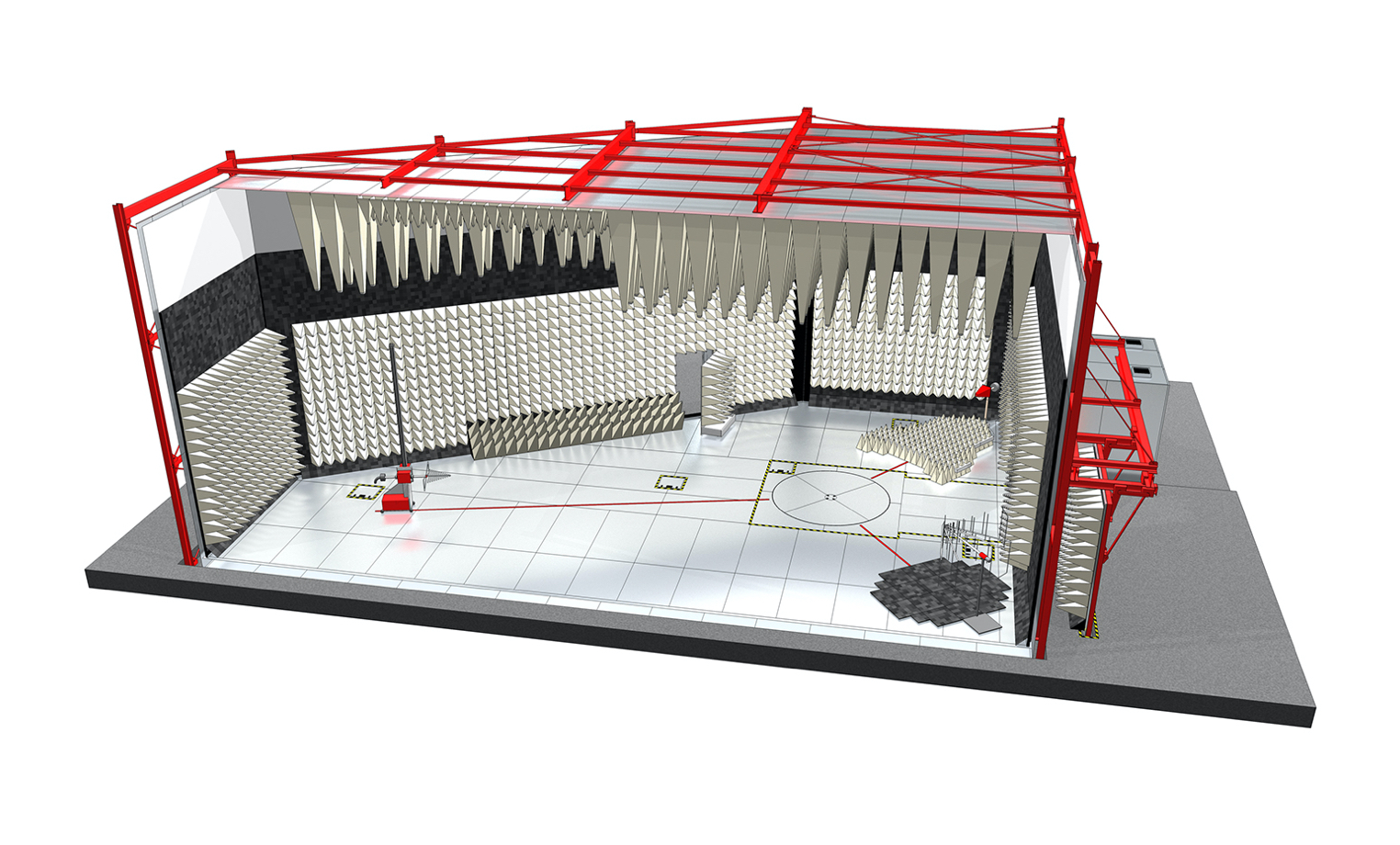
Ubiquiti’s Salt Lake City-based engineering team has expanded its regulatory compliance and engineering development laboratory to include state-of-the-art anechoic chambers: the 10/5/3 m Multi-Axis Anechoic Chamber & the 3 m Anechoic Dome-Roofed Chamber.

This laboratory expansion gives us capabilities to speed up product development cycles, ensuring product quality and improving our time to market in a growing number of countries.

10/5/3 m Multi-Axis Anechoic Chamber

Chamber 1: Frankonia SAC-10 Plus Triton chamber with three measurement axes

The Frankonia SAC-10 Plus Triton chamber (19.21 m x 12.08 m x 8.18 m) is the top-of-the-line model from the manufacturer. It’s the only one of its kind in the world outside the manufacturer’s lab.

The specialized “Triton” form factor allows us to have three different emission and immunity test setups in place at once:

  • Test Axis 1: Low-frequency emissions compliant with ANSI C.63.4 + CISPR 16-1-4 (NSA)
  • Test Axis 2: High-frequency and RF emissions compliant with ANSI C.63.10 + CISPR 16-1-4 (SVSWR)
  • Test Axis 3: Radiated RF Immunity compliant with IEC/EN61000-4-3 (FU)

With this setup, our engineers can perform the required electromagnetic interference (EMI) and electromagnetic susceptibility (EMS) procedures with reduced setup changes, saving hours of time with each iterative test. Keeping the same setup in place reduces the time needed to complete the tests and makes them reproducible.

The Device Under Test (DUT) is placed on a non-reflective (styrofoam) table on top of a rotating turntable. Extensive test automation actuates the test equipment, antennas, and turntable while performing the required tests at all angles.

Anechoic chambers offer excellent isolation against interference from the surrounding environment. Carefully designed and positioned absorbers significantly remove radio frequency (RF) reflections. The SAC-10 Plus Triton chamber provides a 9 kHz to 40 GHz measurement frequency range. The metal exterior shielding provides over 100 dB of attenuation from the outside world.

How much is 100 dB attenuation in practice? Consider a case with a tower-top macro LTE base station that has high-gain antennas at a distance of 5 m from the chamber. To get service inside the chamber, the phone needs at least -100 dBm signal level. With a typical equipment setup, the signal level remains below -100 dBm inside the chamber and there is no LTE service.

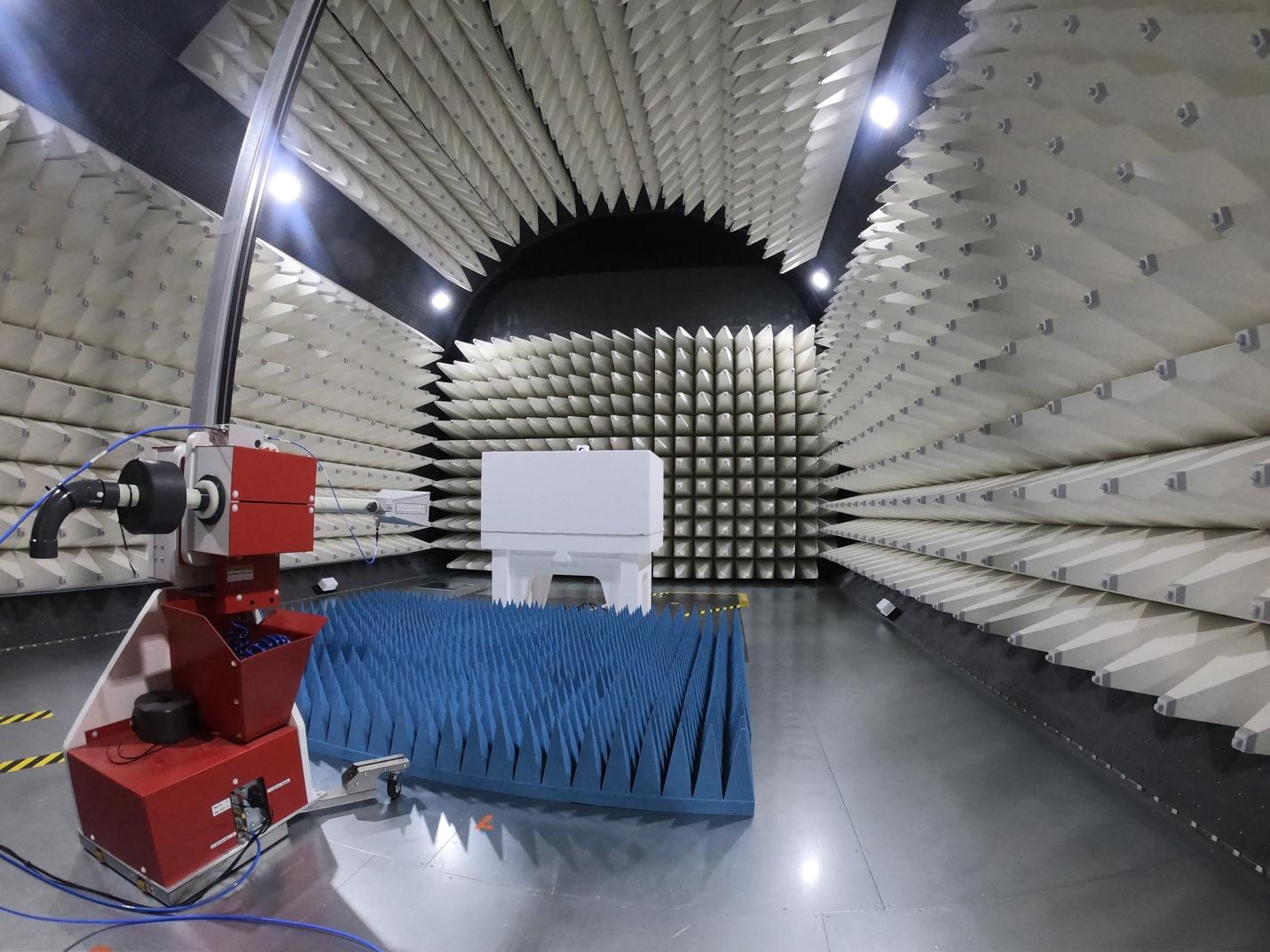
3 m Dome-Roofed Anechoic Chamber

Chamber 2: Frankonia SAC-3 Plus 3 m chamber with AmpliFi on the rotating measurement table

The other newly constructed chamber, the Frankonia SAC-3 Plus L (9.23 m x 6.53 m x 6.00 m), is a versatile, fully compliant Electromagnetic Compatibility (EMC) testing room. We use this chamber for emissions and immunity testing in parallel with the larger SAC-10 chamber.

The dome-shaped roof design combined with RF absorbers minimizes reflections and offers excellent measurement performance. The SAC-3 chamber provides over 110 dB isolation from the outside world. Similar to the larger chamber room, the fully automated test routines control the turntable and antenna height, as well as run the test equipment.

Anechoic — No Reflections

Electromagnetic waves are absorbed by the pyramid-shaped structures

Anechoic chambers provide significantly reduced reflections and external interference levels, making measurements repeatable and accurate.

Electromagnetic waves propagate, reflect, and refract differently depending on the frequency and surrounding structures. The following techniques are important for RF and anechoic chamber designs.

Design techniques for RF and anechoic chambers

While our chambers provide a drastic reduction in RF reflections, they are not intended to be completely anechoic by design (i.e. semi-anechoic).

Performing measurements in an anechoic chamber have certain unique consequences. Multiple-input, multiple-output (MIMO) technology used in Wi-Fi relies on multiple spatial signal paths created by reflections. Performance measurements, for example, throughput, require adding metallic RF-reflecting materials inside the chamber. Even in a perfect interference-free environment, in the absence of reflections and multipath propagation, Wi-Fi throughputs are low.

Control Room Hosts Test Equipment

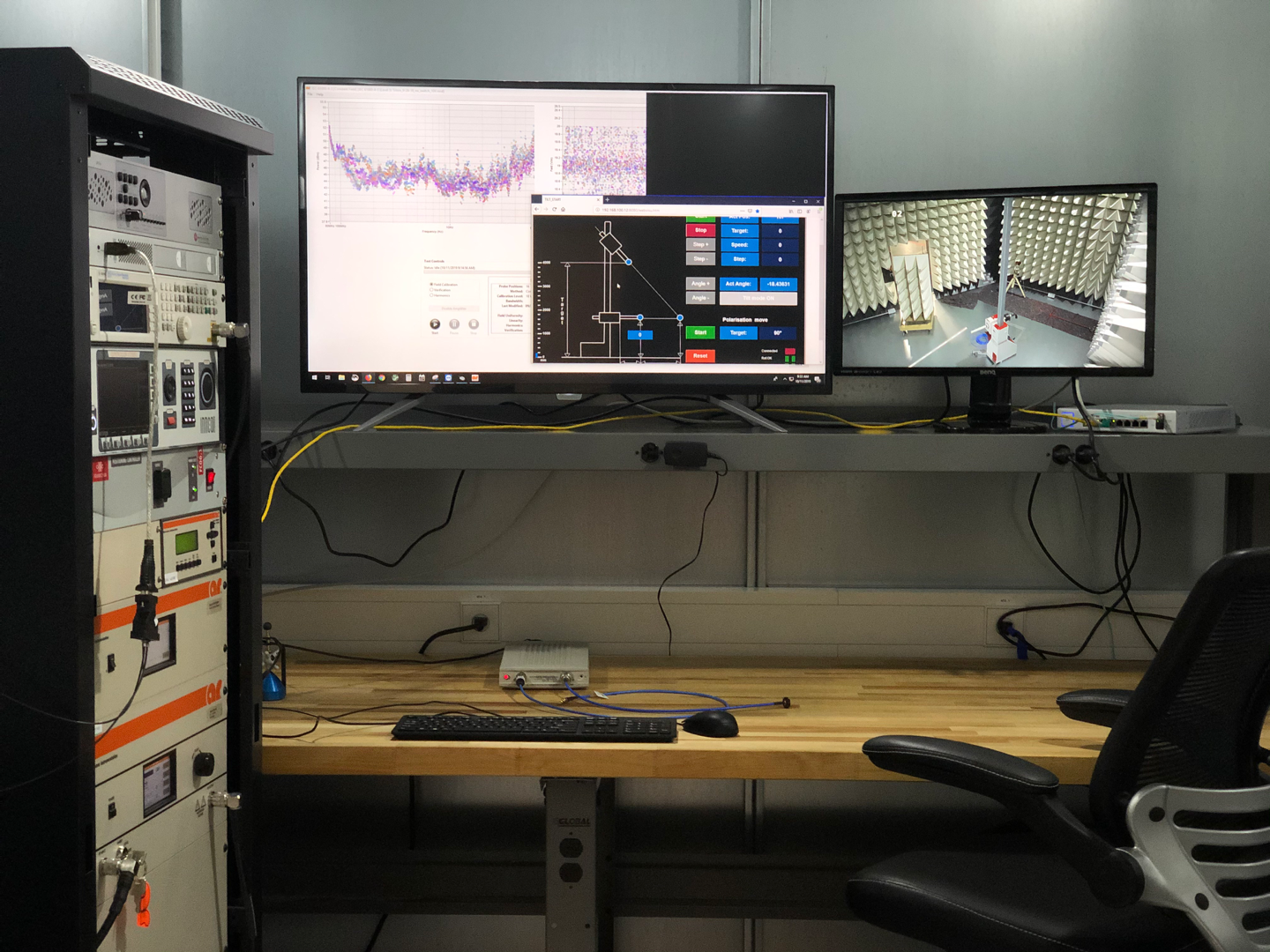
Control room with test equipment

When a chamber’s door is closed, engineers work in the shielded control room with test equipment next to the chamber and oversee test progress. This eliminates any potential source of emissions from interfering with testing. Cameras inside the chamber help ensure the test setup remains intact with automated DUT position and antenna adjustments.

Accredited Accuracy, Shorter Time to Market

Governments heavily regulate RF, EMC, and safety testing. The Federal Communications Commission (FCC); Innovation, Science and Economic Development Canada (ISED); European Union directives (CE Mark), regulate RF devices and potential interference to licensed operations respectively for the US, Canada and European Union.

Since all regions and countries have their own regulations, the resulting testing effort for each new product is significant. The Salt Lake City lab’s new accreditation by the National Voluntary Laboratory Accreditation Program (NVLAP) of the National Institute of Standards and Technology (NIST) means our engineers can perform a broad range of performance and regulatory compliance tests quickly expediting product’s time-to-market.

These are the most common test requirements:

  • RF parameters
    • RF performance, limits, and requirements for transmitters
  • Radiated and conducted emissions
    • Limits unintentional emissions across various frequency bands and test mode
  • Radiated and conducted immunity
    • Test for product susceptibility to external radio energy, ensuring product reliability
  • Static discharge, surge, and fast transient immunity
    • Ensures that various magnitudes and types of voltage and current spikes can be withstood by the product without degradation of performance or abnormal behavior
  • Product safety
    • Tests to ensure international safety standards are met or exceeded to reduce the hazard to humans and the environment

      Source :
      https://blog.ui.com/2019/12/04/ui-expands-lab-with-anechoic-chambers-to-deliver-products-faster/

How to Enable a Pre-Boot BitLocker PIN on Windows

If you encrypt your Windows system drive with BitLocker, you can add a PIN for additional security. You’ll need to enter the PIN each time you turn on your PC, before Windows will even start. This is separate from a login PIN, which you enter after Windows boots up.

RELATED: How to Use a USB Key to Unlock a BitLocker-Encrypted PC

A pre-boot PIN prevents the encryption key from automatically being loaded into system memory during the boot process, which protects against direct memory access (DMA) attacks on systems with hardware vulnerable to them. Microsoft’s documentation explains this in more detail.

Step One: Enable BitLocker (If You Haven’t Already)

RELATED: How to Set Up BitLocker Encryption on Windows

This is a BitLocker feature, so you have to use BitLocker encryption to set a pre-boot PIN. This is only available on Professional and Enterprise editions of Windows. Before you can set a PIN, you have to enable BitLocker for your system drive.

Note that, if you go out of your way to enable BitLocker on a computer without a TPM, you’ll be prompted to create a startup password that’s used instead of the TPM. The below steps are only necessary when enabling BitLocker on computers with TPMs, which most modern computers have.

If you have a Home version of Windows, you won’t be able to use BitLocker. You may have the Device Encryption feature instead, but this works differently from BitLocker and doesn’t allow you to provide a startup key.

Step Two: Enable the Startup PIN in Group Policy Editor

Once you’ve enabled BitLocker, you’ll need to go out of your way to enable a PIN with it. This requires a Group Policy settings change. To open the Group Policy Editor, press Windows+R, type “gpedit.msc” into the Run dialog, and press Enter.

Head to Computer Configuration > Administrative Templates > Windows Components > BitLocker Drive Encryption > Operating System Drives in the Group Policy window.

Double-click the “Require Additional Authentication at Startup” Option in the right pane.

Select “Enabled” at the top of the window here. Then, click the box under “Configure TPM Startup PIN” and select the “Require Startup PIN With TPM” option. Click “OK” to save your changes.

Step Three: Add a PIN to Your Drive

You can now use the manage-bde command to add the PIN to your BitLocker-encrypted drive.

To do this, launch a Command Prompt window as Administrator. On Windows 10 or 8, right-click the Start button and select “Command Prompt (Admin)”. On Windows 7, find the “Command Prompt” shortcut in the Start menu, right-click it, and select “Run as Administrator”

Run the following command. The below command works on your C: drive, so if you want to require a startup key for another drive, enter its drive letter instead of c: .

manage-bde -protectors -add c: -TPMAndPIN

You’ll be prompted to enter your PIN here. The next time you boot, you’ll be asked for this PIN.

To double-check whether the TPMAndPIN protector was added, you can run the following command:

manage-bde -status

(The “Numerical Password” key protector displayed here is your recovery key.)

How to Change Your BitLocker PIN

To change the PIN in the future, open a Command Prompt window as Administrator and run the following command:

manage-bde -changepin c:

You’ll need to type and confirm your new PIN before continuing.

How to Remove the PIN Requirement

If you change your mind and want to stop using the PIN later, you can undo this change.

First, you’ll need to head to the Group Policy window and change the option back to “Allow Startup PIN With TPM”. You can’t leave the option set to “Require Startup PIN With TPM” or Windows won’t allow you to remove the PIN.

Next, open a Command Prompt window as Administrator and run the following command:

manage-bde -protectors -add c: -TPM

This will replace the “TPMandPIN” requirement with a “TPM” requirement, deleting the PIN. Your BitLocker drive will automatically unlock via your computer’s TPM when you boot.

To check that this completed successfully, run the status command again:

manage-bde -status c:

If you forget the PIN, you’ll need to provide the BitLocker recovery code you should have saved somewhere safe when you enabled BitLocker for your system drive.

Source :
https://www.howtogeek.com/262720/how-to-enable-a-pre-boot-bitlocker-pin-on-windows/

Android and Chrome Users Can Soon Generate Virtual Credit Cards to Protect Real Ones

Google on Wednesday took to its annual developer conference to announce a host of privacy and security updates, including support for virtual credit cards on Android and Chrome.

“When you use autofill to enter your payment details at checkout, virtual cards will add an additional layer of security by replacing your actual card number with a distinct, virtual number,” Google’s Jen Fitzpatrick said in a statement.

The goal, the search giant, said to keep payment information safe and secure during online shopping and protect users from skimming attacks wherein threat actors inject malicious JavaScript code to plunder credit card numbers and sell them on the black market.

The feature is expected to roll out in the U.S. for Visa, American Express, Mastercard, and Capital One cards starting this summer.

Interestingly, while Apple offers an option to mask email addresses via Hide My Email, which enables users to create unique, random email addresses to use with apps and websites, it’s yet to offer a similar option for creating virtual credit cards.

The development comes a week after Google, Apple, and Microsoft banded together to accelerate support for a common passwordless sign-in standard that allows “websites and apps to offer consistent, secure, and easy passwordless sign-ins to consumers across devices and platforms.”

Additionally, Google said it’s expanding phishing protections in Google Workspace to Docs, Slides and Sheets, and that it plans to debut a new “My Ad Center” later this year to give users more control over personalized ads on YouTube, Search, and Discover feed.

What’s more, users would be able to request personally identifiable information such as email, phone number, or home address to be removed from search results through a new tool that will be accessible from the Google App.

Also coming is a new Account Safety Status setting that will “feature a simple yellow alert icon on your profile picture that will flag actions you should take to secure your account.”

Other key privacy and security features unveiled at Google I/O 2022 include support for end-to-end encryption for group conversations in the Messages app for Android and the availability of on-device encryption for Google Password Manager.

Source :
https://thehackernews.com/2022/05/blog-post.html