How to Remove Bing on Chrome, Firefox, and Edge

Users have been complaining that the search engine, Bing, loads as the default instead of Google. Annoying, but don’t fret! We’ve put together a simple guide on how to get rid of Bing and restore your preferred search engine.

On Google Chrome

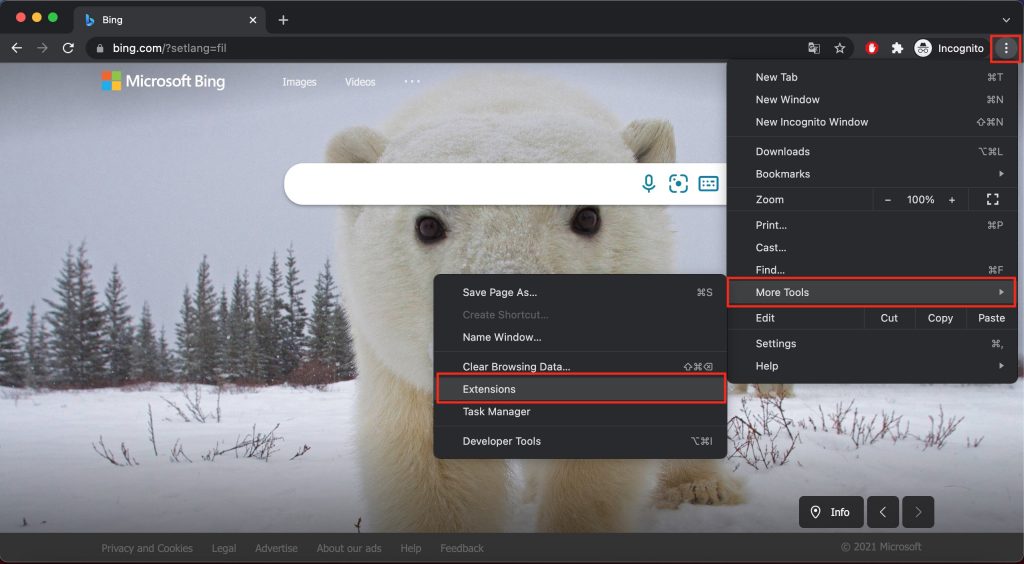
1. Open Google Chrome and click the 3-dots menu.
2. Select More Tools, then choose Extensions.

3. Remove any Bing Extensions you see.
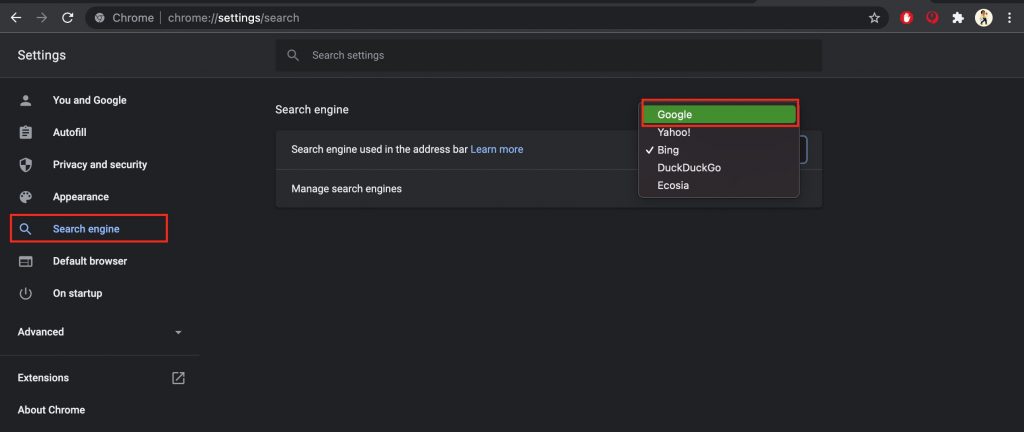
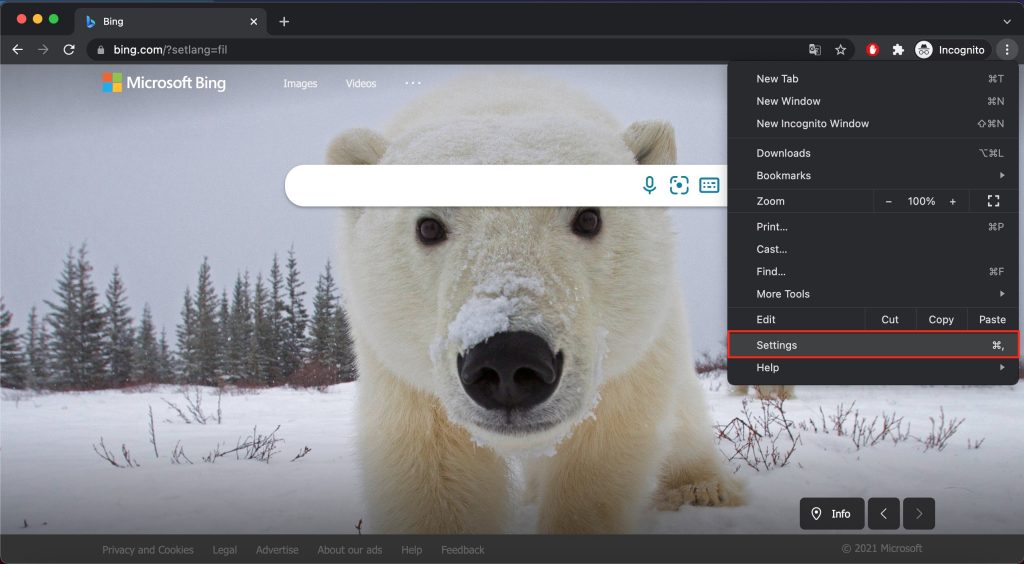
4. Go back to the Menu, then select Settings.

5. Look for Search Engine and click it.

6. On the right side, choose your preferred Search Engine (Google, Yahoo, DuckDuckGo or Ecosia).
7. Restart Google Chrome.  If it still uses Bing as your search engine, we suggest resetting or reinstalling Chrome.

On Mozilla Firefox

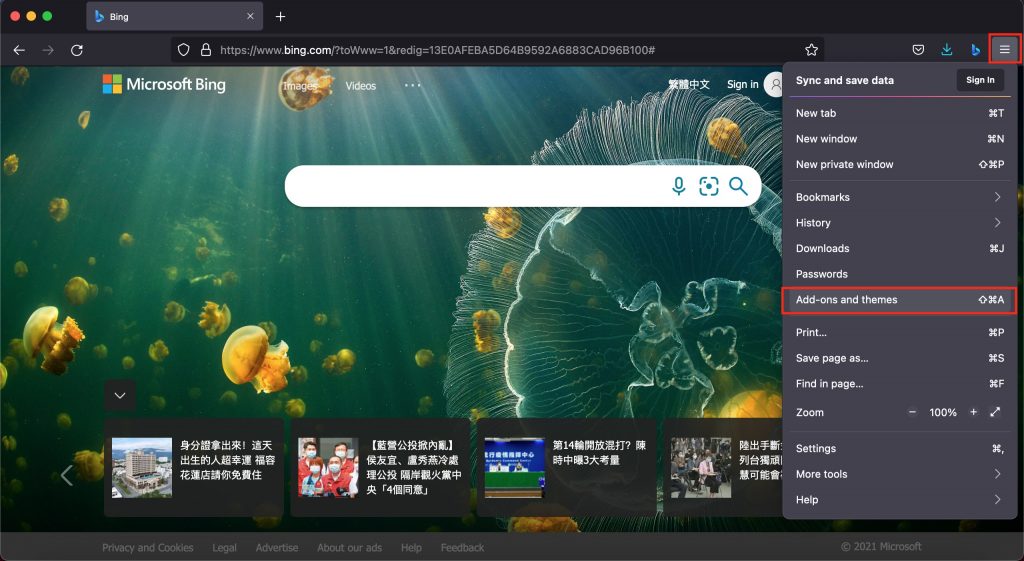
1. Open Mozilla Firefox and click the hamburger menu (3 horizontal lines).
2. Select Add-ons and themes.

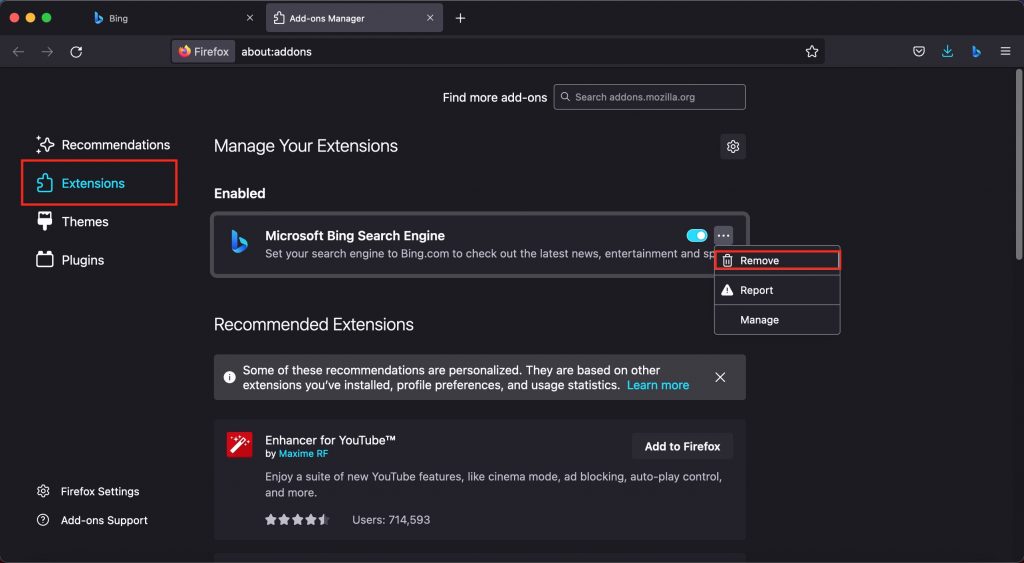
3. Choose Extensions on the left side, then remove any Bing extensions you see.

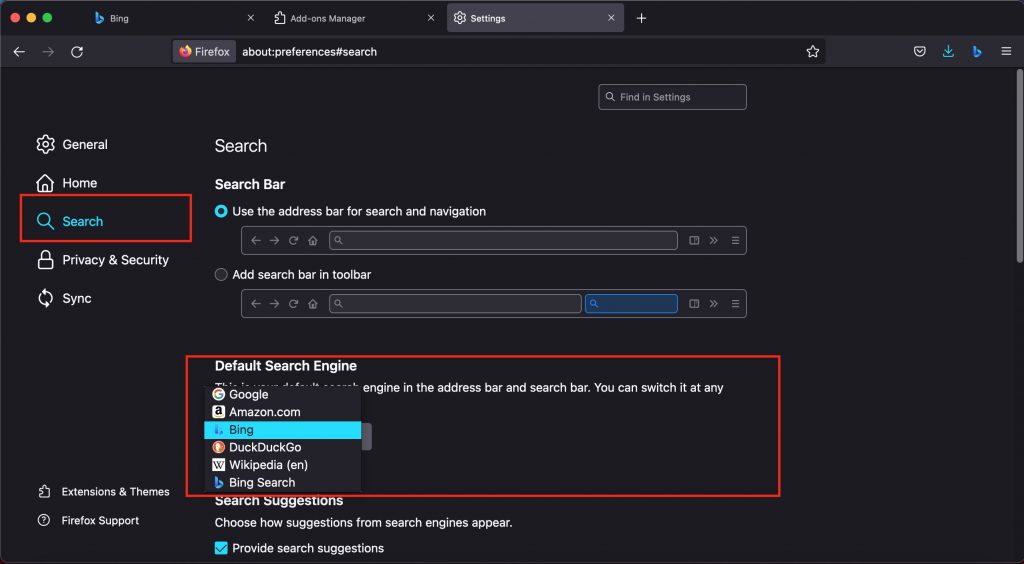
4. Go back to the Menu, then select Settings.
5. On the left side, click Search and look for the Default Search Engine section on the right side.

6. Choose your preferred Search Engine (Google, Amazon.com, DuckDuckGo or Wikipedia).
7. Restart Firefox. If it still uses Bing as your search engine, we suggest resetting or reinstalling Firefox.

On Microsoft Edge

1. Open Microsoft Edge.
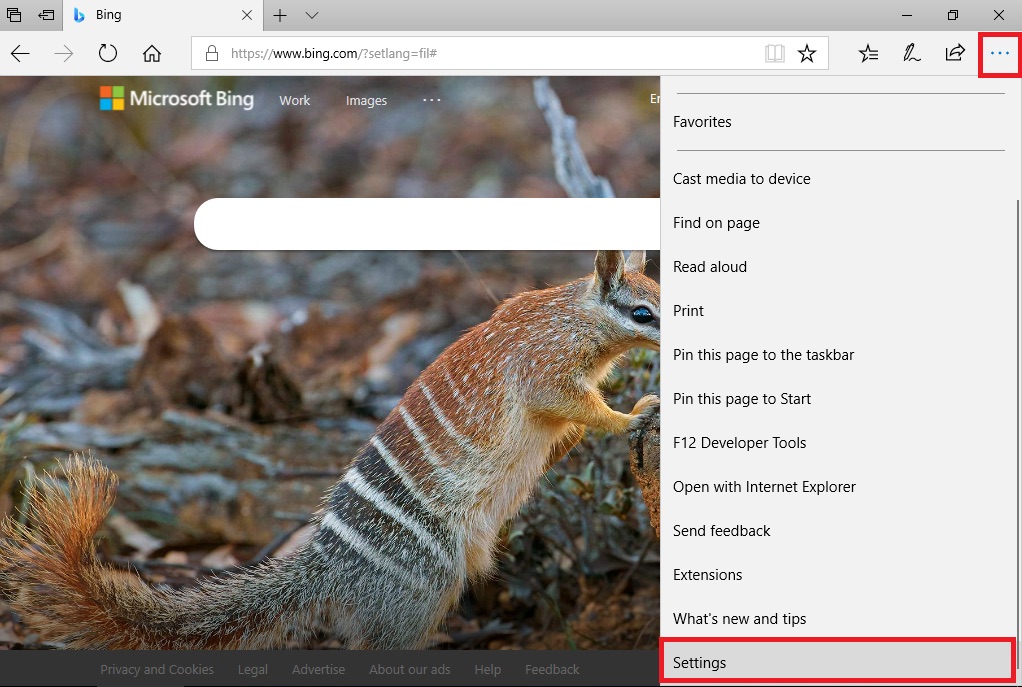
2. Click the 3-dots menu on the upper right corner, then select Settings.

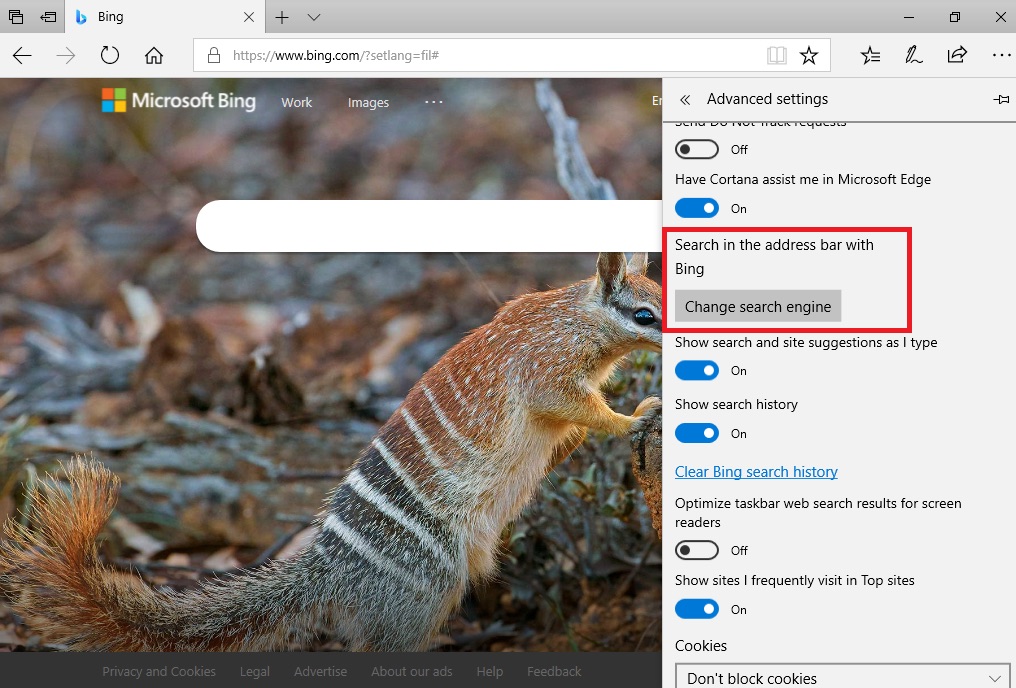
3. Select View Advance Settings and click the Change search engine button.

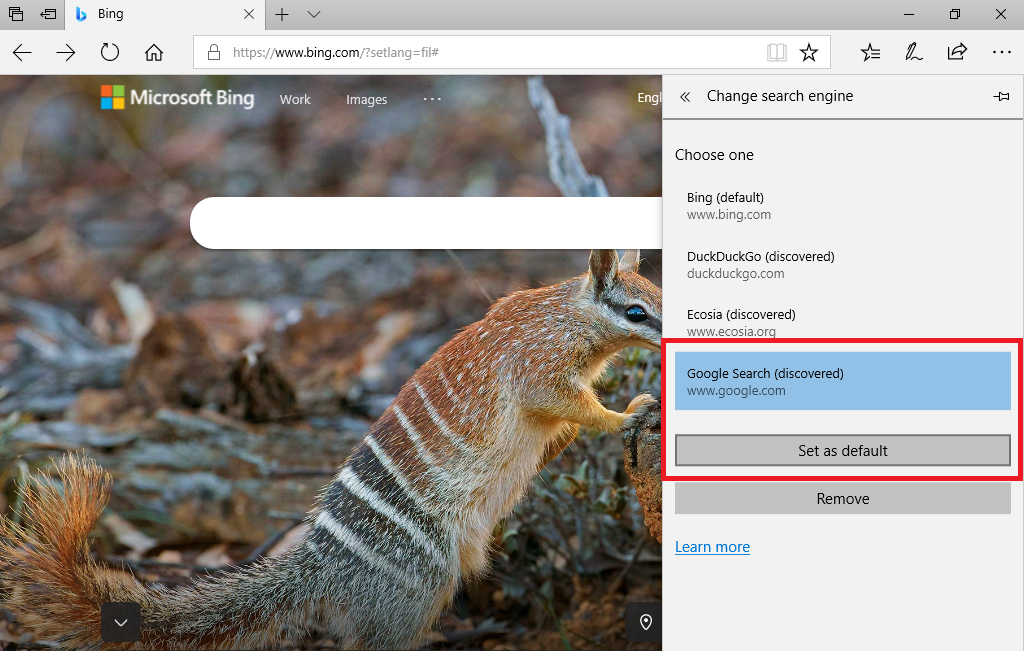
4. Choose your preferred Search Engine then click the Set as default button.

We hope this short guide has helped you get things back to normal! If you’ve found it a useful article, please do SHARE with friends and family.

Source :
https://news.trendmicro.com/2021/11/17/how-to-remove-bing-on-chrome-firefox-and-edge/

Top 10 Most Used Search Engines & Tips for Browsing

In the modern world, searching for information is simple. There’s no need to go from one library to another, flipping through numerous pages, or checking the table of contents before you get to what you’re looking for. Simply typing words on the internet will give you limitless results — all you need to do is narrow them down.

What is a Search Engine?

If you need to find something, like a website or page that contains your needed information, you’ll need to go and visit a search engine page to query keywords.

A search engine is a program or application that checks, hunts, and searches the web for sites based on keywords. It uses these keywords and returns pages that are connected to what you have typed.

Search engines use web crawlers or web spiders to catalog the World Wide Web. These crawling bots are used for indexing contents. They will scan, check, assess and inspect site pages and their information across the web.

Notable Search Engines and Their Brief Histories

Archie — During the 1990s, the very first search engine arrived, named Archie. Its purpose was to search FTP sites to create indexes of files that are downloadable.

Veronica and Jughead — Created around 1992/93, they both searched file names and titles in Gopher index systems.

Infoseek — In 1994, Webmasters would submit and provide a page in real-time with this program.

Yahoo Search — Also created in 1994, it created a collection of favorable web pages with description of each website.

Looksmart, Excite and AltaVista — These search engines were created in 1995 and tried to compete with Yahoo.

Backrub — Created around 1996, Google’s initial project, Backrub, was a search engine that utilized backlinks for searches. It ranked pages depending on citations from other sites.

Ask Jeeves — Started in 1996, this search engine used human editors that tried to match search queries.

Google — Officially launched in 1998.

MSN Search — Relied on three different search engines: Looksmart, Overture and Inktomi.

Snap — A somewhat complex search engine, released in 2005, that shows search volumes, revenues and advertisers.

Bing — Rebranded name for MSN/Live Search.

Schema.Org — In 2011, Microsoft, Google and Yahoo collaborated to create Schema.org to create structured internet data.

Top 10 Most Used Search Engines

The following list contains the top ten from across the world:

1. Google:“Just google it” is a ubiquitous expression nowadays. Google is the most popular across all search engines — even more than all others combined. According to statistics, around 78% of desktops and laptops uses Google.

2. Yahoo: In the past, Yahoo had competed with Google. But as the years went on, Yahoo users had declined significantly. Now it is mostly used as a backup search engine in case the dominant one is down.

3. Bing: Microsoft Bing (or just Bing) is owned by Microsoft. Its origin came from MSN Search and Windows Live Search. This search engine is proud of its ‘decision’ engine which provides suggestions on the sides.

4. AOL Search: Known before as American Online Search. This search engine is used mostly by older people accustomed to AOL.

5. Duck Duck Go: Some say that Duck Duck Go is for and by Hipsters. But the main reason users choose this search engine is that it does not track search history and avoids spammy websites.

6. Baidu: This search engine is the 3rd largest out there. Baidu dominates the Chinese market and is the first choice in China. This engine has a sophisticated online censorship system since there’s many restrictions in its operating region.

7. Yandex: If Baidu has China as its market, then Yandex has the Russian market.

8. Ask: Its origin is the older “Ask Jeeves”. Since it could not compete with Google, it’s now powered by Google — if you can’t beat ‘em, join ‘em!

9. Naver: South Korea is another huge tech and communications market with its own search engine, Naver.

10.Seznam: The search engine popular in the Czech Republic and C. Europe.

And some honorable mentions:

  • Ecosia — Donates surplus income to organizations that plant trees.
  • Dogpile — Shows results from the top 3 search engines (Google, Bing and Baidu).
  • Gigablast — An open-source search engine.
  • Qwant — A popular, EU-based search engine.

Tips For Using Search Engines

Search engines are brilliant tools to immediately get the information we want. However, since search engines generally do not have much security capability, you should invest in a security product to provide and efficient browsing.

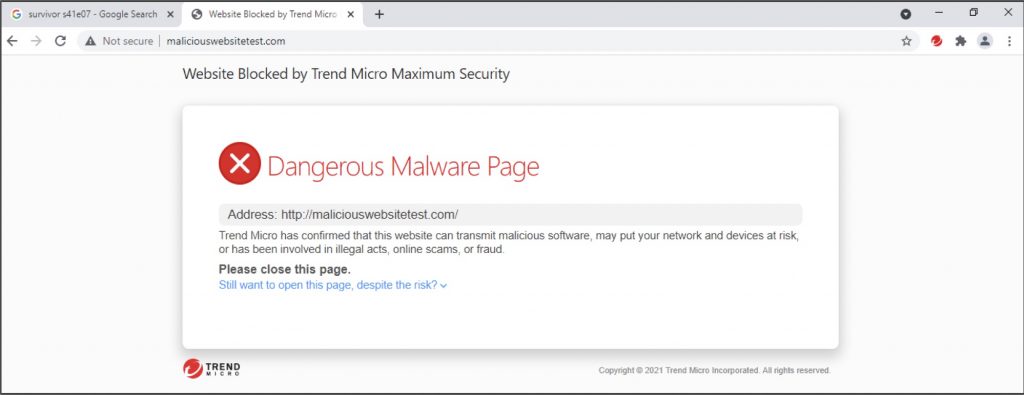
1. Install the Maximum Security tool bar to prevent you from visiting malicious websites.

You can install the Trend Micro Maximum Security toolbar service, which warns you of security risks relevant to the websites you visit.

When you search online, it monitors and rates websites in search engines such as Google, Bing, Baidu, and Yahoo. The Trend Micro Toolbar provides Page Ratings that show if the page is safe, suspicious, dangerous, trusted or untested.

  • A Mac User? No problem. Trend Micro Antivirus for Mac has the same toolbar feature to protect your online activity.

2. Install AdBlock One to stop annoying ads.

In addition, be sure to also use AdBlock One for Safari. This app stops annoying online ads from bothering you and helps load web pages faster — a significant boost in securing and improving your digital life.

Without AdBlock One

With AdBlock One

Get AdBlock OneIt’s free

If you’ve found this article an interesting and/or useful read, please do SHARE with family and friends.

Source :
https://news.trendmicro.com/2021/11/25/top-10-most-used-search-engines-tips-for-browsing/

How to Transfer Photos From iPhone to Mac

Eventually, if you’re shutter-happy enough, you’ll need to transfer your iPhone’s photos to your Mac to save the precious space on your mobile device. Simply sending a few photos as an email attachment is fine for a small number of photos, but in this article, we share several easier and more convenient ways of exporting your iPhone’s photos to your Mac.

Transfer Photos from iPhone to Mac with a USB Cable

Connecting your device using a Lightning-to-USB cable is the most common way of transferring pictures from an iPhone to a Mac. Below are several ways you can do this using a few different apps.

How to Use Finder to Transfer Photos from iPhone to Mac

Starting with macOS Catalina, there is no iTunes. However, you can easily sync your iPhone with your Mac using Finder. Here’s how to do it:

1. Connect your iPhone to your Mac with a Lightning-to-USB cable.
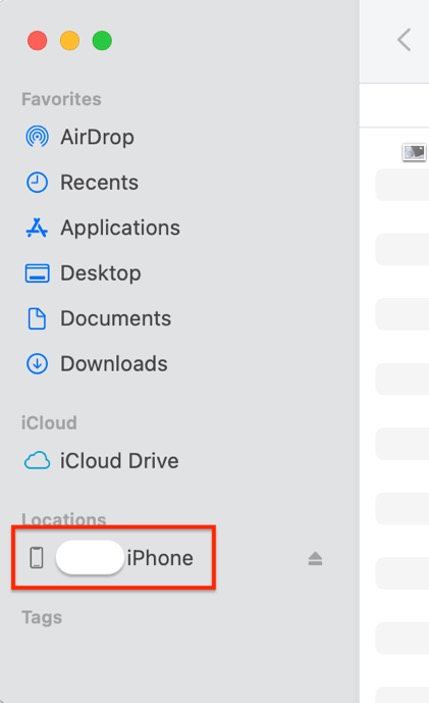
2. Open Finder. Your iPhone should appear in Finder’s sidebar under Locations.

Sync Pictures_20220221_1

3. In the sidebar, select your iPhone. If prompted, confirm that you trust your iPhone.
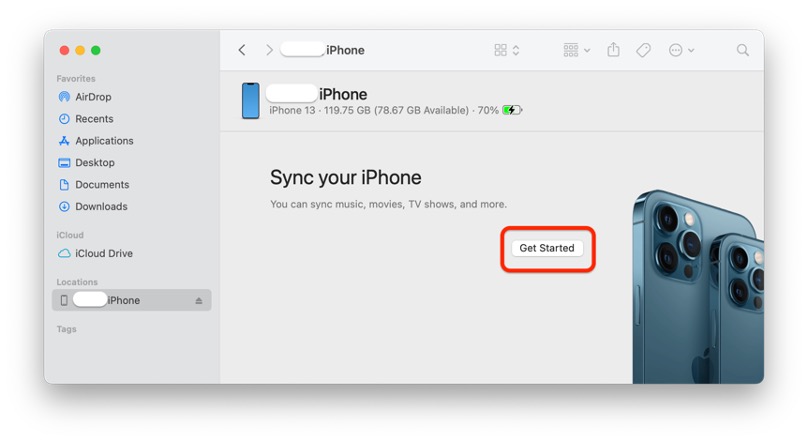
4. Click Get Started.

Sync Pictures_20220221_2

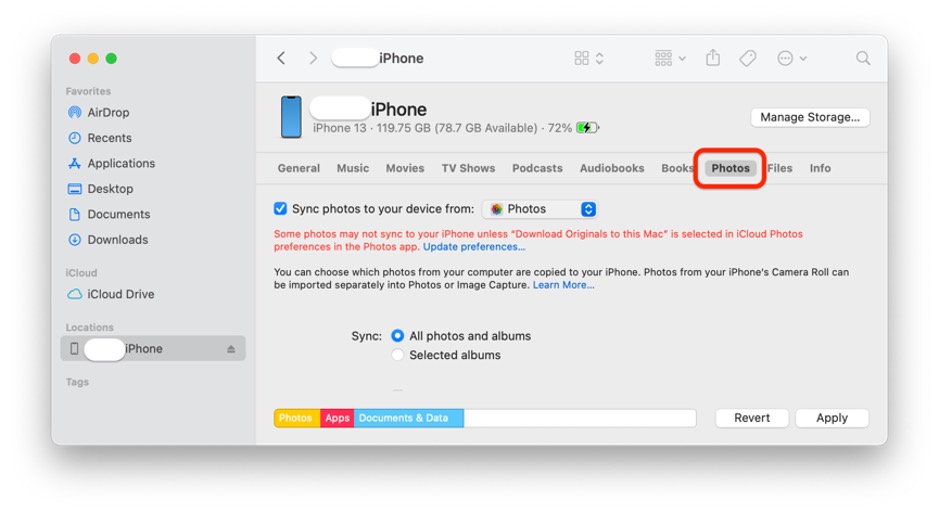
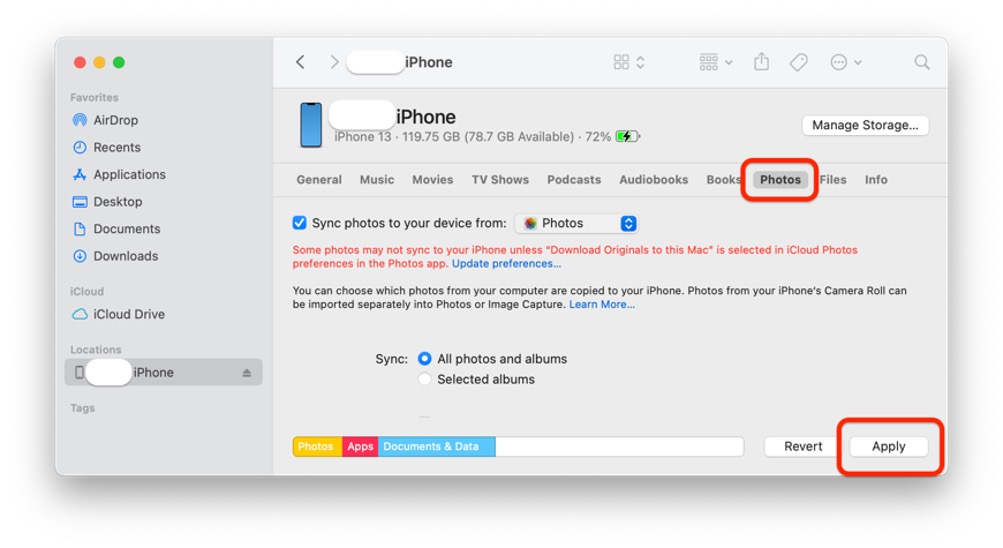
5. At the top of the window, click Photos and then check the Sync photos to your device from: box.

Sync Pictures_20220221_3

6. Use the drop-down menu to choose the folder or app on your iPhone that you want to sync photos from.
7. Use the checkboxes at the bottom of the window to choose whether you want to sync all your photos and albums or only selected albums.
8. Click Apply.

Sync Pictures_20220221_4

How to Use the Photos App to Transfer Photos from iPhone to Mac

Below are instructions on how to transfer photos from iPhone to Mac using the Photos app:

1. Connect your iPhone to Mac using a Lightning-to-USB cable.
2. Once prompted, confirm that you are using a trusted device. You will only need to do this if you haven’t synced your photos using this method before.
3. Open the Photos app on your Mac if it doesn’t automatically open.
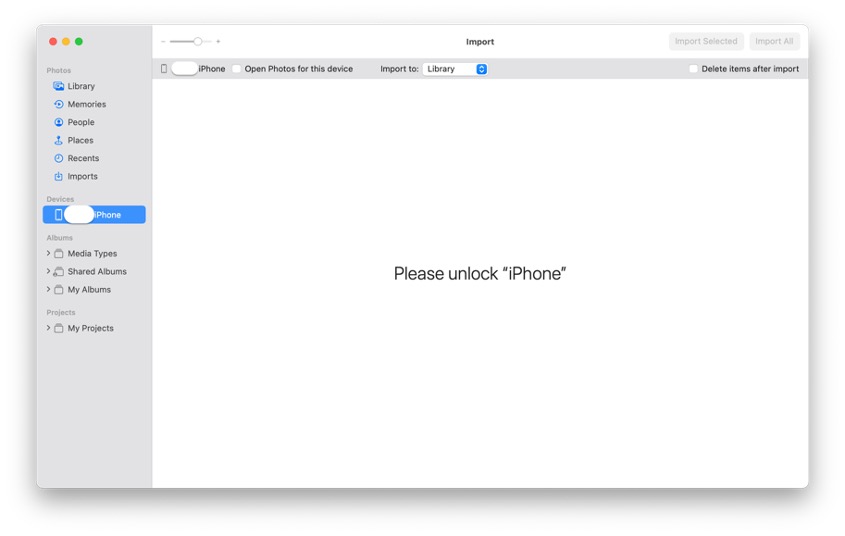
4. In the sidebar, select your iPhone.

Sync Pictures_20220221_5

5. In the upper menu of the Photos app, choose Import.
6. Click Import All New Photos, or select the photos you need and click Import Selected.

Sync Pictures_20220221_6

Use Image Capture to Transfer Photos from iPhone to Mac

Another method for transferring photos from your iPhone to your Mac involves using the native Image Capture app. This method lets you quickly and easily download your photos to a folder of your choice.

It is primarily intended for use with digital cameras and scanners, but it can also be used with iPhones with no issue.

1. Connect your iPhone to your Mac using a Lightning-to-USB cable and allow access to the device when prompted.
2. Open Image Capture on your Mac.
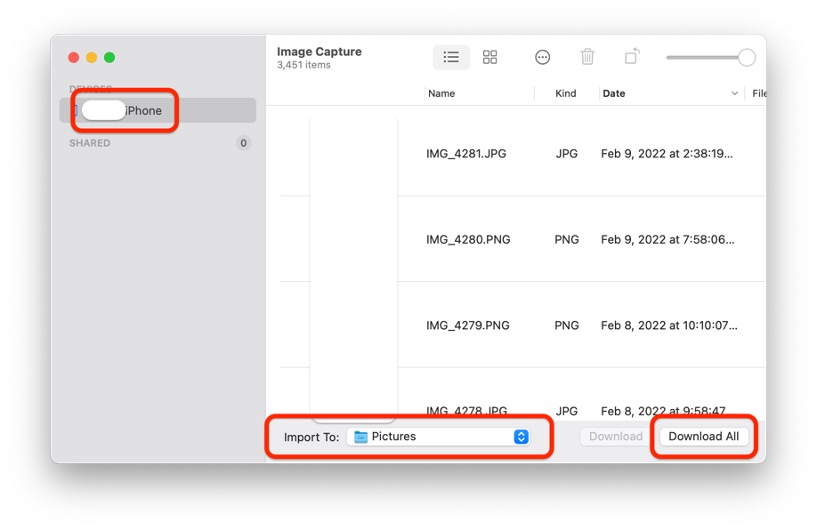
3. In the sidebar, select your iPhone under the Devices category.
4. At the bottom of the window, use the Import To drop-down menu to choose the location to save your pictures.

Sync Pictures_20220221_7

5. Select the pictures you want to import and click the Download button, or if you want to transfer all your photos, click Download All.

Transfer Photos from iPhone to Mac wirelessly

There are several options for transferring photos even if you don’t have a Lightning-to-USB cable. Here they are:

Use AirDrop to Transfer Photos from iPhone to Mac

AirDrop works great for transferring photos between your iPhone and Mac, and vice versa. Please ensure both devices are connected to the same Wi-Fi network and no more than around 30 feet from each other.

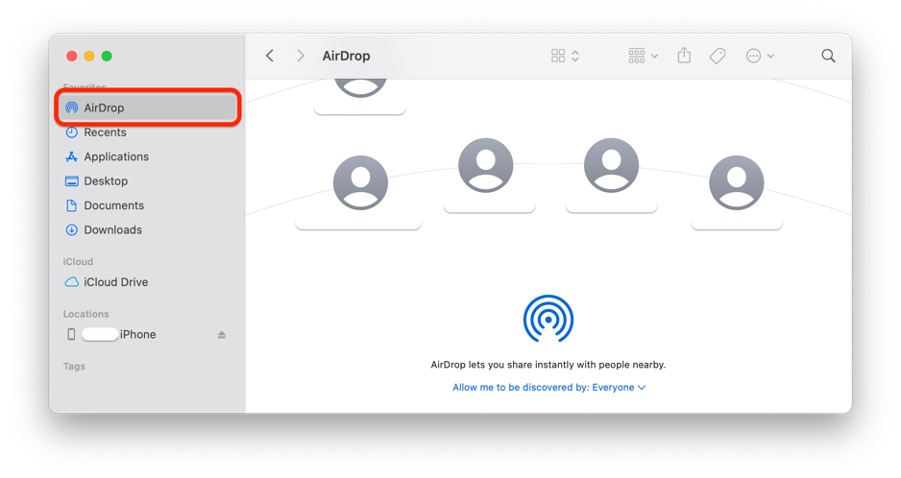
1. First, make sure your Mac is discoverable by everyone. Open Finder on your Mac, click Go in the menu bar, and select AirDrop. A Finder window will open with the AirDrop icon at the bottom.

Sync Pictures_20220221_8

2. Make sure that Everyone is selected under the Allow me to be discovered by: drop-down menu.
3. On your iPhone, open the Photos app and select the pictures you want to transfer.
4. Tap the Share button and select AirDrop.

Sync Pictures_20220221_9

5. Select the device you want to transfer your photos to and click Done. Depending on your Mac’s settings, you may be asked where you want to save the photos.

Use iCloud to Transfer Photos from iPhone to Mac

iCloud lets you synchronize your photos between your iPhone and Mac. Because the two devices will be regularly synchronized, this method is very efficient.

1. Make sure to sign in to your Apple ID on your iPhone and Mac and that they are both connected to Wi-Fi.
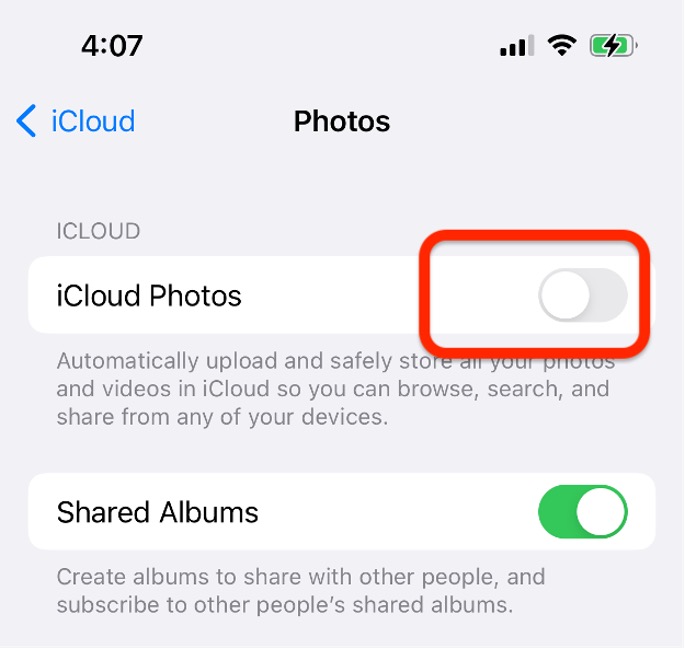
2. On your iPhone, go to Settings > Your Apple ID > iCloud > Photos.
3. Enable the slider next to iCloud Photos.

Sync Pictures_20220221_10

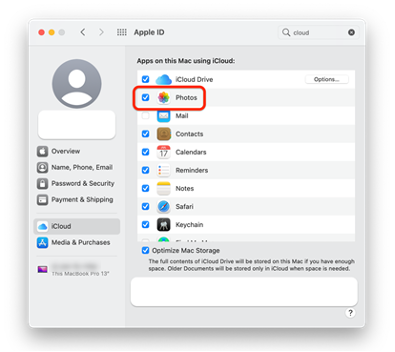
4. On your Mac, go to the Apple menu and select System Preferences.
5. For macOS Catalina or later (Big Sur and Monterey), go to iCloud or Apple, then choose iCloud.
6. Check the boxes next to iCloud Drive and Photos.

Sync Pictures_20220221_11

Note: remember to switch off sync after transferring if you want to delete photos on your iPhone and keep them on your Mac because as long as sync is enabled, any changes you make to photos on one device will automatically be synced to the other.

Got lots of duplicates?

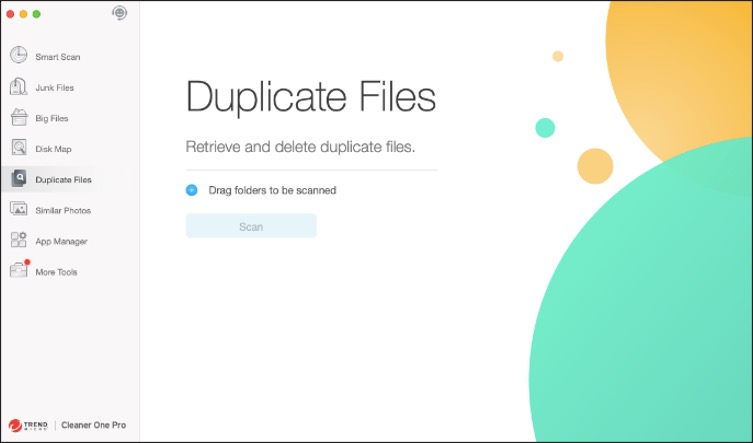
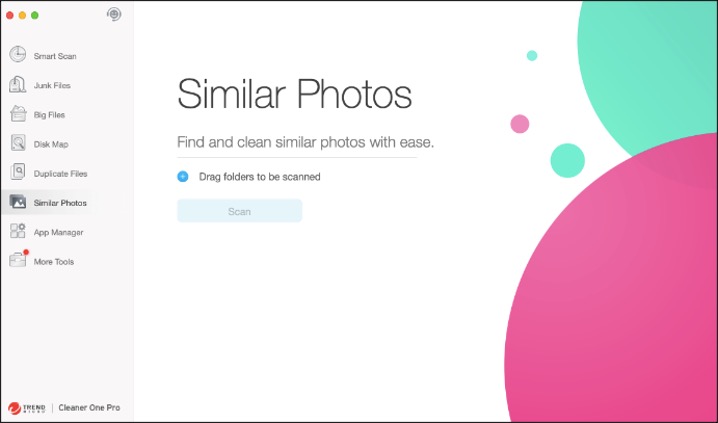
Transferring photos to your Mac is a great way to reclaim some of the precious storage space on your iPhone, but if you’ve got lots of duplicate photos, you’re going to have a nightmare of a time sorting through them on your Mac. Fortunately, Cleaner One Pro is on hand to help out!

Cleaner One Pro makes the time-consuming process of finding and removing similar photos and duplicate files a thing of the past! Simply run a quick scan on your Mac to detect and remove everything hogging storage space.

Sync Pictures_20220221_COP
Sync Pictures_20220221_COP_2

Source :
https://news.trendmicro.com/2022/02/22/how-to-transfer-photos-from-iphone-to-mac/

Urgent Update Released for Zero-Day Chrome & Edge Vulnerability

Updates for both Google Chrome and Microsoft Edge have been released which address the critical CVE-2022-1096 zero-day exploit. If you use either of these web browsers, you should install the update immediately.

What we know so far

The high severity vulnerability — referred to as CVE-2022-1096 — stems from a newly-discovered “type confusion” issue with V8, Google’s open-source JavaScript engine that powers both Google Chrome and Microsoft Edge. The vulnerability, which affects Windows, Mac, and Linux, could allow hackers to hijack people’s web browsers and embed malicious code.

Although it didn’t elaborate, in a short blog post addressing the issue, Google stated that a known exploit currently exists in the wild, although it is not clear how many people have already been affected or how damaging this exploit is.

The vulnerability also affects Microsoft’s Chromium-based web browser Edge in the same way.

What you need to do

You can stay protected from this vulnerability by ensuring your web browser is updated to the latest version. For Google Chrome, this is version 99.0.4844.84 and for Microsoft Edge, it is version 99.0.1150.55.

To check if you have the latest version installed, within one of the web browsers, click the three vertical dots in the top right-hand corner > Settings > About Chrome/About Microsoft Edge. If you don’t already have the latest version installed, you will be presented with the option to download and install it.

How to help the online community

Due to Google remaining tight-lipped about the severity of the known exploit, the level of harm it could cause to potential victims is as yet unclear. To limit the fallout, we all need to do our part in spreading the word — especially when considering how easy it is to install the latest update and guarantee protection. If you found this article helpful and you would like to see that others are protected, please consider sharing this post.

Source :
https://news.trendmicro.com/2022/03/30/urgent-update-chrome-edge-zero-day/

CISA Warns of Active Exploitation of Critical Spring4Shell Vulnerability

The U.S. Cybersecurity and Infrastructure Security Agency (CISA) on Monday added the recently disclosed remote code execution (RCE) vulnerability affecting the Spring Framework, to its Known Exploited Vulnerabilities Catalog based on “evidence of active exploitation.”

The critical severity flaw, assigned the identifier CVE-2022-22965 (CVSS score: 9.8) and dubbed “Spring4Shell”, impacts Spring model–view–controller (MVC) and Spring WebFlux applications running on Java Development Kit 9 and later.

“Exploitation requires an endpoint with DataBinder enabled (e.g., a POST request that decodes data from the request body automatically) and depends heavily on the servlet container for the application,” Praetorian researchers Anthony Weems and Dallas Kaman noted last week.

Although exact details of in-the-wild abuse remain unclear, information security company SecurityScorecard said “active scanning for this vulnerability has been observed coming from the usual suspects like Russian and Chinese IP space.”

Similar scanning activities have been spotted by Akamai and Palo Alto Networks’ Unit42, with the attempts leading to the deployment of a web shell for backdoor access and to execute arbitrary commands on the server with the goal of delivering other malware or spreading within the target network.

“During the first four days after the vulnerability outbreak, 16% of the organizations worldwide were impacted by exploitation attempts,” Check Point Research said, adding it detected 37,000 Spring4Shell-related attacks over the weekend.

Microsoft 365 Defender Threat Intelligence Team also chimed in, stating it has been “tracking a low volume of exploit attempts across our cloud services for Spring Cloud and Spring Core vulnerabilities.”

According to statistics released by Sonatype, potentially vulnerable versions of the Spring Framework account for 81% of the total downloads from Maven Central repository since the issue came to light on March 31.

Cisco, which is actively investigating its line-up to determine which of them may be impacted by the vulnerability, confirmed that three of its products are affected –

  • Cisco Crosswork Optimization Engine
  • Cisco Crosswork Zero Touch Provisioning (ZTP), and
  • Cisco Edge Intelligence

VMware, for its part, also has deemed three of its products as vulnerable, offering patches and workarounds where applicable –

  • VMware Tanzu Application Service for VMs
  • VMware Tanzu Operations Manager, and
  • VMware Tanzu Kubernetes Grid Integrated Edition (TKGI)

“A malicious actor with network access to an impacted VMware product may exploit this issue to gain full control of the target system,” VMware said in the advisory.

Also added by CISA to the catalog are two zero-day flaws patched by Apple last week (CVE-2022-22674 and CVE-2022-22675) and a critical shortcoming in D-Link routers (CVE-2021-45382) that has been actively weaponized by the Beastmode Mirai-based DDoS campaign.

Pursuant to the Binding Operational Directive (BOD) issued by CISA in November 2021, Federal Civilian Executive Branch (FCEB) agencies are required to remediate the identified vulnerabilities by April 25, 2022.

Source :
https://thehackernews.com/2022/04/cisa-warns-of-active-exploitation-of.html

Hackers Breach Mailchimp Email Marketing Firm to Launch Crypto Phishing Scams

Email marketing service Mailchimp on Monday revealed a data breach that resulted in the compromise of an internal tool to gain unauthorized access to customer accounts and stage phishing attacks.

The development was first reported by Bleeping Computer.

The company, which was acquired by financial software firm Intuit in September 2021, told the publication that it became aware of the incident on March 26 when it became aware of a malicious party accessing the customer support tool.

“The incident was propagated by an external actor who conducted a successful social engineering attack on Mailchimp employees, resulting in employee credentials being compromised,” Siobhan Smyth, Mailchimp’s chief information security officer, was quoted as saying.

Although Mailchimp stated it acted quickly to terminate access to the breached employee account, the siphoned credentials were used to access 319 MailChimp accounts and further export the mailing lists pertaining to 102 accounts.

The unidentified actor is also believed to have gained access to API keys for an unspecified number of customers, which the company said have been disabled, preventing the attackers from abusing the API keys to mount email-based phishing campaigns.

In the wake of the break-in, the company is also recommending customers to enable two-factor authentication to secure their accounts from takeover attacks.

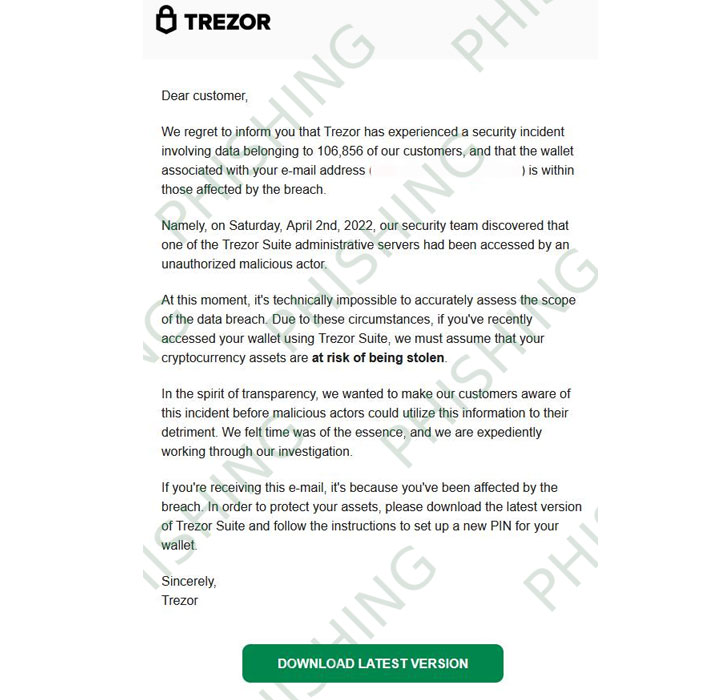
The acknowledgment comes as cryptocurrency wallet company Trezor on Sunday said it’s investigating a potential security incident stemming from an opt-in newsletter hosted on Mailchimp after the actor repurposed the stolen data to send rogue emails claiming that the company had experienced a security incident.

The fraudulent email, which came with a supposed link to download an updated version of the Trezor Suite hosted on what’s actually a phishing site, prompted unsuspecting recipients to connect their wallets and enter the seed phrase on the trojanized lookalike application, allowing the adversary to transfer the funds to a wallet under their control.

“This attack is exceptional in its sophistication and was clearly planned to a high level of detail,” Trezor explained. “The phishing application is a cloned version of Trezor Suite with very realistic functionality, and also included a web version of the app.”

“Mailchimp have confirmed that their service has been compromised by an insider targeting crypto companies,” Trezor later tweeted. “We have managed to take the phishing domain [trezor.us] offline,” warning its users to refrain from opening any emails from the company until further notice.

The American company hasn’t so far clarified on whether the attack was carried out by an “insider.” It’s also unclear at this stage how many other cryptocurrency platforms and financial institutions are impacted by the incident.

A second confirmed casualty of the breach is Decentraland, a 3D virtual world browser-based platform, which on Monday disclosed that its “newsletter subscribers’ email addresses were leaked in a Mailchimp data breach.”

Source :
https://thehackernews.com/2022/04/hackers-breach-mailchimp-email.html

VMware Releases Critical Patches for New Vulnerabilities Affecting Multiple Products

VMware has released security updates to patch eight vulnerabilities spanning its products, some of which could be exploited to launch remote code execution attacks.

Tracked from CVE-2022-22954 to CVE-2022-22961 (CVSS scores: 5.3 – 9.8), the issues impact VMware Workspace ONE Access, VMware Identity Manager, VMware vRealize Automation, VMware Cloud Foundation, and vRealize Suite Lifecycle Manager.

Five of the eight bugs are rated Critical, two are rated Important, and one is rated Moderate in severity. Credited with reporting all the vulnerabilities is Steven Seeley of Qihoo 360 Vulnerability Research Institute.

The list of flaws is below –

  • CVE-2022-22954 (CVSS score: 9.8) – Server-side template injection remote code execution vulnerability affecting VMware Workspace ONE Access and Identity Manager
  • CVE-2022-22955 & CVE-2022-22956 (CVSS scores: 9.8) – OAuth2 ACS authentication bypass vulnerabilities in VMware Workspace ONE Access
  • CVE-2022-22957 & CVE-2022-22958 (CVSS scores: 9.1) – JDBC injection remote code execution vulnerabilities in VMware Workspace ONE Access, Identity Manager, and vRealize Automation
  • CVE-2022-22959 (CVSS score: 8.8) – Cross-site request forgery (CSRF) vulnerability in VMware Workspace ONE Access, Identity Manager, and vRealize Automation
  • CVE-2022-22960 (CVSS score: 7.8) – Local privilege escalation vulnerability in VMware Workspace ONE Access, Identity Manager and vRealize Automation, and
  • CVE-2022-22961 (CVSS score: 5.3) – Information disclosure vulnerability impacting VMware Workspace ONE Access, Identity Manager and vRealize Automation

Successful exploitation of the aforementioned weaknesses could allow a malicious actor to escalate privileges to root user, gain access to the hostnames of the target systems, and remotely execute arbitrary code, effectively allowing full takeover.

“This critical vulnerability should be patched or mitigated immediately,” VMware said in an alert. “The ramifications of this vulnerability are serious.”

While the virtualization services provider noted that it has not seen any evidence that the vulnerabilities have been exploited in the wild, it’s highly recommended to apply the patches to remove potential threats.

“Workarounds, while convenient, do not remove the vulnerabilities, and may introduce additional complexities that patching would not,” the company cautioned.

Source :
https://thehackernews.com/2022/04/vmware-releases-critical-patches-for.html

First Malware Targeting AWS Lambda Serverless Platform Discovered

A first-of-its-kind malware targeting Amazon Web Services’ (AWS) Lambda serverless computing platform has been discovered in the wild.

Dubbed “Denonia” after the name of the domain it communicates with, “the malware uses newer address resolution techniques for command and control traffic to evade typical detection measures and virtual network access controls,” Cado Labs researcher Matt Muir said.

The artifact analyzed by the cybersecurity company was uploaded to the VirusTotal database on February 25, 2022, sporting the name “python” and packaged as a 64-bit ELF executable.

However, the filename is a misnomer, as Denonia is programmed in Go and harbors a customized variant of the XMRig cryptocurrency mining software. That said, the mode of initial access is unknown, although it’s suspected it may have involved the compromise of AWS Access and Secret Keys.

Another notable feature of the malware is its use of DNS over HTTPS (DoH) for communicating with its command-and-control server (“gw.denonia[.]xyz”) by concealing the traffic within encrypted DNS queries.

In a statement shared with The Hacker News, Amazon stressed that “Lambda is secure by default, and AWS continues to operate as designed,” and that users violating its acceptable use policy (AUP) will be prohibited from using its services.

While Denonia has been clearly designed to target AWS Lambda since it checks for Lambda environment variables prior to its execution, Cado Labs also found that it can be run outside of it in a standard Linux server environment.

“The software described by the researcher does not exploit any weakness in Lambda or any other AWS service,” the company said. “Since the software relies entirely on fraudulently obtained account credentials, it is a distortion of facts to even refer to it as malware because it lacks the ability to gain unauthorized access to any system by itself.”

However, “python” isn’t the only sample of Denonia unearthed so far, what with Cado Labs finding a second sample (named “bc50541af8fe6239f0faa7c57a44d119.virus“) that was uploaded to VirusTotal on January 3, 2022.

“Although this first sample is fairly innocuous in that it only runs crypto-mining software, it demonstrates how attackers are using advanced cloud-specific knowledge to exploit complex cloud infrastructure, and is indicative of potential future, more nefarious attacks,” Muir said.

Source :
https://thehackernews.com/2022/04/first-malware-targeting-aws-lambda.html

World Backup Day: Because Real Life Can Have Save Points Too

March 31 is World Backup Day. Get 1-up on theft, device failure and data loss by creating and checking backups — both for your organization and for yourself. 

You’ve been playing for hours. You’ve faced two tough enemies in a row, and all signs indicate you’re about to take your remaining 12 hit points straight into a boss fight.

Up ahead a glowing stone beckons like a glimmering oasis.

“Would you like to save your progress?” a popup asks as you approach.

Um. YES!

But as obvious a choice as that seems, when the same opportunity presents itself in real life, a shocking number of people don’t take advantage of it.

What Do You Have to Lose?

The digital revolution has brought about unprecedented efficiency and convenience, ridding us of the need for bulky filing cabinets, media storage, photo albums, rolodexes and more. But every time we outsource the storage of our data to the cloud, we become a little more reliant on digital devices that are anything but infallible.

According to WorldBackupDay.com, more than 60 million computers worldwide will fail this year, and more than 200,000 smartphones—113 every minute—will be lost or stolen. But while the devices themselves are replaceable, their contents often aren’t. Imagine what could be at stake: All the photos you’ve taken of your children over the past two years. Every message you ever sent your spouse, all the way back to the very beginning. The last voicemail you ever got from your grandmother. All could disappear in an instant, even when associated with cloud accounts, as experienced below.

But the loss isn’t always just sentimental. Sometimes it’s professional too, as journalist Matt Honan found out in 2012. Honan used an iCloud account for his data, but had no backups — and when hackers gained access to the account, they remotely wiped his phone, tablet and computer. They also took over and deleted his Google account. “In the space of one hour,” Honan told Wired, “my entire digital life was destroyed.”

Good Backups Are Good Business

Businesses have fallen victim to devastating data loss, as well. In 1998, Pixar lost 90% of its film “Toy Story 2,” then in progress, due to the combination of a faulty command and insufficient backups.

And when social media/bookmarking site Ma.gnolia.com experienced a database failure resulting in the loss of all user data, it ultimately shuttered the company. “I made a huge mistake in how I set up my [backup] system,” founder Larry Halff said of the incident. 

The Cultural Cost of Insufficient Backups

While World Backup Day’s primary goal is to encourage people to create and check their backups, it also aims to spark discussion of an enormous task: how to preserve our increasingly digital heritage and cultural works for future generations.

Due to insufficient archiving and backup practices, many cultural properties have already disappeared. For example, an entire season of the children’s TV show “Zodiac Island” was lost forever when a former employee at the show’s internet service provider deleted over 300GB of video files, resulting in a lawsuit over the ISP’s lack of backups.

And decades before, a similar fate befell the now-iconic sci-fi series “Dr. Who.” The Film Library of Britain and BBC Enterprises each believed the other party was responsible for archiving the material. As a result, the BBC destroyed its own copies at will, resulting in the master videotapes of the series’ first 253 episodes being recorded over or destroyed. Despite the existence of secondary recordings and showrunners obtaining copies from as far away as Nigeria, 97 episodes are still unaccounted for and presumed lost for good.

How to Ensure Your Digital Future Today

With so much at stake, you’d think almost everyone would back up their data at least occasionally. This isn’t the case, however. According to WorldBackupDay.com, only about 1 in 4 people are backing up their data regularly, and an astounding 21% have never made a backup.

This phenomenon is also seen at the corporate level. While 45% of companies have reported downtime from hardware failure and 28% reported a data loss event in the past 12 months, FEMA reports that 1 in 5 companies don’t have a disaster recovery/business continuity plan (and thus don’t typically have current backups.) With 20% of SMBs facing catastrophic data loss every five years, being left unprepared is much less an “if” than a “when.”

The difference in outcome for these businesses is stark. Ninety-three of businesses that experienced data loss and more than ten days of downtime filed for bankruptcy within a year. But 96% of businesses that had a disaster recovery plan fully recovered operations.

While a good backup plan will require ongoing attention, today is a great day to start — and even one backup is a tremendous improvement over no backups at all. The World Backup Day website is full of information on online backup services, external hard drive backup, computer backup, smartphone backup, creating a NAS backup, and other methods of preserving your data.

If you’re like many IT professionals and already understand the importance of backups, today’s a perfect day to test your backups out and make sure they’re still fully operational. It’s also a good opportunity to share the importance of backups with bosses, colleagues and friends.

After all, if you’re an individual, you won’t get an “extra life” to go back and relive all the memories you might lose if your device fails. And if you’re a small- or medium-sized business owner and lose all your data, having backups might be the difference between “Continue” and “Game Over.” On World Backup Day and every day, the choice is up to you.

To learn more about backups, visit WorldBackupDay.com.

Source :
https://blog.sonicwall.com/en-us/2022/03/world-backup-day-because-real-life-can-have-save-points-too/
Hackers can crash Cisco Secure Email gateways using malicious emails

Cisco has addressed a high severity vulnerability that could allow remote attackers to crash Cisco Secure Email appliances using maliciously crafted email messages.

The security flaw (tracked as CVE-2022-20653) was found in DNS-based Authentication of Named Entities (DANE), a Cisco AsyncOS Software component used by Cisco Secure Email to check emails for spam, phishing, malware, and other threats.

This bug is due to an insufficient error handling issue in DNS name resolution found and reported to Cisco by Rijksoverheid Dienst ICT Uitvoering (DICTU) security researchers.

“An attacker could exploit this vulnerability by sending specially formatted email messages that are processed by an affected device,” Cisco explained.

“A successful exploit could allow the attacker to cause the device to become unreachable from management interfaces or to process additional email messages for a period of time until the device recovers, resulting in a DoS [Denial-of-Service] condition.”

To make things even worse, continued attacks can cause the targeted devices to become completely unavailable, which results in a persistent DoS condition.

The company’s Product Security Incident Response Team (PSIRT) said that it found no evidence of malicious exploitation in the wild before the security advisory was published on Wednesday.

Vulnerable component not enabled by default

While the security vulnerability can be exploited remotely by unauthenticated attackers, Cisco says the vulnerable DANE email verification component is not enabled by default.

Admins can check if DANE is configured by going to the Mail Policies > Destination Controls > Add Destination web UI page and confirming whether the DANE Support option is toggled on.

Cisco has also confirmed that CVE-2022-20653 does not impact Web Security Appliance (WSA) and Secure Email and Web Manager or devices without the DANE feature enabled.

The company also provided a workaround requiring customers to configure bounce messages from Cisco ESA instead of from downstream dependent mail servers to block exploitation attempts.

Earlier this month, Cisco patched several maximum severity flaws with proof-of-concept exploit code available that would enable threat actors to take control of Small Business RV Series routers without authentication.

Source :
https://www.bleepingcomputer.com/news/security/hackers-can-crash-cisco-secure-email-gateways-using-malicious-emails/