Adapting to AI penetration testing orchestrators: The Modern Security Model

Blake Darché, Myles Sloan, Jacob Crisp, and Cloudforce One

11 minute read
Over the last month, the number of Large Language Model (LLM) penetration testing and orchestration frameworks has exploded. Just a few weeks ago, ARTEX — an open source agentic penetration testing system that automates offensive security workflows — was the only framework available. In just the last three days, we have seen over 50 framework families attempt to scan Cloudflare customers globally. The number of Internet Protocol (IP) addresses seen running these frameworks has grown into the thousands and continues to increase daily. The proliferation of these frameworks has significantly changed the status quo in cyber defense: defenders are struggling to keep up with the volumetric nature of these autonomously guided attacks.

ARTEX was taken down by its creator Autumn-27 on October 8. (“The malicious exploitation of this tool runs entirely counter to its original intent,” they wrote in Chinese.) But in the month since, the ecosystem has exploded with new fragmented versions of it. There are now over 12,000 repositories, with several hundred unique forks containing lineage from the original repository. Additionally, hundreds of other similar agentic orchestration frameworks have been created since October 8. Daily requests of AI penetration testing (pentesting) and exploitation tools has grown by 30x since October 1. These tools have also begun chaining stolen customer credentials in some of the more complex attacks, such as lateral movement chaining throughout an environment.
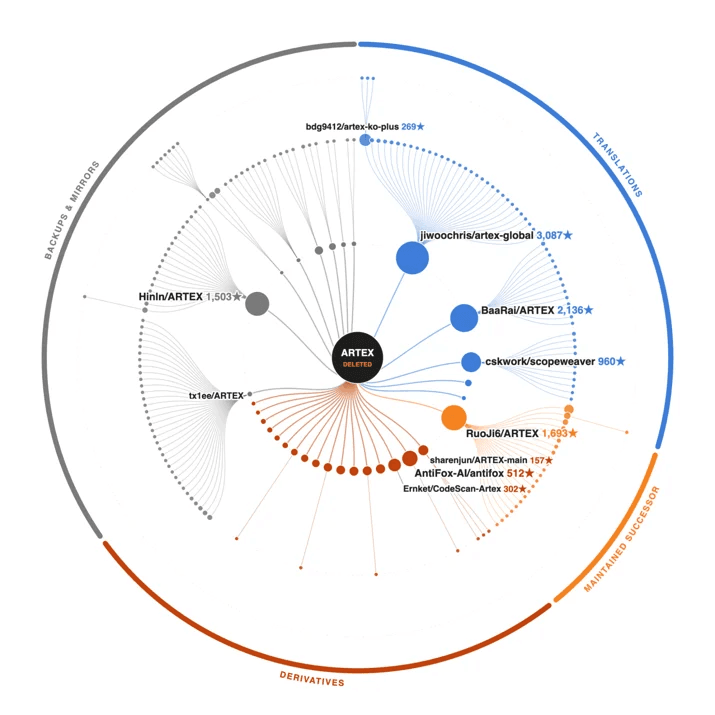
Fork tree of ARTEX: 204 public repositories with their own code changes, grouped by type and sized by stars.

We expect these frameworks to continue to proliferate, and every organization should be prepared to address this threat. To counter LLM-based pentest frameworks, we recommend that all organizations adopt what we call the Modern Security Model, which has six key pillars:

  • Fortify the front gate: Implement a Web Application Firewall (WAF) with advanced rules such as rate limits.
  • Security station in the foyer: Anomaly detection on all web applications your customers access.
  • Identify phony visitors: Implement Bot Defense.
  • Remove the back door: Implement Identity-Gated Access for all high-risk external and internal web applications.
  • Inspect deliveries: Enforce validated schemas and explicit security controls.
  • Neighborhood watch: Implement Threat Intelligence to gain visibility into attacks.

What is an LLM penetration and exploitation orchestrator?

Open-source pentesting frameworks are able to orchestrate AI agents to carry out stages of the traditional Cyber Kill Chain at scale. Tools like ARTEX have the ability to quickly plug in existing Model Context Protocol (MCP) and connect traditional standalone pentesting tools in novel ways. Some even allow operator direction on what type of task to accomplish. These tools can map and enumerate environments, both from the inside and outside. ARTEX and its forks map assets and environments onto a graph, allowing multiple independent parallel agents to enumerate, verify, prototype, and attack at the speed of inference. These tools turn compromises into a hill-climbable problem, which agents are specifically good at.

The AI LLM pentesting tools that currently exist

We are currently tracking 50+ AI LLM agents. The table below shows the top five LLM penetration and exploitation orchestrators. Each is extremely popular (1k+ GitHub stars) and fully autonomous. The fully autonomous nature of these agents represents a doctrinal shift in offensive cyber capabilities:

  • Human skills are no longer the limit: A harness performs every step of the OODA loop by observing the environment, orienting itself to prioritize valuable and/or vulnerable targets, decide on an action, and act autonomously.
  • Speed increase: Having multiple parallel agents working towards a goal is a large shift compared to single operator or multiple operator augmented by AI.
  • Scale: A single operator can target multiple organizations at the same time, greatly increasing their blast radius.
  • Small mistakes are easily discovered: Autonomous frameworks relentlessly and systematically test exposed services, including their configurations.
ArchitecturePlanning modelBuilt-in capabilities/execution environmentPost-exploitation capabilities
ARTEX (and forks)Planner and parallel agentsGraph of goals, leads, and findings is linked to separate asset graph of targetDirectly on host or container with network/root access, can install/develop tools as neededNothing built-in, requires user instruction
LuaN1aoAgentSupervisor agent, planner agent, and generic executor agentsThree graphs, with goals/tasks/blockers, evidence/hypothesises/exploits, and target/localContainer with network/user access, can develop tools as needed and install user packagesBuilt-in SSH and Chisel for tunneling and attempted reconnection after disruption
DecepticonOrchestrator agent dispatching specialist sub-agentsGraph of objectives with prerequisitesKali container running as root, can develop tools as neededDedicated post-access, Active Directory and cloud pivoting skills
CairnDispatcher orchestrating work to existing AI harnesses (Codex, Claude Code, Pi)Graph of facts and leads; new nodes trigger dispatcherKali container with root access or directly on host, can develop tools as neededPrompt guidance and Kali tools
PentestGPT-AgentSupervisor agent and one generic executor agentTask list with dependencies, goals, and evidenceRun on host, can develop tools as neededNothing built-in, requires user instruction

Observations from the world’s largest network

As of November 12, ARTEX and its forks make up over 60% of currently known AI penetration testing orchestrators. The charts below help us understand how adoption of these tools has changed over the past six weeks. Since the removal of the original ARTEX repository on October 8, traffic has grown more than tenfold, and has increased more than 30x since October 1.
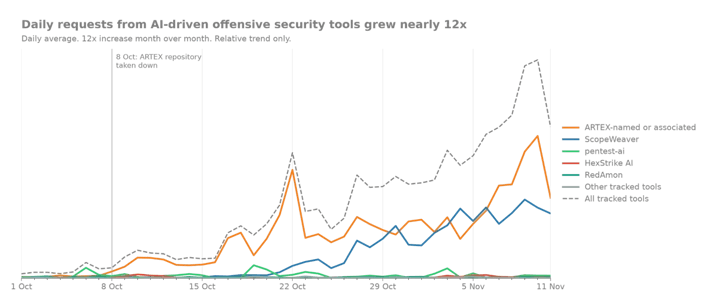

Trend in the volume of daily requests from a selected handful of AI-driven pentesting orchestrators
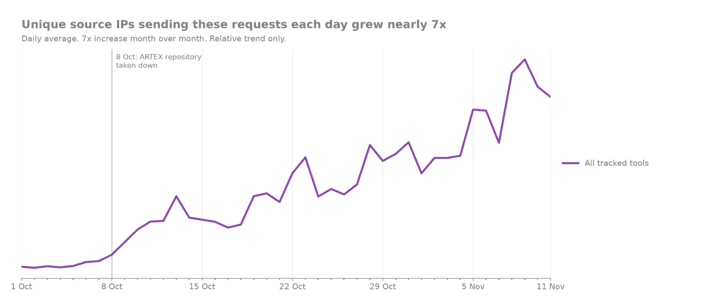

Daily trend in the number of unique IPs sending at least one request from any AI-driven pentesting orchestrator
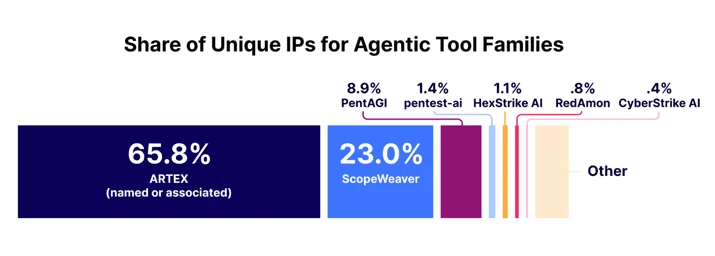

Detailed breakdown of the share of attributed unique IPs observed during the last three complete days. IP shares are non-exclusive as a single IP can run multiple tools.
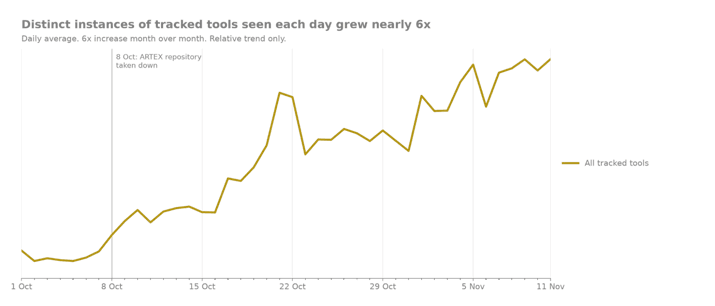

Daily trend in the number of unique instances of tracked AI-driven penetration testing orchestrator tools

As demonstrated above, the takedown of ARTEX on October 8 (and widespread reporting of it) likely caused a hydra effect, where the removal of the original repository led to a massive increase in the number of forks and modifications which can be seen in the steep acceleration of unique instances around October 8.

Identity-chained LLM exploitation

Over the last eight weeks, our Cloudforce One team has been called into multiple incident response investigations involving ARTEX and ARTEX-derived LLM exploitation frameworks. We’ve seen firsthand how exposed credentials are being chained with LLM-based exploitation frameworks to gain the upper hand over defenders.
We observed multiple incidents in which a threat actor gained initial access to a hyperscaler environment and pivoted directly into the customer’s Cloudflare environment. Root-cause analysis revealed a common credential hygiene failure. Attackers repeatedly compromised static, non-expiring tokens running inside CI/CD pipelines, which granted broad, cross-environment access across the organization’s hyperscaler infrastructure. LLM frameworks greatly expand the likelihood of a client’s API key being laterally leveraged to take over other tenant environments.

ARTEX in action

As part of one incident response investigation, our team observed ARTEX gaining access to a compromised account-level API token previously used for CI/CD with no IP restrictions or rate limiting. Available evidence indicated that the compromise most likely originated through a third-party hyperscaler.

We observed that a large number of new Worker scripts had been created with distinct names such as artex-*, artex-pgrecon-*, artex-pgw-*, and artex-do-*. The naming of each Worker script correlated to distinct behaviors and actions it was taking, and was often postfixed by an alphanumeric identifier. We observed activity in excess of 69 requests per minute across multiple unique parts of their Cloudflare infrastructure and 400 database dump requests in an hour. We also observed attempted persistence mechanisms and attempts to validate session tokens for other third-party applications. While we believe that much of this activity was lightly guided by the human operator, this is just one example of the speed and breadth that ARTEX and similar frameworks can achieve post-compromise.

Our recommendation: the Modern Security Model

Large Language Models increase the ability of a threat actor to rapidly iterate through the Cyber Kill Chain against a target. They do this by giving the actor the advantage of speed and validation. Each step of the Cyber Kill Chain can be validated and fed into the next stage of the attack. This level of orchestration is unparalleled and effectively vaporizes legacy cyber security models. A modern model must be used against these attacks.

To help explain this model further, let’s use the metaphor of protecting a house on an estate. Each section below outlines how to defend against the threat at each step.

Fortify the front gate: implement traffic control and a WAF with advanced rules

Before anyone even sets foot on your lawn, they have to reach the perimeter fence.

On an unprotected estate, an adversary can drive an endless fleet of decoy trucks straight into your driveway, completely blocking the entrance and smashing through the barriers (Layer 3/4 volumetric floods and direct IP probing).

With perimeter gate security in place, all incoming traffic is routed through massive, distributed outer gates miles away from the main house. Rogue delivery trucks are filtered out to the highway, rogue utility tunnels trying to wiretap your property are severed, and only legitimate foot traffic ever reaches your home address.

Network traffic control serves as an important role in stopping volumetric attacks.

A security station in the foyer: anomaly detection

Once visitors arrive at the main entry, they meet a strict security station at the foyer.

Automated prowlers don’t just kick the door; they disguise themselves. They attempt weird ways to get in the door — stuffing paper into the lock, trying variations like //front-door//back-room/ to trick the mechanism into swinging open.

The security guard at the door enforces clear rules:

  • You cannot knock 500 times in five seconds.
  • You cannot disguise your path with trickery.
  • You cannot attempt to roll a massive flatbed cart through the front hall to haul away the house’s internal blueprints (diagnostic heap dumps). Suspicious behavior is turned away immediately.
  • Implement security keys and hardware based FIDO keys.

Web Application Firewall (WAF) serves as a key defense mechanism in stopping application exploitation through rate limits and anomaly detection.

Identify phony visitors: implement Bot Defense

A sophisticated intruder rarely looks like a masked burglar; they disguise themselves as ordinary visitors. But automated agents, headless browser scrapers, and AI reconnaissance tools don’t act like real people.

They don’t blink, their posture is unnervingly rigid, their cadence is mechanical, and their “identification” is often a sloppy imitation of a real visitor badge.

Bot Defense and challenges act as behavioral specialists watching the crowd through one-way glass. It flags the unnatural cadence, catches the synthetic micro-behaviors, and quietly escorts the machines off the property before they can touch a single doorknob.

Remove the back door: implement Identity-Gated Access and micro-segmentation

Many homes historically were built with side doors or a cellar hatch (internal admin panels, /actuator diagnostic endpoints, and remote gateways). Even if locked, a prowler could stand on the sidewalk, shine a flashlight on the cellar door, and start picking the lock.

Zero Trust application access does something radical: it bricks up the doorway from the outside and restricts which rooms can be entered.

To anyone wandering the perimeter, the cellar door does not exist. There is no lock to pick, no handle to rattle, and no light on inside. The only way in is with an escort who checks your biometric badge, confirms your device has a clean bill of health, and steps you directly into the specific room you need — leaving the rest of the house out of view.
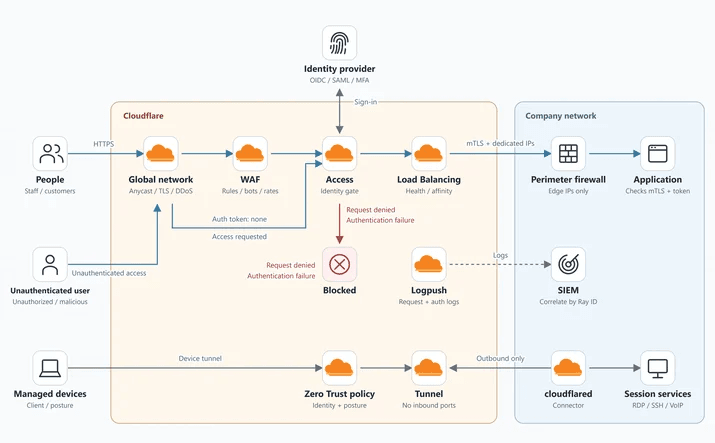
For those who do enter, you have to ensure they cannot breach rooms next to the room they enter. Micro-segmentation is a highly effective strategy at stopping lateral movement. It limits compromised credentials from breaching production, test, and development systems.

Inspect deliveries: enforce validated schemas and explicit security controls

You receive daily supply deliveries to your estate — groceries, mail, maintenance parts. In digital terms, this is your incoming API traffic, which must be inspected and verified.

Intruders often attempt to bypass controls by sending unvalidated payloads or forged delivery manifests meant for restricted internal systems.

The porch protocol mandates thorough inspection and schema validation for all traffic:

  • Every incoming request must undergo OpenAPI schema validation to ensure it strictly conforms to expected definitions and structures.
  • Drivers and couriers must present validated mutual TLS (mTLS) certificates to establish trusted, authenticated connections.
  • Any request failing inspection or missing valid credentials is rejected immediately at the boundary.
  • Default-Deny Posture: Every positive security implementation ends with an explicit deny-all rule at the bottom of the ruleset.

Neighborhood watch: implement threat intelligence to gain visibility into attacks

Even with ironclad walls, an isolated property can be vulnerable if a syndicate invents a brand-new infiltration technique across town.

Threat intelligence acts as your warning network with neighboring estates. When a rogue actor sets up a new command-and-control safehouse down the road or begins deploying dynamic tunneling vans in your district, you receive an early dossier. Your estate updates its watchlists, recalibrates its sensors, and slams the gate shut before the actor ever turns onto your street.

How to get real-time help

ARTEX and similar LLM-based frameworks pose a significant challenge to legacy cyber defense models. Even the historical defense-in-depth model — which emphasizes a classic network DMZ — falls short in today’s complex architectures. Tomorrow’s attacks will only advance as orchestration tools become the new normal.

Securing legacy equipment and on-premises devices requires an identity-gated approach that logically makes these devices impossible to reach on the Internet. Beyond identity, slowing or making lateral movement more noisy is the goal of micro-segmentation. This architecture emphasizes a containment-first approach to security, which is essential when users are consistently losing their keys. When combined, the elements of the Modern Security Model are the answer to this vexing problem.

If you are facing an active security incident and need the Cloudforce One team on the ground to help respond to the incident or require threat intelligence support, please contact us immediately. If you need help implementing the Modern Security Model outlined here, please contact our Solutions Engineering team.

Source:
https://blog.cloudflare.com/adapting-to-ai-penetration-testing-orchestrators/
Agents aren’t humans (but they kinda are)

Bryan Becker

15 minute read

AI Agents now act on the web for millions of people. To a Site, an Agent can take many forms. It may be indistinguishable from a human user carrying out a task, or it might look like one visitor carrying many Users. This removes the ability for the Site to recognize, serve, and hold accountable the user or users behind the Agent, and causes the Site to face the costs when something goes wrong. This post argues that in order for Sites to maximize the access they provide to Agents, the ecosystem must develop new mechanisms to preserve the relationship between Sites and Users. Traditionally, in Security and Fraud Prevention, that requires three things: Identity, Reputation, and Accountability, allowing Sites to answer: Is the person acting being truthful about who they are? Is that person trustworthy? And who answers for the action?

“Personal AI Agents” (“Agents” for short) are automations that take instructions from a human (“User”) and pursue a goal by controlling a cloud computer or browser. They are usually hosted and maintained by an “Operator” as part of a managed service or consumer offering. Examples include Muse from Meta and dots from OpenAI, and more are launching all the time. Agents can potentially take any action online that their User could, without the limits that hold humans back. They don’t tire, they run around the clock, they act in parallel, and they put up with friction no person would. Much of the web, from how Sites plan capacity to how they make money, assumes those limits.

Fundamentally, remotely hosted Agents are intermediaries. An intermediary is anything that sits between a User and a Site, so the Site sees it instead of the User. Agents are the newest kind of intermediary, but intermediaries have existed for a long time. Cloud browsers (hosted browsers that software controls on a User’s behalf) and Proxies (services that relay a User’s traffic, including VPNs) are intermediaries too. What has changed is the trajectory. Agentic traffic is growing rapidly and may eclipse traditional human browsing on the Internet in the near future. This forces a reckoning for anyone operating a Site today. Historically, a Site could simply block intermediary traffic and require Users to disable the intermediary service. That stops working when the majority of traffic is agentic. Once blocking is no longer viable, Site Operators are left with the problem that intermediaries have always created. The Site loses direct information about the User and must decide whether to trust the intermediary without it. 

This post covers Agents hosted somewhere other than the User’s device. Local agents (e.g. OpenClaw) or Agents running in the User’s own browser, on their own device, are out of scope of the primary topic addressed by this post (see below, “On open source and local Agents”).

Without Agents, the User interacts with the Site directly.

With Agents, the Site sees the Agent, not the User, and one Agent acts for many Users.

Sometimes several intermediaries sit between the User and the Site.

This post rests on one principle:

The Intermediation Principle: The business relationship between Users and Sites, and each participant’s security responsibilities, must be upheld regardless of intermediation.

A Site needs new tools to recognize, serve, and hold accountable a User acting through an Agent just as it could if that User had visited directly. The Agent, and the Operator behind it, must be recognizable and accountable too, because an Agent can do what no User could. Agents are able to scale human access almost without limit, so they create new risks, even for behavior that was previously benign.

Copy linkThe intermediary problem

Meet Ezra. Ezra works as a personal assistant for people in her city. Her best client is Amy, a local CEO, but she also works for Bob, Charlie, and Debra. She runs their errands: groceries, appointments, paperwork, and flights. Ezra blends into the crowd.

The corner grocer used to know Amy. He knew what she bought and set aside what he thought she’d like. Now only Ezra comes in, carrying orders for four people, and the grocer can’t tell whose preferences are whose. He doesn’t want to turn Ezra away, because she brings him a lot of business.

Then Bob asks Ezra to buy him an iPhone. A week later he calls the store, says he never authorized the charge, and keeps the phone. To win the dispute, the store has to prove Bob asked for it. But the only person the store ever saw was Ezra.

Then Charlie gives Ezra a list of passwords: “I forgot mine, but it’s one of these.” Ezra patiently tries each one at Charlie’s bank. The bank can see an attack happening, but the only person it can ban is Ezra. Banning Ezra also bans Amy, Bob, and Debra.

None of these business owners has a problem with Ezra herself. Their problem is that they can only see Ezra, not the person she’s acting for. Swap Ezra for an AI Agent and the businesses for websites, and you have the web today.

A website owner wants sufficient visibility both to prevent bad behavior and to effectively monetize or get value from their Site. But as with Ezra, much of that visibility goes away with AI Agents. Below is a list of actions that a website owner might want to address that were previously solved, but are made more challenging by allowing Agents.

ChallengeWebsite owner’s goal
Account sharingSites need to ensure that one paid subscription is not being abused to serve many Users. The Site sees one account and one client when accessed via an Agent.
Compliance and illegal activityA Site must meet legal requirements to verify information about its Users. For example, some Sites have age or geographic restrictions.Agents do not provide guarantees that can meet the bar for Sites to remain compliant, if they allow Agent access.
Friendly fraudFriendly fraud is when the User approves an Agent’s purchase, then disputes it as unauthorized. Sites may win with circumstantial evidence: the same device, IP, and address as the User’s past undisputed purchases. Agent purchases come from the Agent’s infrastructure, so that evidence doesn’t exist. Even when the Site wins, the dispute itself costs money.Sites need to maintain records of checkout behavior for fraud prevention purposes. Maintaining these records helps Sites reduce overall friction from additional verification, and results in a lower transaction decline rate, and overall greater number of checkouts.
Human verification is irrelevantA Site wants to be able to distinguish the type of Users it has. CAPTCHAs and other human verification check whether the entity controlling the browser is a human or not.Agents are never expected to be humans. Solutions that pass this signal through to the human User add no new information and just make Agents less efficient.
Identity spoofingA Site wants to limit access to content to human Users or impose restrictions on what particular Users can access. Agents often run on residential IPs and use real Browsers, are mixed with human-directed traffic, and take efforts to not distinguish themselves from human traffic. Attackers copy a well-known Agent’s user agent string to get the same allowances.
Identity verification breaksA Site may require additional verification of the User’s identity, or other information, in order to provide access to sensitive operations or content. Liveness checks, KYC ID checks, and similar assume the person present is the person being verified. The Agent is never that human. The Site has to accept verification passed through by the Agent (which weakens the check), reject Agents, or drop the check.
MisalignmentSites may want to protect themselves from erroneous actions taken by newer or more experimental Agents.Agents make mistakes: the wrong item, the wrong date, duplicate orders. Sites may absorb the cost through refunds and support to keep customer goodwill, with no way to tell which Agents are reliable.
Policy circumventionThe Site is looking to impose a policy (e.g. block, allow only partners, rate limit) that is based on identity, but Agents don’t always identify themselves, and they often don’t bring information about the User they act for.
Resource exhaustionSites that provide free services or that rely on User engagement were often designed with an assumed limit on User behavior.Agents poll constantly (e.g. stock and price checks), hit expensive endpoints (e.g. search, inventory, or support chat), and use up free trials and promotions.
Risk-based authentication breaksA Site wants to maintain its risk-based authentication system, which expects the device, location, and behavior to match the User. Agents run on cloud infrastructure and look unusual every time.
Traffic comminglingSites would like to protect themselves and User accounts from abuse or fraudulent activity. When one User abuses a shared Agent for credential stuffing, scraping, or card testing, the Site can detect the abuse but can only block the Agent, which also blocks all of its legitimate Users.
Unauthorized card usersSites and payment providers need to protect cardholders from unauthorized transactions, while minimizing dispute costs and other costs related to fraud.When an authorized User makes a purchase on a card, the cardholder is responsible. If the cardholder hands the card to someone who isn’t an authorized user, they’re still responsible for having handed it over. Agents have no authorized-user status, so the Site can’t tell whether the User stands behind this purchase. In practice, when the User disputes it, the Site pays.
Uncompensated consumptionSites that monetize content require visibility and control over who accesses that content in order to apply the correct monetization model.The Agent reads or extracts content (articles, product data, reviews) to answer the User somewhere else. The Site pays to serve it and gets no visit, ad impression, or purchase.
User attributionSites offer additional capabilities to consenting Users regarding personalization, recommendations, and loyalty programs, using analytics tied to the User’s session and device. Agent traffic either groups many Users into one client or shows up without the User’s session at all.

In nearly every challenge above, the Site bears the primary cost. That outcome follows from how trust works when an intermediary is involved.

Copy linkOur vision

Our aim is an Internet where all Users have equal or greater access to websites than they had before. Before Agents, a Site was typically able to mitigate these risks with a collection of techniques, including fingerprinting the User’s device, session, and history. Users could still browse using private browsing mode, and we believe Agents should be able to do that as well. But they probably won’t be able to log in to a bank without additional verification.

None of this requires an Agent to act like a human or a human to be present for every action. It requires that Sites have the means to obtain or require information about the User to hold them accountable, when applicable, with or without an Agent.

Copy linkWhat people have tried, and why they fall short

A common proposal is for Agents to pass a Site’s CAPTCHA through to the User to solve. That proves some human is present at that moment (“human in the loop”, or HITL), and nothing more. HITL is primarily a mechanism to prevent mistakes from misalignment. Misalignment is an issue between the Operator and the User, and resolving it does not resolve the majority of the problems above. For example, it can’t tell Bob from anyone else (Traffic commingling), and it says nothing about who the Agent acts for the rest of the time. Additionally, Agents exist to remove friction, and HITL adds back that friction, so Operators are incentivized to remove or bypass it for the User.

Another common proposal is to use tightly scoped access controls. Agents are built to do anything a User could, so in practice they ask for, and get, permission to do everything. A scope of “everything” tells the Site nothing. And even a narrow scope only says what the Agent was allowed to do. It doesn’t say who answers when the Agent gets it wrong, which is the question the Site actually needs answered.

Copy linkWhat the web needs

The web needs tools and protocols that allow Sites and Agents to collaborate to determine what behaviors and actions are allowed, as well as express preferences and policies from Sites to Agents, all in a way that can be reasonably supported by all Sites and Agents. Fortunately, work is already underway along all of these fronts, and many, if not all, of these can be addressed by applying existing standards.

Copy linkProtocols

Agents and Sites can engage in explicit protocols for solving some of the problems above. For instance, MOLE is one upcoming approach that aims for rate limiting without User-specific identifiers, allowing Sites to transition away from implicit identities and towards explicit protocols for accomplishing the same goal. This is similar to the x402 protocol, which aims to enable payments on the web while remaining privacy-preserving. We are actively exploring ways in which we can leverage existing protocols for addressing other problems, as well as exploring designing new protocols when existing solutions fall short.

Copy linkIdentities

When discussing Agent Identity, Web Bot Auth (WBA) is our preferred method. WBA allows an Agent to sign its requests, which provides a secure way for an Agent to identify itself (and, implicitly, the Operator). We must still define a mechanism that supports multiple intermediaries: when Agent A uses Agent B inside Browser C, the Site needs to be able to know this, so that the Site can correctly ensure that access by Agent A is correctly understood and controlled, for example, in order to prevent Policy circumvention.

Other types of identifying information, such as session, account, or even User-specific IDs, might be necessary, depending on the context. We are working with the relevant standards to explore ways to communicate such identifying information.

Let’s take a look into types of Identity in regards to a User. Ultimately, Identity is a spectrum that trades various degrees of information about a user, while ideally practicing principles of data minimization. Identity provides us a mechanism to answer “who are you?” in pursuit of answering the follow-up questions of: “are you who you say you are?” and “can we trust you?”.

In many cases, identifying information isn’t needed, and privacy-preserving methods for moderating access to agents, such as through Privacy Pass and MOLE, can help us answer “can we trust you?” without needing to answer “who are you?”. Private Access Tokens was one early way in which we tried to establish trust without identifying the user, and MOLE is intended to be the successor to this technology. However, there are cases where graduated forms of disclosure along this spectrum would be needed, and you can generally characterize them in the following ways:

  1. Nothing – Users may act on the internet while bringing no identifiers to the table.
  2. Session – Sites require some way of linking requests in the same session to a single agent. This allows the Site to establish reputation for a given session and act on it accordingly. For example, Poppy has a notion of a session ID for exactly this purpose. 
  3. Account – Sites require a way of attributing requests to the same User across sessions. This might be a stable identifier assigned by an Operator or third party to a User that persists across the account with the Operator, such as a single Agent visiting the same Site every day using the same identifier. An example use case this would enable is: “Bind your Site account to your Agent account”.
  4. Unique – Some Sites might require a unique, per-User identifier provisioned by a third party that persists across Operators, accounts, Agents, and sessions. This may be useful for high risk actions, or for Sites that need to provide limited access to an expensive resource or that have very restrictive obligations or compliance requirements. Government IDs, third party identity verification, and decentralized technologies like Proof of Human are all examples of technologies that can provide this.

Ultimately, Sites determine what information they need for clients to answer “is the entity behind this request allowed to do this action at this time?” In many cases, protocols already exist, or are being developed, to convey this information: WBA for conveying an Agent’s platform identity, MOLE for conveying User reputation, OAuth for conveying account identities, and so on.

Copy linkClaims

Beyond identities, some actions require a fact about the real person, such as being over 18 or being the cardholder (Identity verification breaks, Friendly fraud). Often the Operator verified this at sign-up or a third party already has this information. 

In order to allow Agents access to Sites or actions with these kinds of restrictions, we need mechanisms for Sites to request this information, and for Operators or third parties to provide this information.

Copy linkSite Agent access policy

Today, an Agent infers a Site’s rules by trying something and interpreting the Site response (usually, whether it gets blocked). That wastes resources on both sides, and in some cases makes honest Agents appear to be malicious. Robots.txt says where a crawler may go, but isn’t fully suited to express what Agents may do.

Sites need a machine-readable way to publish what actions Agents are allowed to do. The Internet Engineering Task Force (IETF) is actively working on some preference expression mechanisms for this, primarily in the AI Preferences Working Group. However, the focus of the group is on expressing preferences for use (such as training, inference, and search), and there is still not a group focused on the larger need for preference expression mechanisms discussed here.

Copy linkOn open source and local Agents

Agents that are not run as an “Intermediary” (e.g. on-device Agents, or locally hosted Agents such as OpenClaw) raise different concerns. Primarily, they look like (and are) automation, and they have no single party to build reputation or hold accountability with.

There are many solutions to this, one of which is to ask these Agents to provide a Unique ID. However, addressing this is not the initial focus of Trusted Agent Delegation.

Copy linkWhat’s next

Real-world solutions to the problems that Sites face won’t emerge from fragmented, vendor-specific mechanisms. They require open, interoperable standards that are rooted in real world experience. We have been, and continue to actively collaborate across the ecosystem, with major Operators, identity verification companies, payment providers, merchants, publishers, proxy providers, and cloud browsing companies, to align operational requirements directly with active work on these problems in the IETF and elsewhere 

Our focus is on bridging the gap between running code and emerging specifications across working groups and activities like Web Bot Auth, AIPREFs, OAuth, WIMSE, and MOLE. We are doing this, in part, by co-authoring and refining open protocols like WBA and MOLE and building and deploying implementations of these protocols at scale.

We are also announcing the Trusted Agent Delegation (TAD) coalition. The goal of TAD is to bring a group of representatives across the ecosystem to have discussions on the overall problem set that was put forth in this document, examine all existing protocols, and then to bring more well-defined problems or problems to the IETF to work through, as needed. We intend to hold side meetings at the IETF and workshops in the future to facilitate discussion.

If you are building agents, agent runtimes, running an edge or cloud platform, or managing commercial or compliance applications or infrastructure, we need you to get involved in these efforts too. Check out this page for more information on how to participate.

Copy linkWhat you can do today

An open, interoperable foundation  is where we’re headed, starting with TAD. But you don’t have to wait for new protocols to start regaining visibility and control. As of this week, Cloudflare customers can take three concrete steps:

See which Agents are on your site, and what they’re doing. Security Analytics now breaks out Personal Assistants as their own traffic category, and a new widget lists every Agent visiting your site, how many requests each one sends, the paths it hits, and the errors it runs into. Unexplained automated traffic becomes traffic you can reason about. And for the broader picture of AI crawlers and bots affect your business, including how much each Operator crawls versus the traffic it sends back, Enterprise Bot Management customers can use Business Insights.

Set access on your terms, per Agent. Using AI Crawler and Agent access policies, you can welcome the Agents that bring you business and restrict the ones that don’t — allow an Agent across your site, block it only on pages with ads, or block it entirely. Your Search and Training policies stay independent.

Tie an Agent back to the user it acts for — and act on it. For sites using Account Abuse Protection (early access), every login and sign-up now shows whether a personal Agent made the request, and which one. When an attacker abuses a shared Agent on one account, you can mitigate that account — with a WAF rule on its Hashed User ID — without blocking the Agent for every other legitimate user behind it. This is a first, concrete answer to the Traffic commingling challenge described above: you can finally see past the Agent to the User, and respond accordingly.

These are the first building blocks of the vision, already in production. More will follow as the standards mature.

And if your company has a more restrictive position on Agents, we would love to hear it. Reach out and share your problems with us directly. We are looking to help build an Internet where site owners have visibility and control, but also where Agents have the maximum access that is reasonable within those controls. You can reach out to your Customer Support team, or email us at crawlercontrols@cloudflare.com.

Source:
https://blog.cloudflare.com/trusted-agent-delegation/

See the agents, set the terms: New visibility and control for personal agents

Marina Elmore and Nicole Justus

5 minute read

Personal agents are the intermediary between humans and the Internet, turning a person’s instructions into requests and actions on websites. A customer might ask a personal agent to compare products across your site, find support articles, or complete a purchase. To a site owner, all three interactions show up as automated traffic — and without a clear view of which agents are visiting and what they are doing, it can be difficult to know whether that traffic is helping your business or creating risk. Blocking agents altogether can feel like the safest choice, but it can mean losing customers. Better visibility into agent activity allows you to decide what access makes sense for your site.

Today, we’re launching new analytics to help you understand how personal agents access your site on behalf of humans, along with more granular access policies to put those decisions into practice. Together, they let you welcome agents on your own terms, and in ways that support your business.

See how agents access your site

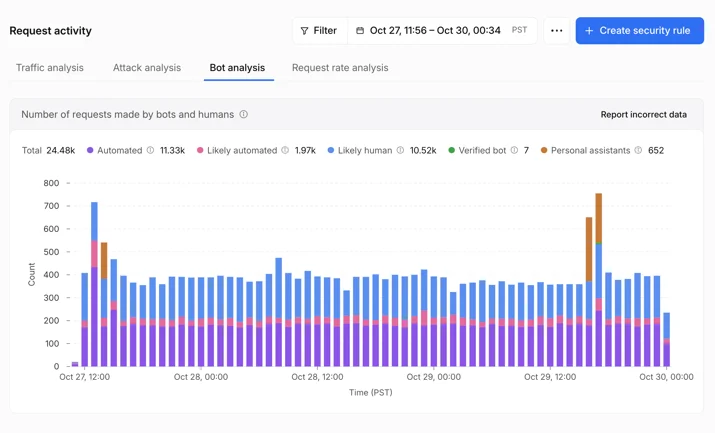
Knowing which agent is behind a request turns unexplained automated traffic into traffic you can act on with confidence. Cloudflare maintains the largest verified bot directory in the world, and we are now bringing that intelligence into your traffic details. In Security Analytics, the Bot Analysis chart now shows Personal Assistants as a new category, next to Verified Bot, Likely Human, Likely Automated, and Automated. Security teams can select it to see only personal agent traffic over time.

Personal assistant traffic in Security Analytics › Bot analysis

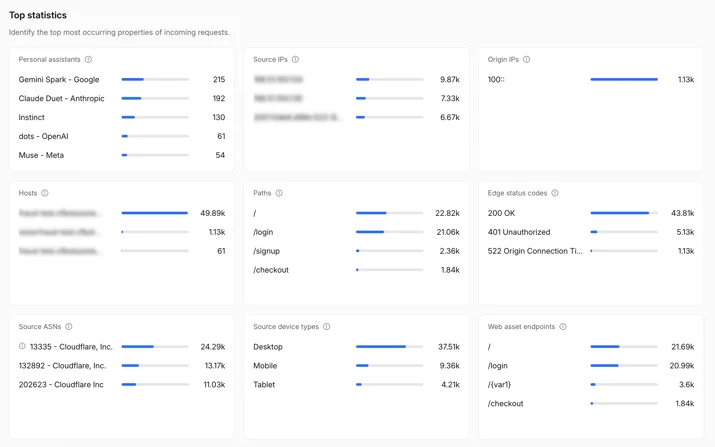
In Top statistics, a new Personal Assistants widget lists which agents are visiting your site and how many requests each one sends. Filter on one agent and every other widget updates to show only its traffic details: the paths it requests, the status codes it receives, and the networks it comes from. At a glance, you can see whether an agent is logging in, reading your product pages, reaching your checkout, or hitting errors on pages it cannot use.

The new Personal Assistants widget shows which agents visit your site and how many requests each sends.

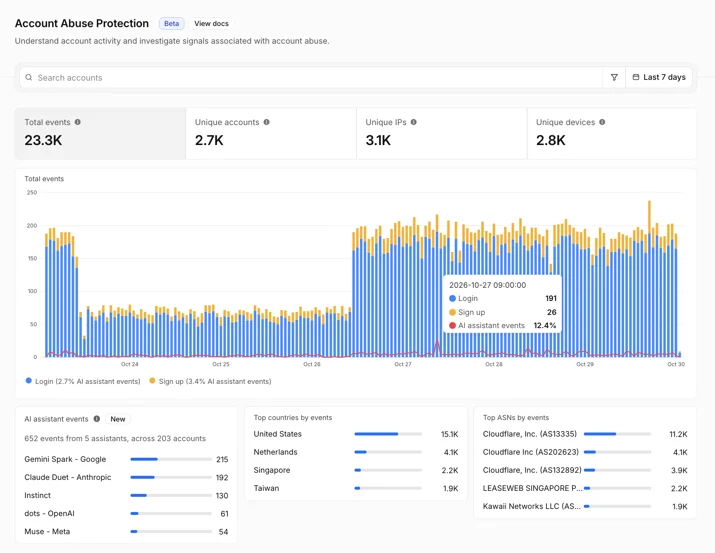
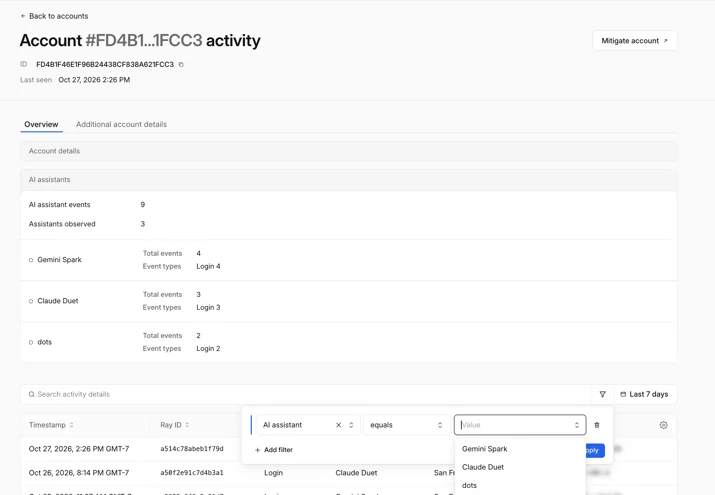
For sites that protect user accounts with Account Abuse Protection (currently in early access), site owners and fraud teams are able to see which user each agent represents. The population overview page shows which personal agents are active across your users and how many accounts use them, so you can determine whether agent traffic is a meaningful part of your business. Every login and sign-up event now shows whether a personal agent made the request, and which one. Fraud teams can filter accounts by AI assistant events or number of AI assistants.

Personal assistants active across your users, alongside total login and sign-up activity

Additionally, each user’s account overview shows the agents acting for that account. A fraud analyst investigating an unusual login can tell whether it came from an agent the customer has relied on for weeks, or from an agent that appeared for the first time today and needs a closer look. If it looks like an attacker is using an agent on an account, fraud analysts can mitigate that account directly, with a WAF rule on its Hashed User ID, without blocking the agent for everyone else who relies on it.

Personal assistants associated with a specific account, with the ability to filter by a specific assistant

Together, these views give you a clearer basis for deciding which personal agents to welcome, limit, or block.

Set access policies that reflect your preferences

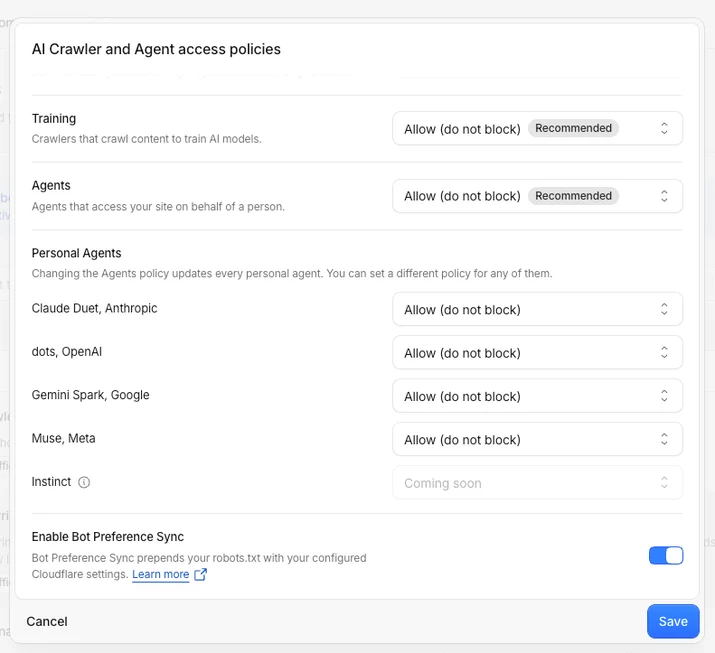
We introduced AI bot policies this summer so site owners could make separate access control choices for AI bots used for Search, Training, and Agent behaviors. Now we’re expanding the existing Agents policy to include granular control options for supported personal agents. To reflect this broader scope, we’re renaming the setting AI Crawler and Agent access policies.

In Security Settings, you can set an overall Agents policy, then choose a different policy for each supported personal agent: Allow (do not block), Block on pages with ads, or Block. For example, you can set the overall Agents policy to Block on pages with ads, then choose Allow (do not block) for a supported personal agent you want to welcome. Your existing Search and Training policies stay as they are.

The AI Crawler and Agent access policies section has a new name, and now shows options to allow or block personal agents.

You can also make these choices when you add a new zone to Cloudflare. During onboarding, we ask whether you monetize pages with ads and then tailor the recommended policies to your answer. You can always revisit your access controls later in Security Settings.

The right policy depends on your site. One publisher may allow a supported personal agent throughout its site so readers can find its articles, while another may block that same agent on pages where ads support the content. Both publishers are choosing the access control that works for their business.

Agent identity is only part of the story

The analytics and policies we’re launching today give site owners visibility into personal agent activity and control over their access. Our next goal is to help site owners preserve the context of their relationships with users when personal agents act as intermediaries. A site may recognize the agent making a request but lack information it would otherwise have about the user: whether they are an existing customer, what they authorized the agent to do, whether they have a subscription, or which protections should apply.

Reaching that goal will require privacy-aware ways to (1) carry user context through an agent, (2) help sites assess reputation, and (3) establish clear accountability when something goes wrong. We’ll be sharing more as we work with agent operators and others across the ecosystem, so site owners can choose whether to grant agents greater access while continuing to build relationships with their users.

Copy linkMake the choice for your site

That person asking a personal agent to compare products, find support, or complete a purchase is still a customer trying to reach your business. Review how personal agents are accessing your site, then visit Security Settings → AI Crawler and Agent access policies to set the terms that work for your site.

Source:
https://blog.cloudflare.com/personal-agents-visibility-control/

Introducing Zero Wire, a hub for investigating critical Internet vulnerabilities


Daniele Molteni
 and Celso Martinho

8 minute read

You run security at your organization. It’s 7:00 am, and you’re having breakfast. You receive a ping: a new critical vulnerability has been disclosed. Your team scrambles to compare vendor advisories, read technical research, check which systems run the affected software, and answer familiar questions from the business: are we affected, and what are we doing about it? Another disclosure arrives before that work is finished.

AI is changing both the volume and speed of critical vulnerability discovery. It can analyze large codebases at scale and surface deeply nested flaws that may have existed for years without being found through human review. That discovery momentum will put more pressure on security teams to understand the impact of each disclosure on their infrastructure.

To help security teams prepare, today we’re introducing Zero Wire: a public vulnerability intelligence feed on Cloudflare Radar, bringing the clarity of a news wire service to critical security developments. It helps security leaders and practitioners understand significant vulnerabilities and decide what to do next.

Copy linkHow it works

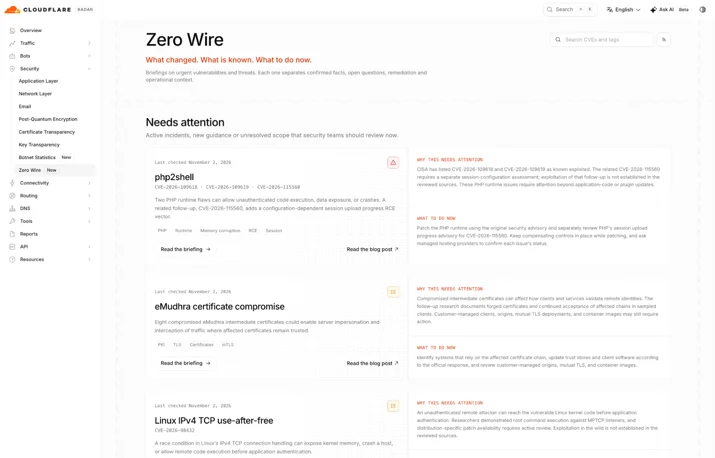
Zero Wire lives inside Cloudflare Radar under the security section.

Each briefing brings together a plain-language explanation of the vulnerability, who should investigate it, recommended actions, and links to the evidence and vendor guidance. The format is deliberately simple: an index card with what you need to know, without the drama. A CISO should be able to understand the issue quickly and ask the right questions. An engineer should be able to follow the same briefing to the technical guidance needed to investigate and remediate it.

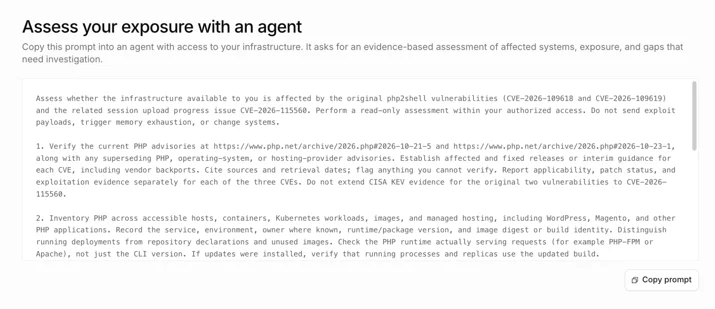
We also offer a pre-compiled prompt you can use with your agent to assess the impact on your infrastructure. Cloudflare contributes security research, observations from our network, and practical knowledge of the controls that can help reduce exposure. The information is useful whether or not you are a Cloudflare customer. 

Zero Wire brings that context together with authoritative external sources, giving readers a starting point for assessment and a place to return as an issue develops.

Our focus

Rather than a catalog of every CVE, Zero Wire complements vendor advisories and vulnerability databases, linking readers to the evidence and technical guidance needed to act. Zero Wire focuses on critical CVEs in Internet-facing software, such as vulnerabilities in web applications, the runtimes and libraries they depend on, and services exposed to the Internet, where a proxy can help mitigate exploitation.

We select significant issues that security teams need to understand and assess. Each briefing explains the potential impact, which deployments should be investigated, what is known about exploitation, and the available mitigation and patching guidance. A vulnerability’s severity and evidence of active exploitation are distinct: readers need both to make informed decisions.

A dedicated Cloudflare protection, such as Web Application Firewall (WAF) rules, is not a prerequisite for inclusion. Some issues require vendor updates or changes beyond the traffic Cloudflare can inspect. Where Cloudflare controls can help, we explain their scope and configuration requirements.

A walk through Zero Wire

Start on the Zero Wire homepage. Each card introduces an issue, identifies associated CVEs where applicable, and summarizes why it matters and what to do. You can search for a published briefing using a CVE or issue name, and follow technology tags to related entries. One briefing can cover several related CVEs when understanding them together makes the response clearer.

Find what needs attention

The homepage separates briefings into two categories. “Needs attention” brings together issues requiring active assessment or action, including those with known exploitation or developing guidance. “Reference” keeps briefings available when guidance has stabilized. Moving to “Reference” does not mean every affected system has been patched: an older vulnerability can still matter to an organization that has not completed remediation.

The status and last-checked date help you interpret each card. Known exploitation, an ongoing investigation, and an available vendor fix describe different things. Read them alongside the briefing’s evidence rather than treating them as a verdict on your own environment.

Understand what happened and who should investigate

When you open a briefing, the overview tells you what happened, why it deserves attention, and which teams should investigate. The explanation connects the technical issue to its practical consequences, such as service disruption or risk of data exposure.

For example, the recent php2shell vulnerability concerns flaws in the PHP runtime. That distinction matters for teams running applications such as WordPress or Magento: updating application code or a plugin alone does not repair the underlying runtime. The briefing helps readers identify the right system owners and directs them to the PHP security guidance for affected versions and remediation.

Turn the briefing into an action plan

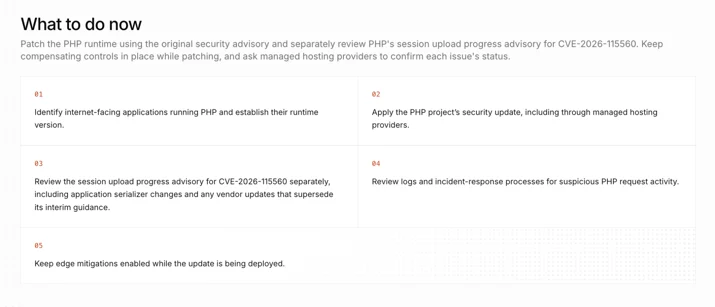
What to do now gives your team a short set of next steps. Depending on the issue, that can mean identifying affected deployments, checking versions with a hosting provider, applying vendor updates, reviewing suspicious activity, or keeping compensating controls in place while patching.

The purpose is to make the next conversation concrete. For a PHP deployment, ask which runtime is actually running, whether the vendor’s fix has been applied, and who owns the update. Follow the linked vendor advisory for detailed applicability and remediation instructions, which can change as the investigation develops.

Assess your exposure with an AI agent

In this section, we share a prompt that can be used with your AI agent to quickly assess the impact on your infrastructure. The prompt asks for a read-only assessment of deployed software, relevant vendor fixes, exposure, and compensating controls, with per-asset evidence, unknowns, and next actions. It helps your team investigate its own environment; copying the prompt does not itself scan or change systems.

Check the evidence and follow what changed

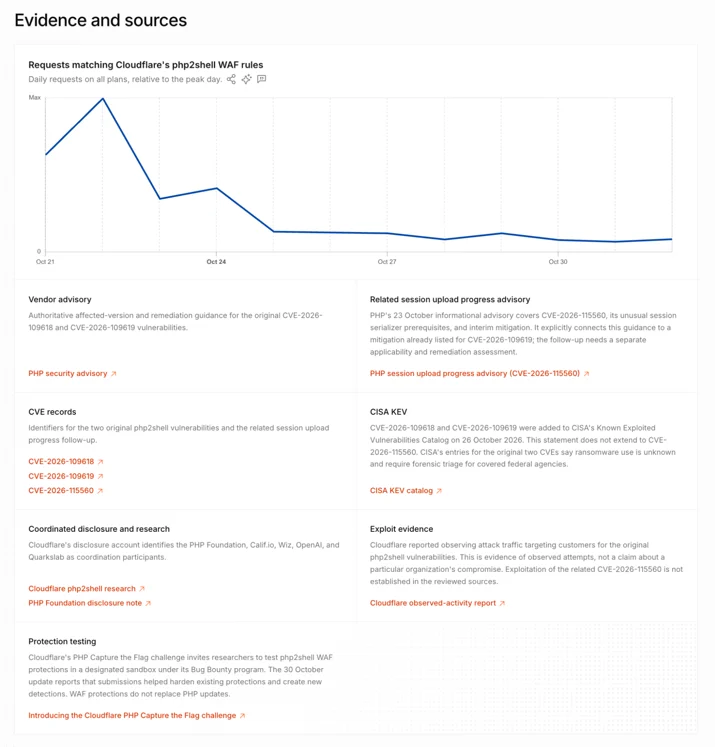
To help you learn more about the vulnerability, each briefing links to external documents such as CVE records, research, and relevant exploitation evidence, including CISA’s Known Exploited Vulnerabilities Catalog. These sources answer different questions. A vendor advisory establishes affected versions and remediation guidance. An exploitation report provides evidence of attacker activity. 

If applicable to a briefing, Cloudflare can add context about traffic seen on our network, for example by showing traffic matching WAF rules that indicates exploitation attempts. Those distinctions matter. Observing an attack attempt does not establish that a particular organization was compromised. Equally, a lack of observed attempts on Cloudflare’s network does not establish that exploitation is absent elsewhere. Briefings distinguish what the sources establish from what remains unknown.

Where available, charts add context to that evidence. The php2shell briefing shows the volume of HTTP requests matching Cloudflare WAF managed rules over time. Note that requests matching these rules are not a count of compromised systems or successful exploits; the chart aims at providing practitioners a sense of what the focus level is by threat actors on a particular vulnerability.

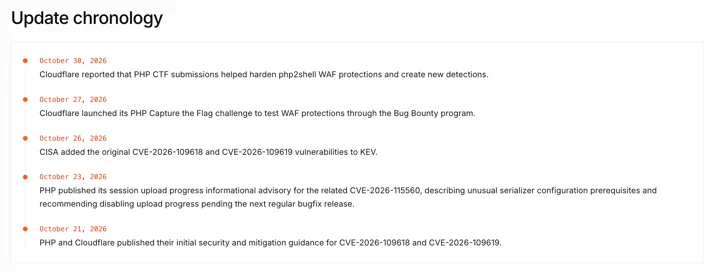
Finally, update chronology records important developments, such as new advisories or changes to the evidence and response guidance. Together with the last-checked date, it helps returning readers understand what has changed since their previous visit.

Understand Cloudflare’s role

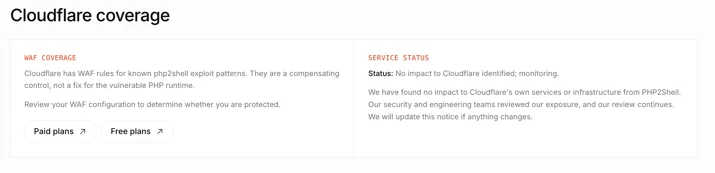
The Cloudflare section provides links to whether we offer compensating controls or provide a way to mitigate the vulnerability impact on your infrastructure. 

If a particular CVE can be addressed with a WAF rule, the briefing reports its availability and essential configuration requirements. When applicable, paid Plans and free Plans links take customers to the relevant dashboard configuration. The next step is explicit: “Review your WAF configuration to determine whether you are protected”. A link allows you to review your security posture, it does not automatically enable a rule or verify a deployment.

Note that a WAF mitigation is a compensating control for the traffic it covers, it is not a replacement for fixing vulnerable software. Blocking the requests can prevent exposed data from reaching an attacker, but it cannot undo actions already performed at the origin. The security teams should always follow the vendor remediation guidance.

Stay informed with Zero Wire

A useful vulnerability briefing should leave you with a clearer understanding of the issue and a concrete next step. Day Zero brings those essentials together: what happened, who should investigate, what to do now, and where to find the evidence.

Visit Zero Wire vulnerability intelligence, share the relevant briefings with the teams responsible for your systems, and return for new entries and updates. When the next disclosure arrives, we want you to spend less time assembling the basic facts and more time acting on them.

Follow Cloudflare Radar on X @CloudflareRadar and Bluesky @radar.cloudflare.com for updates.

Source:
https://blog.cloudflare.com/zero-wire/

How we halved DNS build delay and cut memory use by 85%

Alex Fattouche

18 minute read

When I last wrote about our DNS propagation pipeline in 2022, the Zone Builder received about 250 DNS record changes per second. Today it receives about 700, nearly three times as many, plus about 100 other events, such as zone setting changes. However, the number of events was never the real problem. The problem was the kind of work some of those events needed, and how that work grows with the size of a zone. Some zones now hold more than 20 million records, and we expect them to keep growing toward hundreds of millions.

Each event starts a clock that measures how long it takes us to turn that change into data our authoritative DNS servers can use. We call that work a build. A build reads the current database state, converts it into the format used at the edge, and writes any changes to Quicksilver.

In 2022, per-record builds were 150 times faster than full builds on average. On a test zone with one million records, per-record builds were 4,250 times faster. We ended that post with the obvious next step: do the same thing for zone settings.

Why doesn’t the Zone Builder just rebuild the setting that changed?

It should, and that is where we ended up. However, proving when it was safe took most of the work. A record event identifies what changed. A zone event can come from many Cloudflare products, may not say why the zone changed, and can alter data shared by several zones with the same name. Choosing too much work wastes capacity. Choosing too little can leave stale or incorrect DNS data at the edge.

We built a targeted build planner that chooses the smallest build we can prove is safe, and a new scheduler that combines work for the same zone. Zone setting changes no longer rebuild zones with tens of millions of records. Together, they cut peak memory by 85%, and the extra headroom let us safely shorten waits the pipeline has always needed for resilience, halving the time from a DNS change to its data being written to Quicksilver.

How DNS changes reach the edge

A DNS zone is the collection of records and settings for a domain. Cloudflare uses a multi-stage pipeline to turn a change to that zone into data available across our global network.

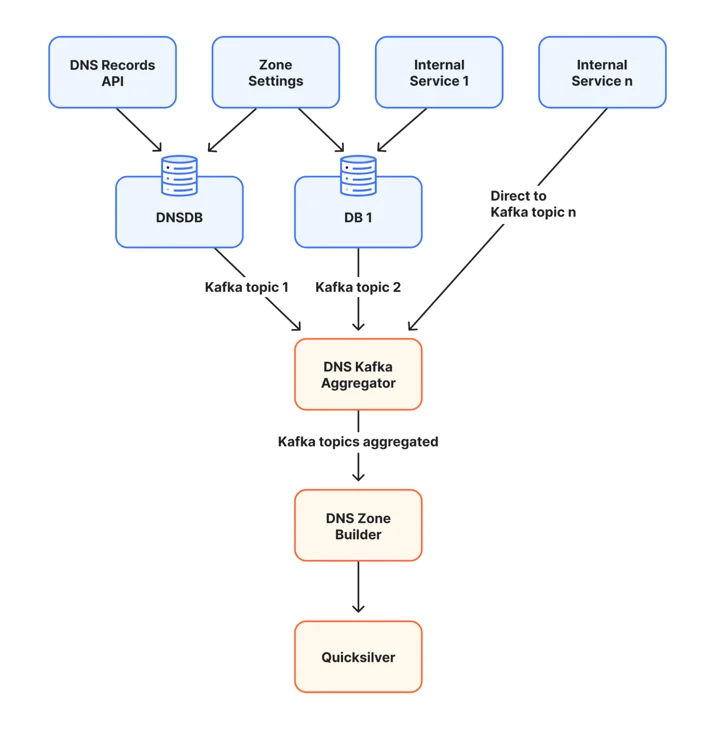
  1. A customer changes a DNS record through the DNS Records API or dashboard, or another Cloudflare service changes a zone setting.
  2. The change is stored in a database.
  3. The database change or another system produces a Kafka event.
  4. The DNS Kafka Aggregator combines events from several Kafka topics and sends them to the Zone Builder.
  5. The Zone Builder reads the required zone data and converts it into keys understood by our authoritative DNS servers.
  6. The Zone Builder compares those keys with Quicksilver, our distributed key-value store. It writes only what changed, and Quicksilver propagates those changes across Cloudflare’s network.

Diagram of the DNS propagation pipeline: the DNS Records API, zone settings, and internal services write to databases or Kafka topics, the DNS Kafka Aggregator combines them, and the DNS Zone Builder writes to Quicksilver.

This is a simplified view. The Zone Builder does not copy database rows directly to the edge. It combines records with zone settings, applies DNS serving rules, and organizes the result so our authoritative DNS servers can read it quickly.

Why full builds stopped scaling

The original Zone Builder had one useful property: it did not need to know why a zone changed. It rebuilt the desired state from the current database state.

  1. Read the current zone and its settings.
  2. Read every DNS record in the zone.
  3. Convert those records into Quicksilver keys.
  4. Compare the new keys with those already stored.
  5. Remove stale keys, write changed keys, and update zone metadata.

The final write contains only changed keys. However, a full build still reads, encodes, and compares every record, and holds the whole zone in memory while it does so. That is cheap for a small zone. For our largest zones, with tens of millions of records, the zone does not fit in memory at all. I explain how we handle that below.

Zone settings made targeting harder. Universal SSL is one example. Enabling or disabling it updates metadata and can change Certification Authority Authorization (CAA) records at the zone apex, the bare domain, such as example.com. CAA records tell certificate authorities whether they may issue a certificate for the domain.

A full build only needed to know that the zone changed. A targeted build must answer three questions:

  1. Which DNS names can change?
  2. Can shared metadata or the list of published zones change?
  3. What previous state must be removed from Quicksilver?

Answering those questions safely meant solving five problems, which the rest of this post covers in order:

  1. Events had to say what changed.
  2. Each change had to map to the smallest build that is still correct.
  3. Builds had to account for data shared by every zone with the same name.
  4. The database could change between the event and the build.
  5. Combining work could not lose a Kafka message.

Making events say what changed

We changed the event producer to include changed zone fields and settings, with previous and new values when available. We then traced each setting through the code that generates DNS output and classified what it could affect.

Not every event was that specific. Some database functions only update a timestamp to say, in effect, “something about this zone changed.” Sometimes that is harmless bookkeeping. Sometimes it means data changed elsewhere and must be read again.

Those cases look identical in the event. Until we can identify the caller and its purpose, a timestamp-only update still causes a full build. The same rule applies to missing details, unknown events, or any change that may affect records anywhere in the zone. The planner never turns uncertainty into less work.

Choosing the smallest safe build

Quicksilver output has two parts that matter here. Record keys contain the DNS answers for one zone and name. A smaller shared metadata key tells our authoritative DNS servers how to use that zone, including where to find special records such as nameservers and wildcards. Some events change only record keys; others must update both.

With that distinction, the planner can choose one of five build types:

  1. Resources only: Rebuild the records at specific DNS names, which we call resources, without changing zone metadata. Ordinary A, AAAA, TXT, and CNAME changes usually take this path.
  2. Resources and metadata: Rebuild specific names and shared metadata. Nameserver and wildcard changes use this path.
  3. Apex and metadata: Rebuild the zone apex and metadata. Settings such as Universal SSL can use this path.
  4. Purge: Remove a zone that should no longer be published.
  5. Full zone: Rebuild every record when smaller work cannot be proven safe.

The rule is simple: every key a targeted build writes must be byte-for-byte identical to what a full build would write. If we cannot prove that, we do a full build.

Removing old state works as it did for per-record builds in 2022. Record events include deleted records and the previous version of updated ones. The Zone Builder then scans Quicksilver for the existing keys under each name it rebuilds, removing any that the new build did not write.

Full builds remain necessary when a change can affect records anywhere in the zone or when a zone may need to be published for the first time.

There is one deliberate exception. A full build holds every record from the database and every existing Quicksilver key for the zone in memory at once, and our largest zones do not fit. Above a fixed record-count threshold, the Zone Builder never escalates to a full build. It rebuilds the apex, the metadata, and every name identified by the queued events instead. We accept this tradeoff because a full build of those zones cannot finish, and, while it retries, it holds back every other change on its Kafka partition. Many of the cases that would otherwise need a full build involve several zones sharing one name, and zone holds reduce that risk by stopping the same name from being added to another account. For the rare cases that remain, such as enabling a zone on another network, we can manually rebuild individual names in the zone.

When one name means more than one zone

Quicksilver stores each zone’s record keys separately. It also stores one metadata key shared by every Cloudflare zone with that domain name. This shared key acts like a directory: it tells our authoritative DNS servers which internal zone IDs they may use when answering a query.

Why can one name have several zone IDs? During customer onboarding, offboarding, and other lifecycle changes, multiple Cloudflare zone objects can briefly exist for the same public domain. We use a priority policy to choose a small, bounded set to publish.

Consider four internal zones for example.com: Zone 101, Zone 202, Zone 303, and Zone 404. The metadata key currently lists Zones 101, 202, and 303. Zone 404 exists, but it is not selected. The numbers identify separate Cloudflare zone objects; customers still see one domain name.

A TXT record change at www.example.com in Zone 202 affects only Zone 202’s record keys, so the metadata key does not change. Nameserver and wildcard changes are different because the metadata key records information about them. Those builds must update both the zone’s records and the metadata key.

At execution time, the Zone Builder reads the current list again. If it writes the metadata key, it rebuilds the whole key from that fresh view rather than patching an older copy. It writes the triggering zone’s records before the metadata that refers to them.

Planning from the event, verifying before writing

An event describes what happened in the past. A build may wait while more events arrive and the database changes, so planning happens twice. The event first creates a conservative work list. Immediately before execution, the Zone Builder reads a fresh publication snapshot: the current zone settings, whether this Zone Builder should publish the zone to its network, and which same-name zone IDs belong in the metadata key. Here, a network is a separate, isolated copy of Quicksilver for one environment. Each Zone Builder deployment writes to one network, and a zone can be enabled on some networks but not others. For example, a zone can be served from Cloudflare’s global network and also from the China Network.

Fresh state can change the result in four ways:

  1. A targeted build can become a full build if the zone now has a feature that requires complete-zone work.
  2. A build can become a purge if the zone should no longer be published to this network.
  3. A build can be skipped if the triggering zone no longer belongs in the metadata key.
  4. A metadata build can reconstruct the shared key from the current candidate set.

The fresh read comes from read-only copies of the database, called replicas, so builds do not compete with customer writes. Kafka delivery and database replication move independently: an event can arrive before its database change is visible on a replica. The DNS Kafka Aggregator delays events long enough to cover normal lag, and a final database check rejects the read if that replica is still behind.

Combining changes in one scheduler

Record work and full-zone work previously used different schedulers. Each could combine its own work, but not work from the other scheduler. We replaced them with one unified scheduler. The planner decides what must be built, and the scheduler decides when it can run.

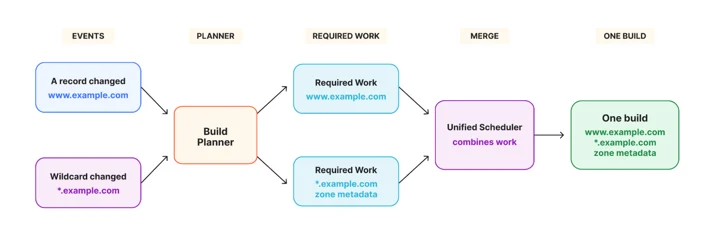
When several events for one zone arrive before a build starts, the scheduler combines their work:

  1. An A record changes at www.example.com, requiring that name.
  2. A wildcard changes at *.example.com, requiring that name and shared metadata.
  3. The scheduler combines both names and the metadata update into one build.

Diagram showing an A record change and a wildcard change passing through the build planner as separate required work, then combined by the unified scheduler into one build.

Merging only adds work. If any event requires the complete zone, the combined build becomes a full build. A purge overrides every rebuild because its desired result is that the zone is no longer published.

The scheduler tracks two things separately: the DNS work that must be performed and the Kafka messages waiting to be acknowledged. A retry preserves both. Even when a full build or purge no longer needs the individual record names, the messages stay attached until the result is safely written.

Keeping Kafka moving

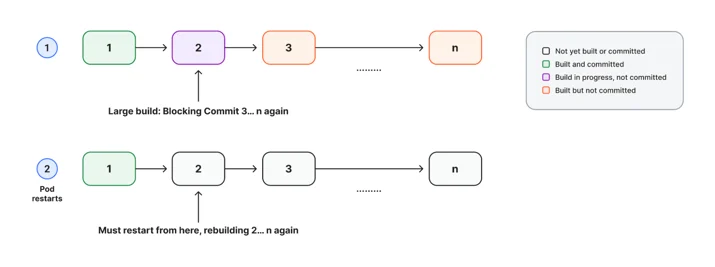
One slow build can delay unrelated customers even when workers are available. Kafka divides messages into ordered partitions. For each partition, it stores one committed offset: the point before which every message is known to be complete. Moving that offset past unfinished work could lose a customer change after a restart.

We use soft committing, which I previously described in my Secondary DNS deep dive. A build can finish out of order and be marked complete in memory, but Kafka’s committed position advances only after every earlier message has also finished.

Diagram of Kafka messages 1 to n where a large build on message 2 blocks commits for messages 3 to n, and a pod restart replays messages 2 to n.

In the diagram, message 2 is still running, so messages 3 through n cannot be committed. If the Zone Builder restarts, those in-memory completions disappear and Kafka replays messages 2 through n. We deliberately choose repeated work over losing a change.

Targeted plans reduce how long the oldest message stays unfinished. The scheduler also prevents one busy zone from taking every worker. After a zone builds, its next build waits for a per-zone rebuild interval, which differs by Cloudflare plan. Changes that arrive in the meantime are merged into that next build. The scheduler normally enforces this interval, but lets old queued work run before it blocks a Kafka partition for too long. Zone locks and retry delays still apply, so a failing build cannot run in a tight loop.

Releasing safely

A smaller build is useful only if it produces the same DNS data. We added equivalence tests for nameserver, wildcard, and apex paths. Each test runs a full build and a targeted build from the same database state, pins time-dependent values, and compares every Quicksilver key owned by the targeted plan byte for byte. Planner and scheduler tests cover classification, same-name zones, merging, purges, and escalation.

During rollout, we also ran a full build next to every targeted build and compared the output. It was expensive by design, reading the complete zone every time, so we used it only until the mirror comparison below gave us the same confidence.

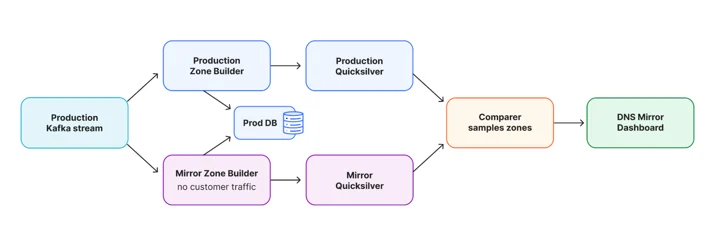
Tests cannot reproduce every customer combination, so every release also runs through a mirror Zone Builder. It consumes the production Kafka stream and reads production database state, but writes to a separate Quicksilver environment that serves no customer traffic.

Diagram of the mirror setup: the production Kafka stream feeds both the production and mirror Zone Builders, each writes to its own Quicksilver, and a comparer samples both and reports to the DNS Mirror Dashboard.

A comparer checks a 20% sample of zones for missing keys, extra keys, and different values. The two environments do not always build a zone at the same instant, so a temporary mismatch is not automatically a regression. We look for new types of differences that remain after both pipelines catch up. That gives us confidence that targeted builds produce the same output as production.

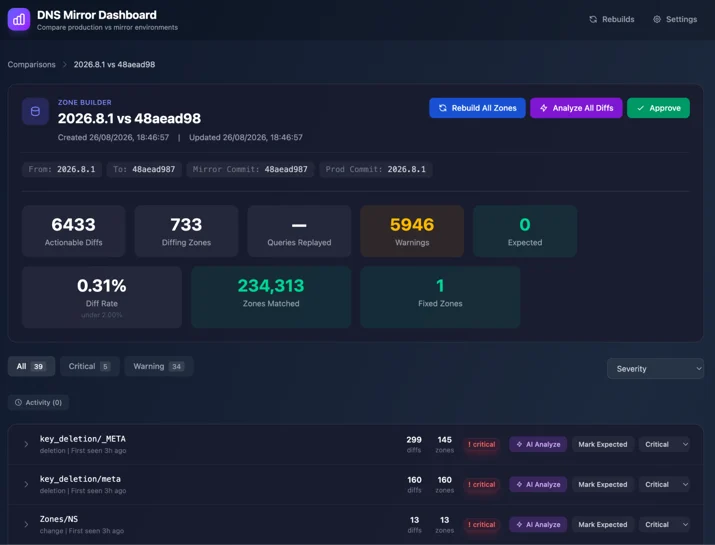
We built the DNS Mirror Dashboard to group those differences and keep examples for investigation. Naturally, it runs on the Cloudflare Developer Platform: a Worker receives results, Durable Objects maintain state, and Cloudflare Access protects it. The critical groups in the screenshot below were each checked and confirmed safe before release. The diff rate is the share of compared zones where production and mirror disagreed on at least one key at the moment of comparison. Most of those are timing differences that disappear once both pipelines catch up, so we watch two things: that the rate stays low, and that no new kind of difference appears.

Screenshot of the DNS Mirror Dashboard comparing production and mirror builds, showing a 0.31% diff rate across 234,313 matched zones.

After the mirror results remained healthy, we rolled the scheduler out by a hash of the zone name. Hashing the name rather than the zone ID kept every zone sharing a name on the same scheduler, so two schedulers never wrote the same metadata key. We increased the percentage for free zones, then repeated the process for paid zones.

Results

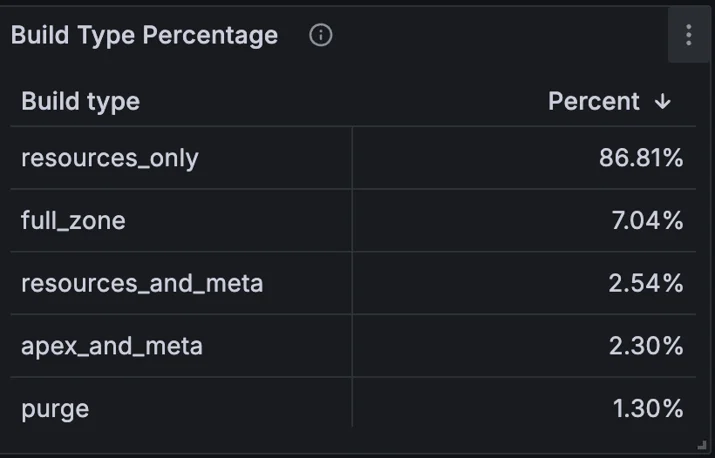
Over 24 hours, we measured 86.81% of builds as resources only, 2.54% as resources and metadata, 2.30% as apex and metadata, and 1.30% as purges. Together, 92.95% of builds avoided rebuilding the complete zone. Full builds were the remaining 7.04%.

The two metadata build types were full builds before, even for large zones. Together, they account for 4.84% of builds. Combined with the 7.04% that are still full builds, that is 11.88%, so full builds fell by about 40%. Their share of the count also understates the work avoided, because they include the largest zones. The full builds that remain average 0.35 seconds, because the events that still trigger them, such as a zone being published for the first time, mostly affect new zones with few records.

Table of build types over 24 hours: resources only 86.81%, full zone 7.04%, resources and metadata 2.54%, apex and metadata 2.30%, purge 1.30%.

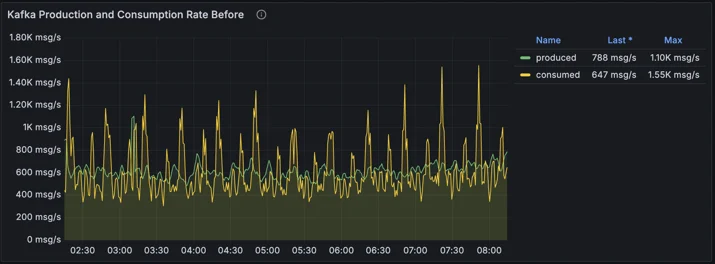
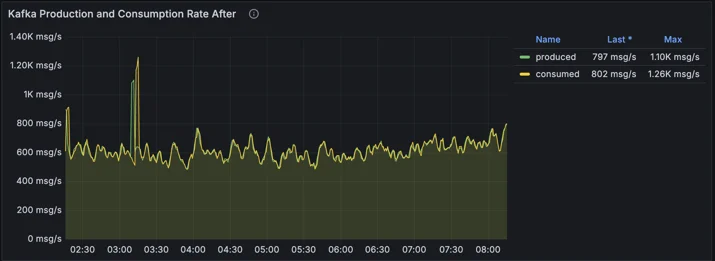
In 2022, we also planned a batching system. The unified scheduler makes it unnecessary: it does not wait to form batches, and it merges events only when work is already queued for the same zone. Before, long full builds held back the committed offset for their partition. With fewer of them, we now consume Kafka at the rate events arrive, instead of falling behind and catching up in bursts of up to 1,550 messages per second.

Chart of Kafka production and consumption before the change: consumption swings between about 300 and 1,550 messages per second while production stays between about 600 and 800.

Chart of Kafka production and consumption after the change: consumption closely follows production at about 600 to 800 messages per second.

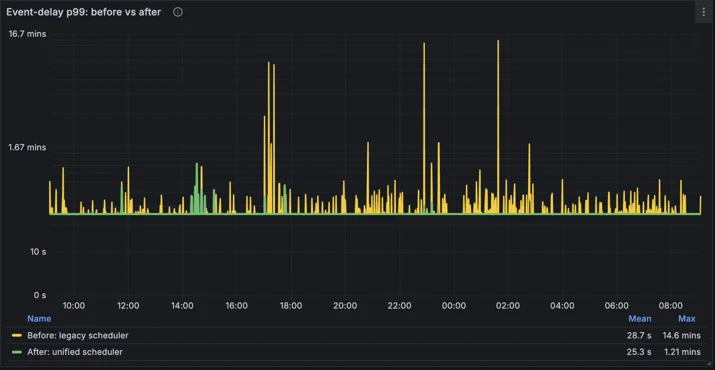
We also measured build completion delay: the time from a DNS record or zone setting change until the Zone Builder finished writing to Quicksilver. It does not include Quicksilver’s distribution across our network, which varies by location and is unaffected by this work. Production ran the old schedulers, and the mirror ran the unified scheduler on the same events over the same 24 hours. The two environments are identical apart from the code: they consume the same Kafka events, read from the same database, and write equivalent data to Quicksilver. That makes this a controlled, side-by-side comparison. The figures combine every build type and customer plan, so they are not a latency guarantee for an individual zone. A large share of this time is the rebuild interval described earlier, not build work. At each measurement point, p99 is the time within which 99% of events finished. Typical delays barely changed here, because most builds were already small. The difference is in the tail: the largest p99 spike fell from 14.6 minutes to 1.21 minutes, a 12-fold reduction. The chart uses a logarithmic scale.

Chart of p99 build completion delay over 24 hours on a logarithmic scale: the legacy scheduler spikes up to 14.6 minutes, while the unified scheduler peaks at 1.21 minutes.

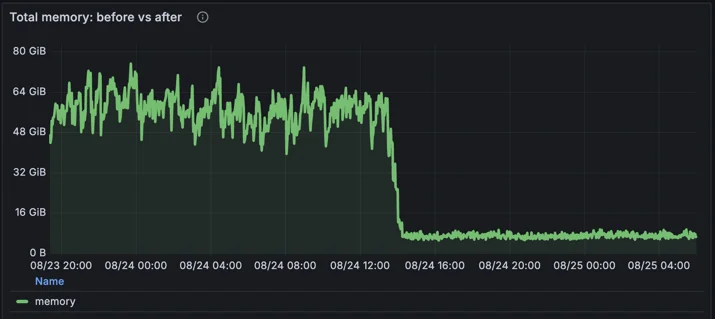
Targeted builds also load complete large zones far less often. Aggregate working-set memory, the memory actively used by the deployment, fell from an average of 49 GiB to 7 GiB, an 86% reduction. Peaks fell from 79 GiB to 12 GiB, an 85% reduction.

Chart of total Zone Builder memory dropping from between 50 and 79 GiB to about 7 GiB after the rollout.

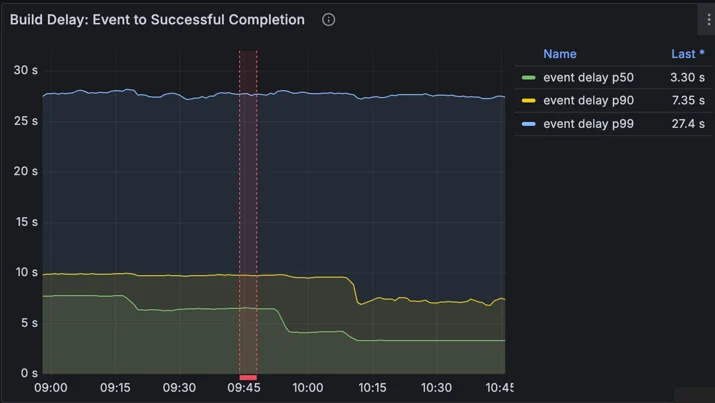
Those were the immediate results of the new scheduler. They also let us revisit two safeguards. The first is the rebuild interval, which stops one busy zone from rebuilding constantly and taking capacity from everyone else. With builds now cheaper, and far fewer of them reading complete zones, we could safely shorten that interval on most plans. The second is how long the DNS Kafka Aggregator holds each event, to make sure database replicas have caught up before we read from them. Once our databases began rejecting reads from replicas that had fallen behind, that buffer could safely be smaller. Together, these halved the median build completion delay, from about 7.7 seconds to about 3.3 seconds. In the chart below, the first step down is the DNS Kafka Aggregator change. The red band marks the Zone Builder release with shorter rebuild intervals. That release rolled out gradually across our servers, so the delay falls in two further steps rather than all at once.

Chart of build completion delay over almost two hours, measured with coarse histogram buckets. The median falls from about 7.7 seconds to about 6.4 seconds after the DNS Kafka Aggregator change, then in two steps to about 3.3 seconds after a Zone Builder release marked by a red band. p90 falls from about 10 seconds to about 7.4 seconds, and p99 stays near 27 seconds.

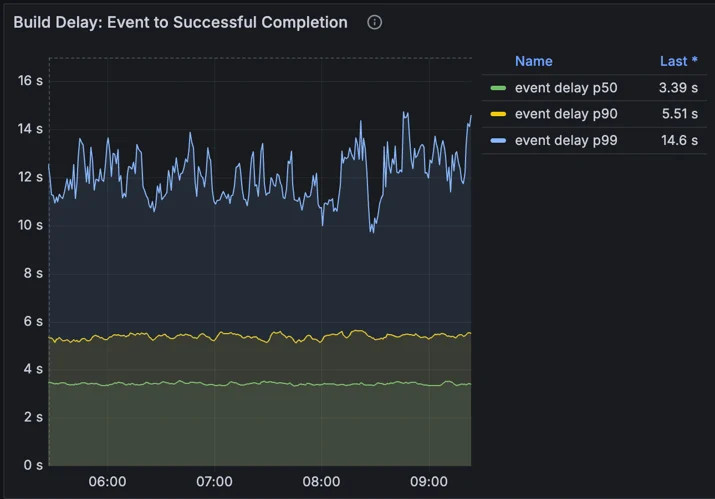
The p90 and p99 lines in that chart are less precise than they look. The histogram had buckets at 1, 5, 10, and 30 seconds, and a percentile that falls between two edges is estimated as if delays were spread evenly across that range. Most delays sit near the bottom of their range, so those estimates come out high: p99 reads close to 30 seconds, and p90 above 7 seconds. The exact average, which does not depend on buckets, confirms the halving. We have since switched to a native histogram, which chooses fine-grained buckets automatically. It puts p90 at about 5.5 seconds and p99 at about 12 seconds.

Chart of build completion delay over about four hours, measured with a native histogram: median about 3.4 seconds, p90 about 5.5 seconds, and p99 mostly between 10 and 14 seconds.

Why full builds still exist

In 2022, we said we planned to eliminate full builds entirely. We now know that is neither realistic nor useful. A zone being published for the first time needs every record written. A change that can affect records anywhere in the zone needs every record checked. An event that does not say what changed still gets a full build, because the planner never turns uncertainty into less work. For a small zone, a full build is also cheap.

As we learn what more events change, we will keep moving them to targeted builds. However, the biggest gain has already landed: the events that used to rebuild our largest zones no longer do, and the full builds that remain are mostly triggered by events, such as first publication, that affect new, small zones.

Want to know what happens after the Zone Builder writes a change? Read how Quicksilver distributes configuration to every Cloudflare data center in seconds.

Source:
https://blog.cloudflare.com/dns-targeted-zone-builds/