Analyzing Attack Data and Trends Targeting Ukrainian Domains

As we continue to monitor the cyber situation in Ukraine, the data we are seeing shows some interesting trends. Not only has the volume of attacks continued rising throughout the conflict in Ukraine, the types of attacks have been varied. A common tactic of cyber criminals is to run automated exploit attempts, hitting as many possible targets as they can to see what gets a result. The data we have analyzed shows that this tactic is being used against Ukrainian websites. This is in contrast to a targeted approach where threat actors go after specific individuals or organizations, using gathered intelligence to make at least an educated guess at the type of vulnerabilities that may be exploitable.

Data Shows a Variety of Attack Types

In the past 30 days, we have seen 16 attack types that triggered more than 85 different firewall rules across protected websites with .ua top-level domains. These rules blocked more than 9.8 million attack attempts on these websites, with the top five attack types accounting for more than 9.7 million of those attempts.
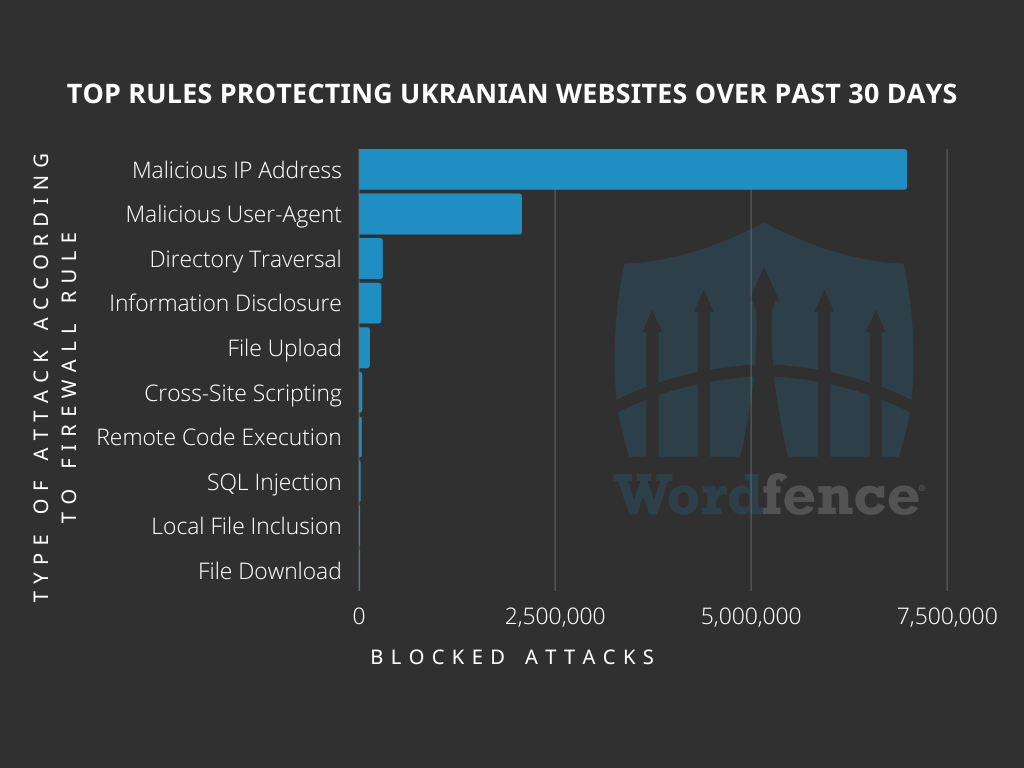
Top blocked rules against .ua domains

In order to demonstrate the top five attack types, we are going to follow a single threat actor who has been observed attempting each of these attack types throughout the last 30 days. Combining the originating IP addresses associated with the attack attempts with the user-agent that was used and other commonalities, we can say with a high degree of certainty that the demonstrated attack attempts were work of the same threat actor.

Known Malicious IP Addresses

The largest category of blocked attack attempts were due to use of a known malicious IP address. These IP addresses are maintained by the Wordfence blocklist, with new addresses added when they become maliciously engaged, and removed when they are no longer being used maliciously. When we see activity from an IP address on the blocklist, it is immediately blocked, however we do track the request that was received from the attacking server.
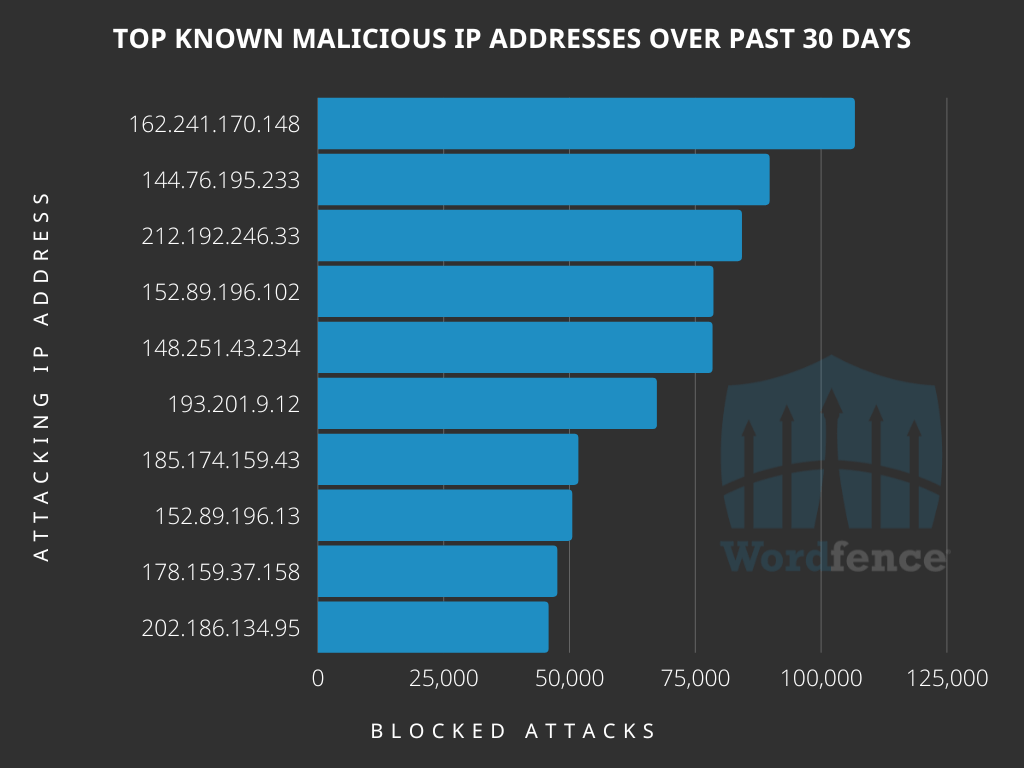
Top IPs blocked from attacking .ua domains

The top IP addresses we have blocked using known malicious IP addresses were often seen attempting to upload spam content to websites, however it was also common to see file upload and information disclosure attempts as well. Here we see a simple POST request that uses URL encoding along with base64 encoding to obfuscate a command to be run.
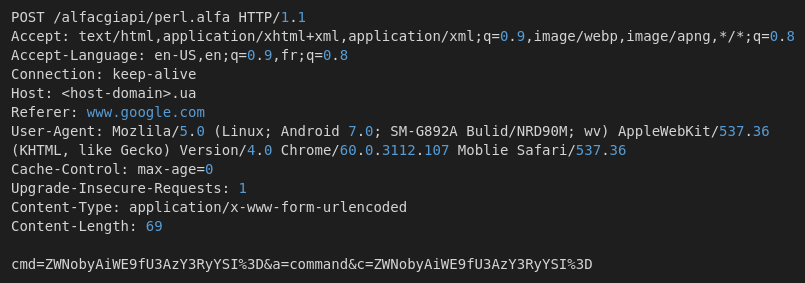
Blocked IP request example 1

The decoded payload will simply display XO_Sp3ctra to alert the malicious actor that the affected system will allow commands to be run by them.

Output from blocked IP example 1

When we look at the top known malicious IP addresses blocked worldwide, the top 15 are IP addresses within Russia. This does not match what we are seeing in the Ukraine, where the top attacking IP addresses vary in location across North America, Europe, and Asia, with only three in Russia. However, there is a similarity. The IP address in 15th position worldwide for most initiated exploit attempts is in 4th position for blocked attacks against .ua domains. The IP address, 152.89.196.102, is part of an ASN belonging to Chang Way Technologies Co. Limited. The IP itself is located in Russia, but assigned to a company named Starcrecium Limited, which is based in Cyprus and has been used to conduct attacks of this type in the past. This IP has been blocked 78,438 times on .ua websites, with a total of 3,803,734 blocked attack attempts worldwide.

When you consider the fact that we logged malicious activity from almost 2.1 million individual IP addresses in this time, and the 15th worldwide ranked IP was ranked 4th against an area as small as Ukraine, the number of blocked attacks becomes very significant. Additionally, there were three IP addresses that ranked higher in Ukraine, but did not even make the top 20 worldwide, showing that while there are threat actors who are not focusing heavily on Ukraine, others are very focused on Ukrainian websites. What we are seeing from the IP addresses targeting Ukrainian websites more heavily is similar to what we see here, with information gathering and uploading spam content being the two main goals of the attack attempts.

One thing to keep in mind here is the fact that all .ua sites get our real-time threat intelligence, which is typically reserved for Wordfence Premium, Care, and Response customers, so it is not possible to get a true comparison between the websites in Ukraine and the rest of the world. IP addresses are added to the blocklist for many reasons, including the attack types we outlined above. Often these addresses are blocked for simple malicious behavior, such as searching for the existence of specific files on a website. More complex behavior like searching for the ability to run commands on the server will also lead to an IP being added to the blocklist.

Known Malicious User-Agents

One way that we block attacks is by tracking known malicious user-agents. This was the second-largest category our firewall blocked on .ua domains. When we see a user-agent string that is consistently being used in malicious events, like the user-agent below, we add it to a firewall rule.

Known malicious user-agent string

User-agent strings can be set to an arbitrary value, so blocking user-agents is not sufficient to maintain security on its own. Nonetheless, tracking and blocking consistently malicious user-agents still allows us to block millions of additional attacks a day and provides us with a great degree of visibility into attacks that are less targeted at specific vulnerabilities. Many threat actors consistently use a given user-agent string, so this also allows us to block a large number of credential stuffing attacks on the first attempt, rather than after a certain threshold of failed logins.

There are many reasons a user-agent will be blocked by the Wordfence firewall, but always for consistent malicious activity. For instance, the user-agent here has been tracked in numerous types of attack attempts without consistent legitimate activity or false positives being detected. It is frequently found looking for configuration files, such as the aws.yml file in this example. Keep in mind that the fact that the actor is searching for this file does not automatically mean it exists on the server. However, if the file does exist and can be read by a would-be attacker, the data contained in the file would tell them a lot about the Amazon Web Services server configuration being used. This could lead to the discovery of vulnerabilities or other details that could help a malicious actor damage a website or server.
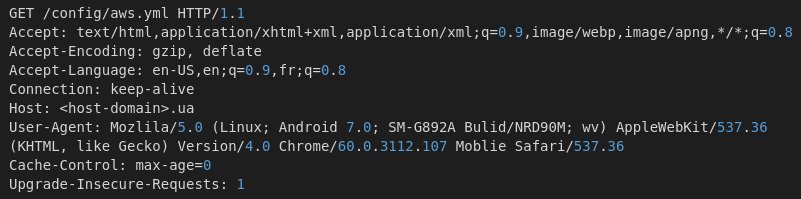
Malicious user-agent request example 1

Similarly, information about the server could be discovered no matter who the server provider is if a file that returns configuration information, such as a info.php or server_info.php file can be discovered and accessed. Knowing the web server version, PHP version, and other critical details can add up to a vulnerability discovery that makes it easy for a malicious actor to access a website.
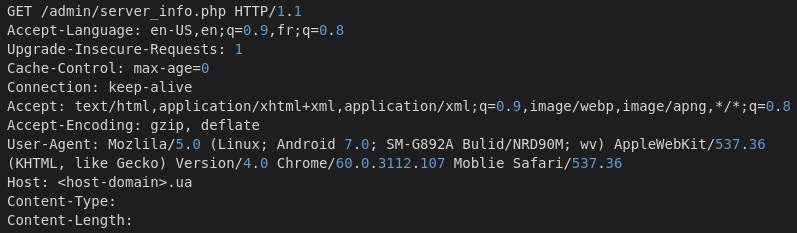
Malicious user-agent request example 2

In addition to searching for configuration files, and other malicious activities, we also see an attacker using this specific user-agent attempting to upload malicious files to the servers they are trying to compromise. The following shows an attacker using the same known malicious user-agent attempting to upload a zip file, which, if successful, unzips to install a file named sp3ctra_XO.php on the server. When we said there were clues that these attack attempts were being perpetrated by the same threat actor, you can see here what one of those clues are with the sp3ctra_XO.php filename variation of the XO_Sp3ctra output seen earlier.
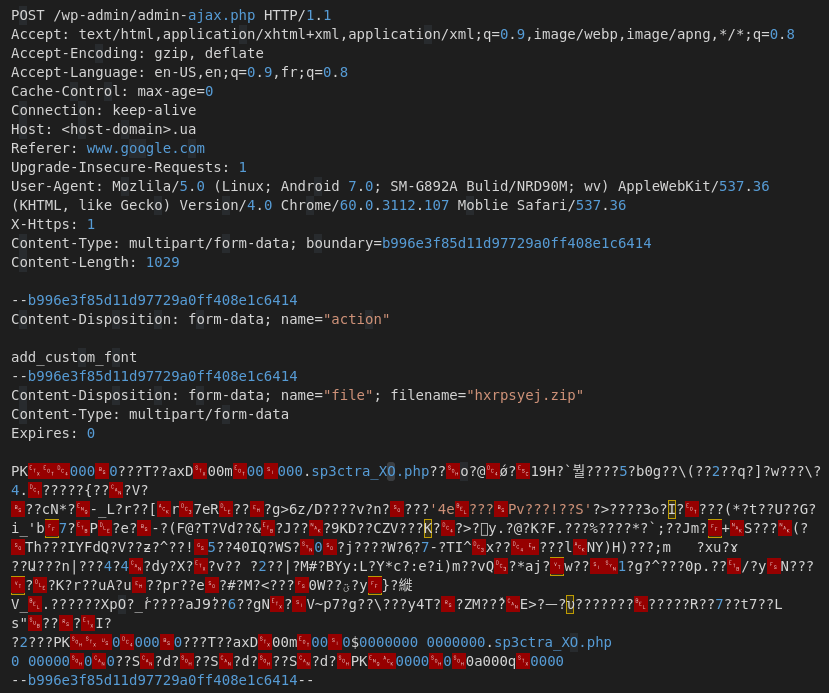
Malicious user-agent request example 3

Over the past 30 days, we have observed this user-agent string used in more than 1.3 million attack attempts against Ukrainian websites. This makes it the largest attacking user-agent that is not immediately recognizable as an unusual user-agent. The only user-agent string that had more tracked attack attempts is wp_is_mobile. These user-agent strings are among the dozens that have been observed over time to be consistently associated only with malicious activity.

The user-agent we are following here was logged in 1,115,824,706 attack attempts worldwide in the same time frame, making this a very common malicious user-agent string. With this being a prolific user-agent in attacks around the world, it is no surprise that it is being seen in regular attack attempts on Ukrainian websites. Whether specifically targeted, or just a victim of circumstance, Ukrainian websites are seeing an increase in attacks. This is likely due to heightened activity from threat actors globally.

Directory Traversal

The next largest category of attack attempts we have been blocking targeting .ua domains was directory traversal. This relies on a malicious actor getting into the site files wherever they can, often through a plugin or theme vulnerability, and trying to access files outside of the original file’s directory structure. We are primarily seeing this used in much the same way as the information disclosure attacks, as a way to access the wp-config.php file that potentially provides database credentials. Other uses for this type of attack can also include the ability to get a list of system users, or access other sensitive data stored on the server.
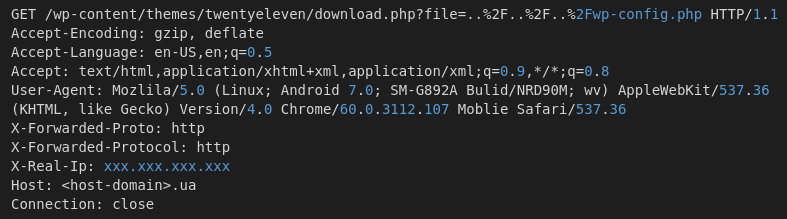
Directory traversal request example

In this example, the malicious actor attempted to download the site’s wp-config.php file by accessing the file structure through a download.php file in the twentyeleven theme folder, and moving up the directory structure to the WordPress root, where the wp-config.php file is located. This is seen in the request by adding ?file=..%2F..%2F..%2Fwp-config.php. This tells the server to look for a wp-config. php file that is three directories higher than the current directory.

This type of attack is often a guessing game for the malicious actor, as the path they are attempting to traverse may not even exist, but when it does, it can result in stolen data or damage to a website or system. The fact that the twentyeleven theme was used here does not necessarily indicate that the theme was vulnerable, or even installed on the site, only that the malicious actor was attempting to use it as a jumping off point while trying to find a vulnerable download.php file that could be used for directory traversal.

Information Disclosure

Information disclosure attacks are the fourth-largest attack type we blocked against .ua domains. The primary way we have observed threat actors attempting to exploit this type of vulnerability is through GET requests to a website, using common backup filenames, as seen in the example below. Unfortunately, due to the insecure practice of system administrators appending filenames with .bak as a method of making a backup of a file prior to modifying the contents, threat actors are likely to successfully access sensitive files by simply attempting to request critical files in known locations, with the .bak extension added. When successful, the contents of the file will be returned to the threat actor.

This is a fairly straightforward attack type, where the request simply returns the contents of the requested file. If a malicious actor can obtain the contents of a site’s wp-config.php file, even an outdated version of the file, they may be able to obtain the site’s database credentials. With access to a site’s database credentials, an attacker could gain full database access granted they have access to the database to log in with the stolen credentials. This would then give the attacker the ability to add malicious users, change a site’s content, and even collect useful information to be used in future attacks against the site or its users.
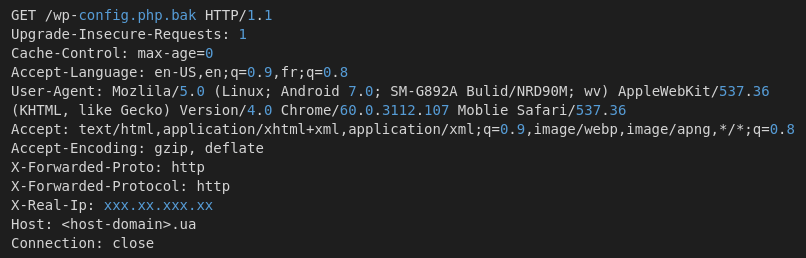
Information disclosure request example

File Upload

File upload rounds out the top five categories of attack attempts we have been blocking targeting .ua domains. In these attempts, malicious actors try to get their own files uploaded to the server the website is hosted on. This serves a number of purposes, from defacing a website, to creating backdoors, and even distributing malware.

The example here is only one of the many types of upload attacks we have blocked. A malicious actor can use this POST request to upload a file to a vulnerable website that allows them to upload any file of their choosing. This can ultimately lead to remote code execution and full server compromise.
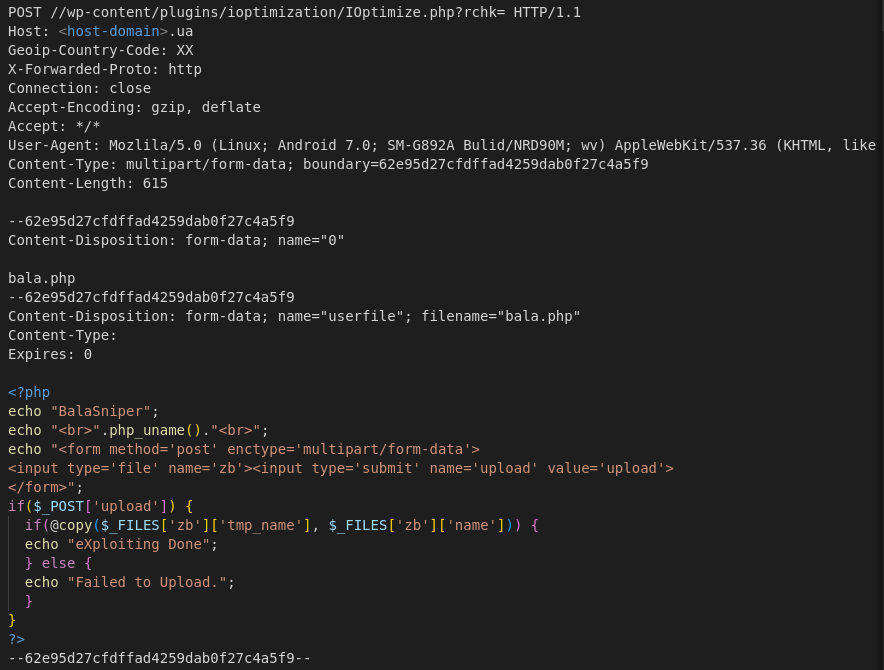
File upload request example with payload

The POST request in this case includes the contents of a common PHP file uploader named bala.php. This code provides a simple script to select and upload any file the malicious actor chooses. If the upload is successful they will see a message stating eXploiting Done but if it fails they message will read Failed to Upload. The script also returns some general information about the system that is being accessed, including the name of the system and the operating system being used.

Another important thing to note about this request is that it attempts to utilize the Ioptimization plugin as an entry point. Ioptimization is a known malicious plugin that offers backdoor functionality, but was not actually installed in the site in question. This indicates that the threat actor was trying to find and take over sites that had been previously compromised by a different attacker.
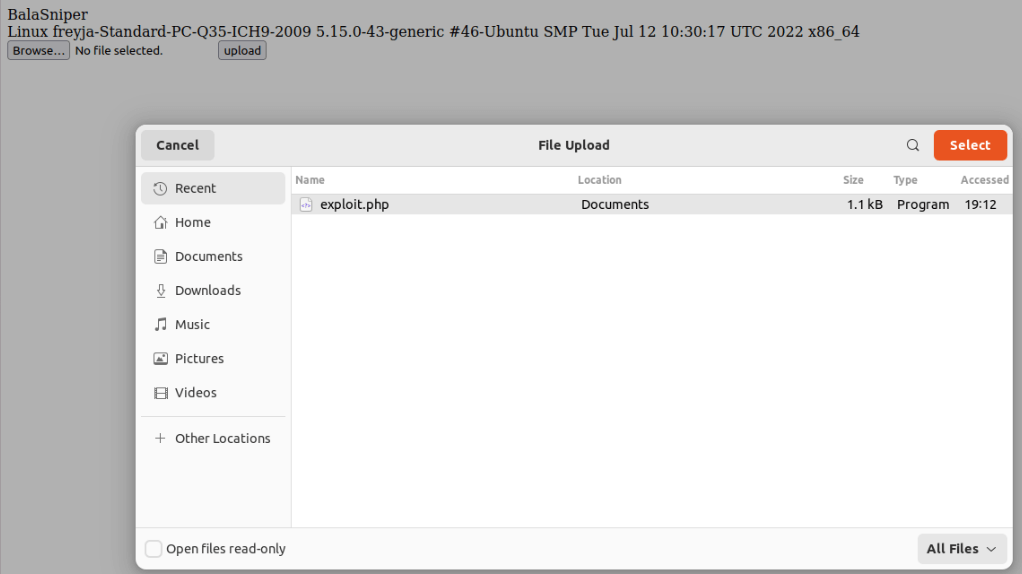
BalaSniper upload example

The fact that file uploads are the most common blocked attack type is not at all surprising. File uploads can be used to distribute malware payloads, store spam content to be displayed in other locations, and install shells on the infected system, among a number of other malicious activities. If a malicious actor can upload an executable file to a site, it generally gives them full control of the infected site and a foothold to taking over the server hosting that site. It can also help them remain anonymous by allowing them to send out further attacks from the newly infected site.

Conclusion

In this post, we continued our analysis of the cyber attacks targeting Ukrainian websites. While there has been an increase in the number of attacks being blocked since the start of Russia’s invasion of Ukraine, the attacks do not appear to be focused. Known malicious IP addresses were the most common reason we blocked attacks in the last 30 days, however, information stealing and spam were the most common end goals for the observed attack attempts.

If you believe your site has been compromised as a result of a vulnerability, we offer Incident Response services via Wordfence Care. If you need your site cleaned immediately, Wordfence Response offers the same service with 24/7/365 availability and a 1-hour response time. Both of these products include hands-on support in case you need further assistance.

Source :
https://www.wordfence.com/blog/2022/08/analyzing-attack-data-and-trends-targeting-ukrainian-domains/

Apple Releases Security Updates to Patch Two New Zero-Day Vulnerabilities

Apple on Wednesday released security updates for iOS, iPadOS, and macOS platforms to remediate two zero-day vulnerabilities previously exploited by threat actors to compromise its devices.

The list of issues is below –

  • CVE-2022-32893 – An out-of-bounds issue in WebKit which could lead to the execution of arbitrary code by processing a specially crafted web content
  • CVE-2022-32894 – An out-of-bounds issue in the operating system’s Kernel that could be abused by a malicious application to execute arbitrary code with the highest privileges

Apple said it addressed both the issues with improved bounds checking, adding it’s aware the vulnerabilities “may have been actively exploited.”

The company did not disclose any additional information regarding these attacks or the identities of the threat actors perpetrating them, although it’s likely that they were abused as part of highly-targeted intrusions.

CyberSecurity

The latest update brings the total number of zero-days patched by Apple to six since the start of the year –

  • CVE-2022-22587 (IOMobileFrameBuffer) – A malicious application may be able to execute arbitrary code with kernel privileges
  • CVE-2022-22620 (WebKit) – Processing maliciously crafted web content may lead to arbitrary code execution
  • CVE-2022-22674 (Intel Graphics Driver) – An application may be able to read kernel memory
  • CVE-2022-22675 (AppleAVD) – An application may be able to execute arbitrary code with kernel privileges

Both the vulnerabilities have been fixed in iOS 15.6.1, iPadOS 15.6.1, and macOS Monterey 12.5.1. The iOS and iPadOS updates are available for iPhone 6s and later, iPad Pro (all models), iPad Air 2 and later, iPad 5th generation and later, iPad mini 4 and later, and iPod touch (7th generation).

Update: Apple on Thursday released a security update for Safari web browser (version 15.6.1) for macOS Big Sur and Catalina to patch the WebKit vulnerability fixed in macOS Monterey.

Source :
https://thehackernews.com/2022/08/apple-releases-security-updates-to.html

What are the Benefits of Adding an SSL Certificate to Your No-IP Free, Enhanced or Plus Hostname?

SSL Certificates are a great way to increase the security of your hostname because they add an extra layer of security for you and anyone that visits your hostname. Learn the benefits of adding an SSL Certificate to your Free, Enhanced Dynamic DNS or Plus Managed DNS hostname.

What is an SSL Certificate?
SSL stands for Secure Socket Layer. This means that your hostname is given a secure connection between it, the Internet browser, and the webserver. This allows websites to transmit private data online, without the worry of it being stolen. You can tell when a website has an SSL certificate enabled, when the HTTP in the URL ends with an S, making it an HTTPS. Example: https://www.noip.com.

What are the advantages of adding an SSL Certificate to your Free, Enhanced Dynamic DNS or Plus Managed DNS hostname?

Encryption and Verification

This is the biggest benefit of adding an SSL certificate to your hostname. The extra layer of encryption shows that your hostname is safe for people to visit. All of your visitor’s data will now be transmitted over an encrypted connection to the hostname and others won’t be able to see what is being sent.

The SSL Certificate also checks that the information it receives is coming from the expected domain. So, if your customer sends personal or private information, the SSL Certificate guarantees it is being sent to the secure site, and not to a potentially malicious one.

Ensures Data Integrity

A website that doesn’t have an SSL Certificate enabled sends data in a plain text format. This means that all of the data that is being sent between the server and the browser can be easily read. If a hacker were to gain access to your domain and then change the information being presented on your hostname, this is an example of domain spoofing.

Domain spoofing happens when a hacker gains access to the information on a website and then changes it before it gets sent to the browser for the user. When this happens, the user is typically not even aware they are visiting a compromised website. When an SSL certificate is enabled on the hostname, this becomes much harder as the data is not sent in plain text, but is sent in an encrypted, unreadable format.

Gains Your Users Trust

When you use an SSL Certificate, your hostname shows up with an HTTPS and a lock icon, signifying the hostname is secure. This helps users feel safe when they are on your hostname and makes them feel comfortable if you are asking them to enter sensitive information, like credit cards, or Social Security numbers.

Our Free Dynamic DNS, Enhanced Dynamic DNS and Plus Managed DNS accounts both come with 1 Free TrustCor Standard DV SSL Certificate. Additional SSL Certificates can be purchased and start at just $19.99 per year. You can learn more about each SSL Certificate and how you can add one today here.

Source :
https://www.noip.com/blog/2022/02/22/benefits-adding-ssl-certificate-ip-free-enhanced-hostname/

New Feature Alert : No-IP Announces Two-Factor Authentication

We are so excited to announce the release of Two-Factor Authentication (2FA). This new feature helps keep our customers’ accounts secure by ensuring that only authorized people are able to access accounts. This helps limit the impact of malicious activity because it adds another layer of security on top of your password.

Why Two-Factor Authentication?

You may be wondering why No-IP added 2FA as a security feature, or even how 2FA is different from our current login policy. 2FA is one of the highest levels of security that can be implemented to ensure customer accounts remain secure. 2FA is a security practice that requires you to verify your identity using multiple forms of account verification.

When 2FA is enabled, you will log in with the same username and password, but you will be required to enter a time-based one-time password (TOTP) pin from an authenticator app of your choice on your smartphone.

It is more important than ever to enable data security measures like 2FA whenever possible. As threats like password breaches, keylogging, and other security threats are becoming a normal thing, 2FA is an added layer of account protection.

What are the Benefits of Two-Factor Authentication?

  • Additional layer of security on account login
    2FA requires users to identify themselves through additional verification measures, this helps protect accounts from theft. Making it so a password alone isn’t enough to authenticate a login. Lately, major password breaches across all industries happen so often that even a very secure password can be breached. 2FA adds another layer of security to help reduce this risk.
  • Identity Protection
    Identity theft and data breaches are all too common lately. 2FA ensures that if your username or password were ever leaked, your account is still protected by an additional layer of authentication.
  • Compliance
    Many of our customers work in industries like the Government and Health Industries that require extra compliance for third-party accounts.
  • Effective Cybersecurity Solution
    2FA is an effective strategy to keep accounts safe because it is difficult for hackers to crack both a password and have access to the 2FA device.
  • Easy Implementation
    We have made enabling and using 2FA simple and easy by offering authentication using TOTP, which is supported by various smartphone apps. You choose the one that works best for you.

How Do I Enable 2FA On My No-IP Account?

Login to your No-IP account, you can then find the 2FA option within your No-IP account under “Account” and then click ”Security”.

The first step is to choose which authentication app you will use. We suggest using Authy, Duo, LastPass Authenticator, or 1Password. However, any 2FA application app that supports TOTP will work. You will then need to download and install whichever authentication app you choose.

After you have downloaded your authentication app, you will need to follow the steps for that certain app to finish the configuration process and fully activate 2FA. Please ensure that you keep your Recovery Codes in a safe place, so you can always get back into your account.

The following Knowledge Base Guides will help you configure 2FA on your No-IP account for the specific apps listed below. Consult your application’s documentation for support with other TOTP authentication apps.

Authy

Duo

LastPass Authenticator

1Password

What 2FA applications does No-IP Support?

Any 2FA application that works with TOTP will work with No-IP’s 2FA.

Does No-IP Require 2FA?

While we don’t currently require No-IP accounts to have 2FA enabled, we strongly suggest that you enable it. 2FA is a simple solution to help keep your No-IP account secure.

What Happens If I Lose Access To My Two-Factor Authentication App? 

When you set up 2FA you will be provided with ten, one-time-use recovery codes that allow you to get into your account without needing to enter your TOTP code. Each code can only be used one time. If you lose your backup codes and your authentication app, you will no longer be able to access your account. Keep these codes in a safe and secure spot that only you have access to.

If I have 2FA set up, do I need an account Security Question? 

Yes, if you ever need to contact No-IP Customer Support. we will need to verify you. One way of verification is by answering your security question. If you cannot verify your account, we will not be able to assist you.

Will you provide other factors of authentication besides TOTP and Recovery Codes?
For now, we are monitoring the usage of TOTP. However, we’re open to adding additional factors dependent on customer feedback.

Does My Dynamic Update Client (DUC) or Other Update Device Require Two-Factor Authentication When Logging In or Sending Dynamic IP Updates?

No, 2FA will only be prompted on our website at this time. We are currently working on separating the Dynamic Update Client credentials from dynamic updates completely. If you want to use different credentials other than your login, you can set up sub-account groups.

Source :
https://www.noip.com/blog/2022/02/22/new-feature-alert-ip-announces-two-factor-authentication/

Google now blocks Workspace account hijacking attempts automatically

Google Workspace (formerly G Suite) now has stronger protections for risky account actions, automatically blocking hijacking attempts with identity verification prompts and logging them for further investigation.

This added layer of security will block threat actors who gain access to a user’s account to protect personal data and sensitive information belonging to their organization.

The enhanced account protection capabilities are available to all Google Workspace customers, including legacy G Suite Basic and Business customers.

“Google will evaluate the session attempting the action, and if it’s deemed risky, it will be challenged with a ‘Verify it’s You’ prompt,” Google said.

“Through a second and trusted factor, such as a 2-step verification code, users can confirm the validity of the action.”

For instance, this new feature would block sensitive actions such as attempts to change the account’s name until “the true account owner can verify that this was intentional.”

Admins can disable it for users stuck behind login prompts

Google added that admins could also temporarily disable login challenges triggered on sensitive account actions for users who can’t get past the verification prompts.

“In the Admin console under Users > ‘UserName’> Security, admins can toggle login challenges OFF for ten minutes if a user gets stuck behind a ‘verify it’s you prompt’,” the company explained.

“We strongly recommend only using this option if contact with the user is credibly established, such as via a video call.”

It’s also important to mention that this feature only supports users using Google as their identity provider, blocking actions taken within Google products, with SAML users not being supported now.

This update builds on a previous Google Workspace security improvement announced in June, with new alerts added to inform of critical and sensitive changes to admin accounts.

Google has further secured Workspace users from attacks by rolling out new Google Drive warning banners in January to warn them of potentially suspicious files used for malware delivery and phishing attacks.

One year ago, in June 2021, the company also added new Google Drive phishing and malware protections for enterprises that automatically mark all suspicious files, making them only visible to admins and owners.

Source :
https://www.bleepingcomputer.com/news/security/google-now-blocks-workspace-account-hijacking-attempts-automatically/

Phishing attack abuses Microsoft Azure, Google Sites to steal crypto

A new large-scale phishing campaign targeting Coinbase, MetaMask, Kraken, and Gemini users is abusing Google Sites and Microsoft Azure Web App to create fraudulent sites.

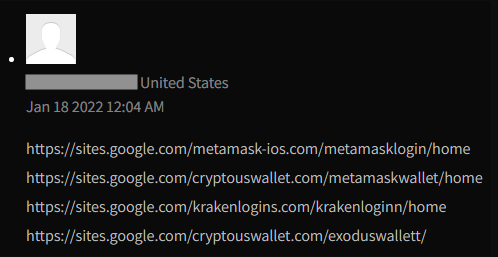
These phishing pages are promoted through comments posted to legitimate sites by a network of bots controlled by the threat actors. Posting links to phishing pages on various legitimate sites aims to increase traffic and boost the malicious site’s search engine rankings.

Furthermore, because the phishing sites are hosted in Microsoft and Google services, they aren’t flagged by automated moderator systems, allowing promotional messages to stay in the comment section for longer.

Comment containing multiple links to phishing pages
Comment containing multiple links to phishing pages (Netskope)

The new campaign was spotted by analysts at Netskope, who noted that this tactic has allowed some of the fraudulent sites to appear as the first result in Google Search.

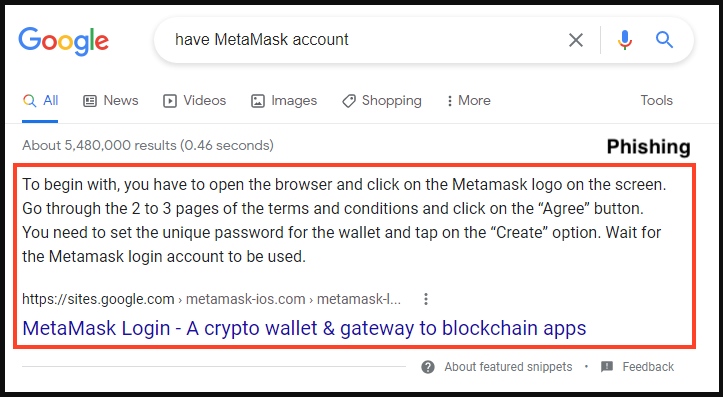
Even worse, as shown below, Google has also included the phishing pages as featured snippets, giving them the highest exposure possible in the search results.

The first result for the given search term
The first result for the given search term (Netskope)

Abusing legitimate services

Google Sites is a free web page creation tool, part of Google’s online service suite, allowing users to create websites and host them on Google Cloud or other providers.

Similarly, Microsoft’s Azure Web Apps is a platform helping users create, deploy, and manage web applications and websites.

Both services are trusted by internet security tools, offer competitive pricing and high availability, so they are a good option for creating phishing pages.

The crooks in the campaign seen by Netskope created sites that mimicked Metamask, Coinbase, Gemini, and Kraken, targeting people’s wallets and their assets.

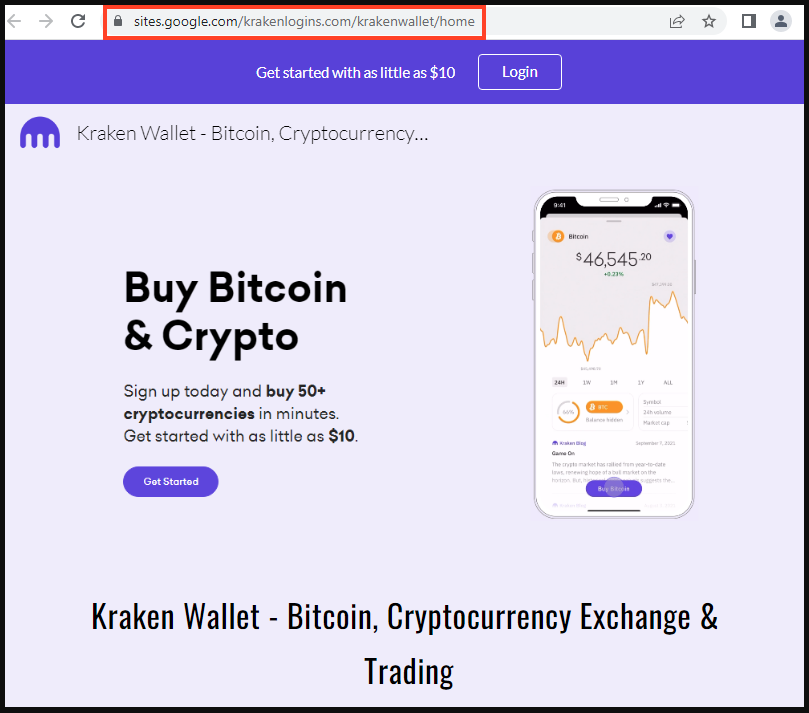
The  sites are just landing pages, and their visitors are redirected to the actual phishing sites when they click on the “login” buttons.

Landing page for Kraken phishing
Landing page for Kraken phishing (Netskope)

Targeting wallets and services

The phishing campaign is currently attempting to steal MetaMask wallets and credentials for crypto exchanges, such as CoinBase, Kraken, and Gemini.

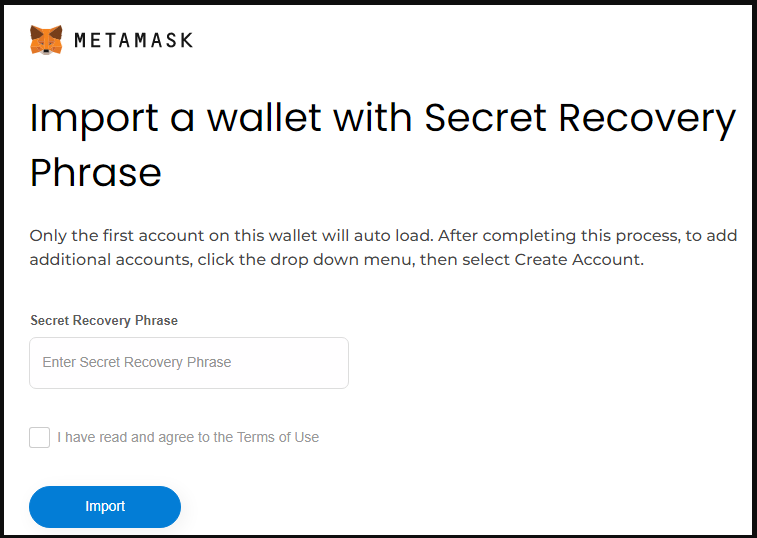
The MetaMask phishing site attempts to steal the user’s password and wallet’s secret recovery phrase (seed phrase). This information allows the threat actor to import the wallet on their own devices and drain the contents.

MetaMask phishing site asking the seed phrase
MetaMask phishing site asking the seed phrase (Netskope)

For the crypto exchange phishing pages, the threat actors attempt to steal their login credentials.

In all four cases, users who enter their credentials are redirected to a fake 2FA (two-factor authentication) page that requests the victim to provide their phone number.

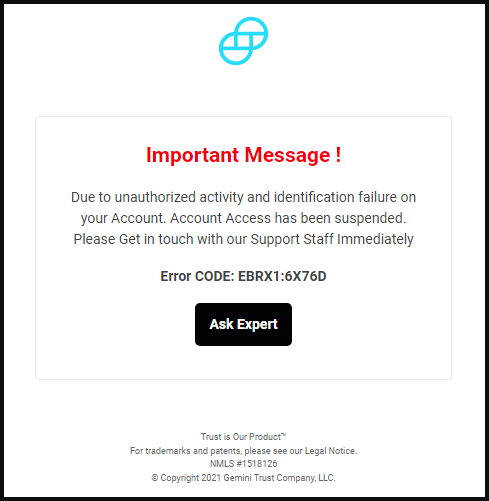
After entering the code, the websites generate a fake error alleging unauthorized activity and authentication problems, prompting the victim to click on an “Ask Expert” button.

Bogus error message served to victims
Bogus error message served to victims (Netskope)

This takes the victims to an online chat page where a scammer pretending to be a customer support agent promises to solve the problem by directing the victim to install the TeamViewer remote access tool.

The remote access is likely to allow the threat actors to retrieve the multi-factor authentication codes required to log in to the exchanges with the stolen credentials.

Don’t get phished

When attempting to log in to a crypto exchange, always make sure you are on the platform’s official website and not on a clone.

Users of locally installed cryptocurrency wallets, such as MetaMask, Phantom, and TrustWallet, should never share their recovery phrase on any website, regardless of the reason.

It is also important to remember that Google Ads can be abused, and Google Search SEO can be manipulated, so the ranking of the results shouldn’t be seen as a guarantee of safety.

Finally, protect your cryptocurrency exchange accounts with MFA and keep most of your crypto investments on cold wallets that are much more challenging to hack.

Source :
https://www.bleepingcomputer.com/news/security/phishing-attack-abuses-microsoft-azure-google-sites-to-steal-crypto/

Multiple attackers increase pressure on victims, complicate incident response

Sophos’ latest Active Adversary report explores the issue of organizations being hit multiple times by attackers

Written by Matt Wixey

AUGUST 09, 2022

SECURITY OPERATIONS THREAT RESEARCH ACTIVE ADVERSARY PLAYBOOK BLACKCAT CONTI CRYPTOMINERS FEATURED HIVE IABS KARAKURT LOCKBIT RANSOMWARE SOPHOS X-OPS

There’s a well-worn industry phrase about the probability of a cyberattack: “It’s not a matter of if, but when.” Some of the incidents Sophos recently investigated may force the industry to consider changing this rule-of-thumb: The question is not if, or when – but how many times?

In an issue we highlighted in our Active Adversary Playbook 2022, we’re seeing organizations being hit by multiple attackers. Some attacks take place simultaneously; others are separated by a few days, weeks, or months. Some involve different kinds of malware, or double – even triple – infections of the same type.

Today, Sophos X-Ops is releasing our latest Active Adversary white paper: Multiple Attackers: A Clear and Present Danger. In the paper, we take a deep dive into the problem of multiple attackers, exploring how and why organizations are attacked several times. Recent case studies from our Managed Detection and Response (MDR) and Rapid Response (RR) teams provide insight into the how, and exploring cooperation and competition among threat actors helps explain the why.

Our key findings are:

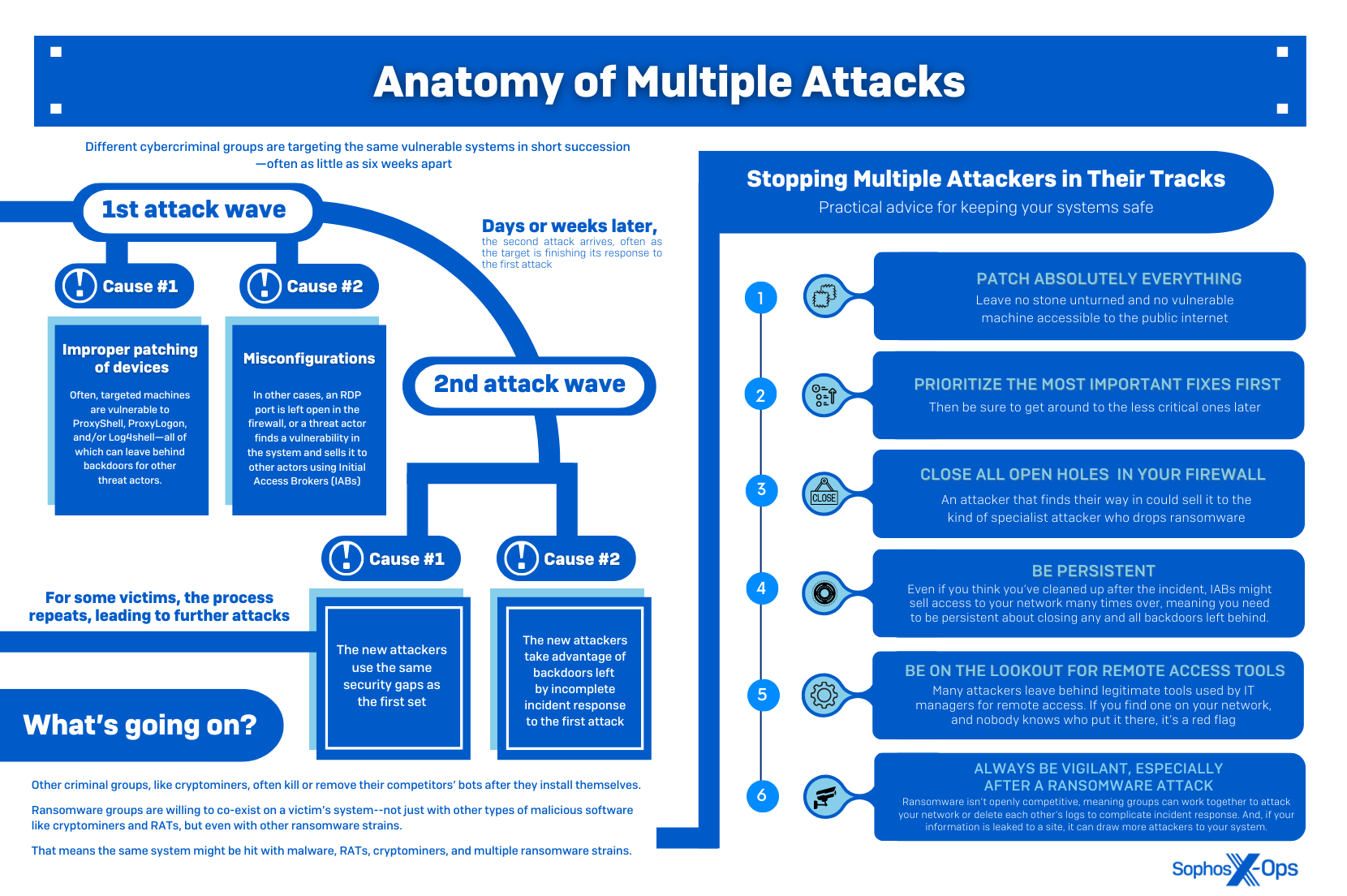
  • The key drivers of multiple exploitations are vulnerabilities and misconfigurations going unaddressed after a first attack
  • Multiple attacks often involve a specific sequence of exploitation, especially after big, widespread vulnerabilities like ProxyLogon/ProxyShell are disclosed – with cryptominers arriving first, followed by wormable botnet builders, RATs, initial access brokers (IABs), and ransomware
  • While some threat actors are interdependent (e.g., IABs later enabling ransomware), others, such as cryptominers, try to terminate rival malware, and may even ‘close the door’ by patching vulnerabilities or disabling vulnerable services after gaining access
  • Historically, threat actors have been protective of their infections, to the extent of kicking rivals off compromised systems
  • Ransomware actors, despite occasionally tangling with each other, seem less concerned about competition, and sometimes adopt strategies which directly or indirectly benefit other groups
  • Certain features of the underground economy may enable multiple attacks – for instance, IABs reselling accesses, and ransomware leak sites providing data that other threat actors can later weaponize
  • Some of the case studies we analyze include a ransomware actor installing a backdoor which was later abused by a second ransomware group; and an incident where one organization was attacked by three ransomware groups in the space of a few weeks, all using the same misconfigured RDP server to gain access. After the dust had settled, Sophos discovered some files which had been encrypted by all three groups

At this stage there’s only anecdotal evidence to suggest that multiple attacks are on the rise, but, as Sophos’ Director of Incident Response, Peter Mackenzie, notes: “This is something we’re seeing affecting more and more organizations, and it’s likely due to an increasingly crowded market for threat actors, as well as ransomware-as-a-service (RaaS) becoming more professionalized and lowering the bar to entry.”

An infographic summarising the key findings and takeaways from our white paper

Key takeaways for organizations

Multiple attacks not only complicate incident response, but also place additional pressure on victims – whether that’s through more than one ransom demand, or just the sheer technical difficulty of trying to recover from two or more attacks in a short space of time.

In the white paper we provide best practice security guidance, as well as the following eight actionable takeaways to help organizations lower the risk of falling victim to multiple attackers:

Takeaway 1: Update absolutely everything
It sounds simple, but: Update everything. One of our key findings is that cryptominers, and webshells and backdoors deployed by IABs, often come first when a vulnerability has been disclosed, and the latter typically try to operate stealthily – so you might think you’ve avoided an attack, when in fact there’s already malware on your system. That might be compounded (in a subsequent attack) by ransomware. Patching early is the best way to avoid being compromised in the future – but it doesn’t mean you haven’t already been attacked. It’s always worth checking that your organization wasn’t breached prior to patching.

Takeaway 2: Prioritize the worst bugs first
But how can you patch early, and how do you know what to patch? Prioritizing can be a big ask, given how many vulnerabilities are disclosed (18,429 in 2021, more than 50 a day on average, and the greatest number of reported vulnerabilities ever disclosed during a calendar year). So focus on two key elements: 1) critical bugs affecting your specific software stack; and 2) high-profile vulnerabilities that could affect your technology. There are paid services which offer vulnerability intelligence, but there are also free tools which let you set up custom alerts for particular products. Bug Alert is a non-profit service that aims to give early warning of high impact bugs. Monitoring ‘infosec Twitter’ is also recommended, as that’s where many prominent vulnerabilities are discussed when first released. Or you could use CVE Trends, which collates data from several sites to show the most-talked-about vulnerabilities.

Takeaway 3: Mind your configurations
Misconfigurations – and a failure to remediate them after an attack – are a leading cause of multiple exploitations. Cryptominer operators, IABs, and ransomware affiliates always look for exposed RDP and VPN ports, and they’re among the most popular listings on most criminal marketplaces. If you do need remote access and/or management over the internet, put it behind a VPN and/or a zero-trust network access solution that uses MFA as part of its login procedure.

Takeaway 4: Assume other attackers have found your vulnerabilities
Threat actors don’t operate in isolation. IABs might resell or relist their products, and ransomware affiliates may use multiple strains – so one vulnerability or misconfiguration can lead to multiple threat actors seeking to exploit your network.

Takeaway 5: Don’t slow-walk addressing an attack in progress
Being listed on a leak site may attract other, opportunistic threat actors. If you’re unfortunate enough to be hit with a ransomware attack, take immediate action, in conjunction with your security teams and incident response provider(s), to close the initial entry point and assess what data has been leaked, as part of your wider remediation plan.

Takeaway 6: Ransomware plays nicely with ransomware
Many threat actors have traditionally been competitive, to the point of kicking each other off infected systems, and that’s still true today when it comes to cryptominers and some RATs. But ransomware doesn’t seem to follow this trend, and may proceed to encrypt files even if other ransomware groups are on the same network – or operate in a mutually beneficial way, so that one group exfiltrates and the other encrypts.

Takeaway 7: Attackers open new backdoors
Some attackers may introduce further vulnerabilities after gaining access, or create deliberate or unintentional backdoors (including the installation of legitimate software), which a subsequent threat actor can exploit. So while it’s crucial to close off the initial infection vector, it’s also worth considering a) other weaknesses and misconfigurations that could be used to gain access, and b) any new ingress points that may have appeared.

Takeaway 8: Some attackers are worse than others
Not all ransomware strains are equal. Some have capabilities and features that may complicate attempts to respond to and investigate others – another reason to try to avoid becoming a victim of multiple attacks.

Conclusion

In an increasingly crowded and competitive threat environment, the problem of multiple attackers is likely to grow, with more threat actors coming into the mix and exploiting the same targets – either deliberately or unintentionally.

For organizations, this means that rapidly responding to attacks, applying patches, fixing misconfigurations – and checking for backdoors which attackers might have installed prior to any entry points being closed – will become more and more important.

Multiple attackers are bad news for analysts and responders too, complicating incident response, threat intelligence, and security monitoring. In one of the case studies we explore in the report, for example, one ransomware group wiped Windows Event Logs – which not only deleted traces of that group’s activities, but also those of the two ransomware groups which had attacked the network previously. In another case study, one threat actor was likely an affiliate of two separate ransomware groups.

The threat actors themselves –particularly ransomware actors – will at some point have to decide how they feel about cooperation: whether to fully embrace it or become more competitive. Going forward, some groups might deliberately team up, so that one group’s tactics complement another’s. Or we might see ransomware become more like cryptominers – actively searching for, and terminating, rivals on infected hosts. At the moment, however, it’s an uncertain area – one which we hope our report will shed some light on.

Source :
https://news.sophos.com/en-us/2022/08/09/multiple-attackers-increase-pressure-on-victims-complicate-incident-response/

Lockbit, Hive, and BlackCat attack automotive supplier in triple ransomware attack

After gaining access via RDP, all three threat actors encrypted files, in an investigation complicated by event log clearing and backups. 3 attackers, 2 weeks – 1 entry point.

Written by Linda Smith, Rajat Wason, Syed Zaidi

AUGUST 10, 2022

SECURITY OPERATIONS ACTIVE ADVERSARY PLAYBOOK BLACKCAT FEATURED HIVE LOCKBIT RANSOMWARE SOPHOS X-OPS

In May 2022, an automotive supplier was hit with three separate ransomware attacks. All three threat actors abused the same misconfiguration – a firewall rule exposing Remote Desktop Protocol (RDP) on a management server – but used different ransomware strains and tactics.

The first ransomware group, identified as Lockbit, exfiltrated data to the Mega cloud storage service, used Mimikatz to extract passwords, and distributed their ransomware binary using PsExec.

The second group, identified as Hive, used RDP to move laterally, before dropping their ransomware just two hours after the Lockbit threat actor.

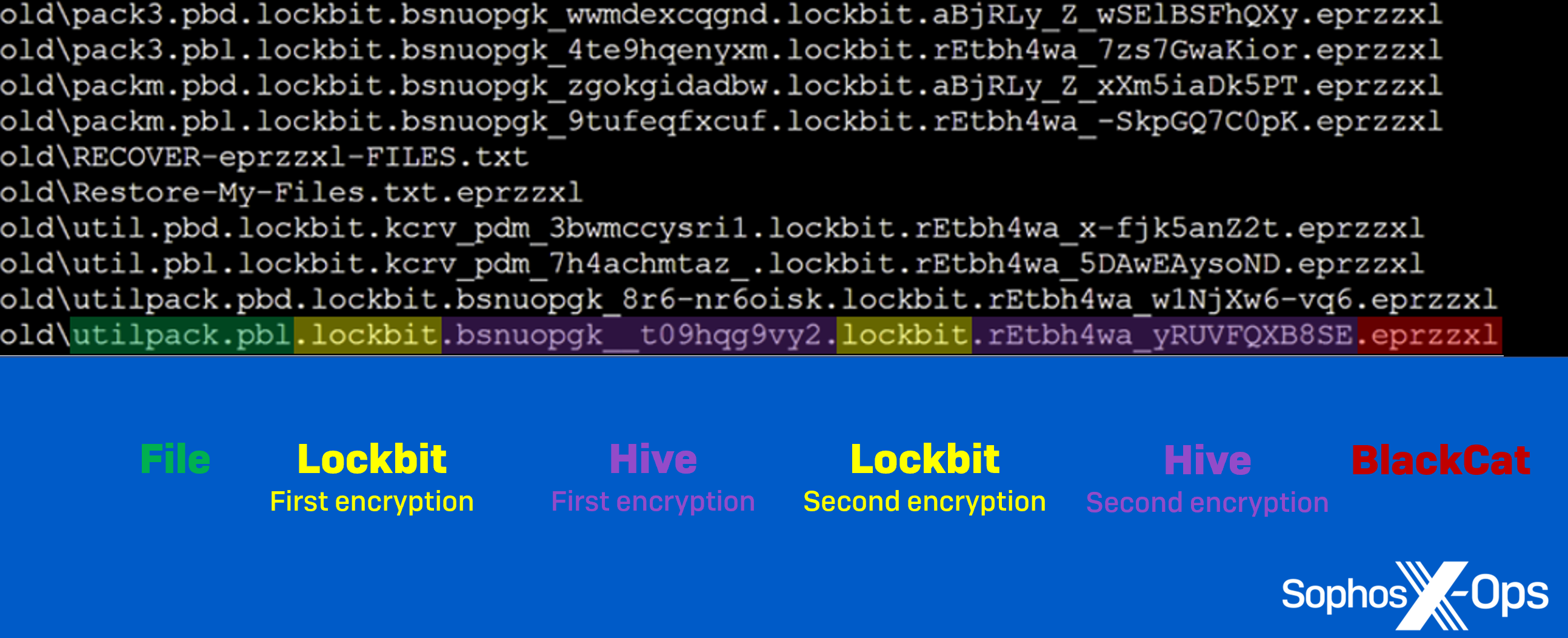
A screenshot showing files encrypted five times - twice each by Lockbit and Hive, and once by BlackCat

As the victim restored data from backups, an ALPHV/BlackCat affiliate accessed the network, installed Atera Agent (a legitimate remote access tool) to establish persistence, and exfiltrated data. Two weeks after the Lockbit and Hive attacks, the threat actor distributed their ransomware, and cleared Windows Event Logs. Sophos’ Rapid Response (RR) team investigated, and found several files which had been encrypted multiple times – as many as five in some instances.

Figure 1: Files which had been encrypted five times – twice each by Lockbit and Hive, and once by ALPHV/BlackCat

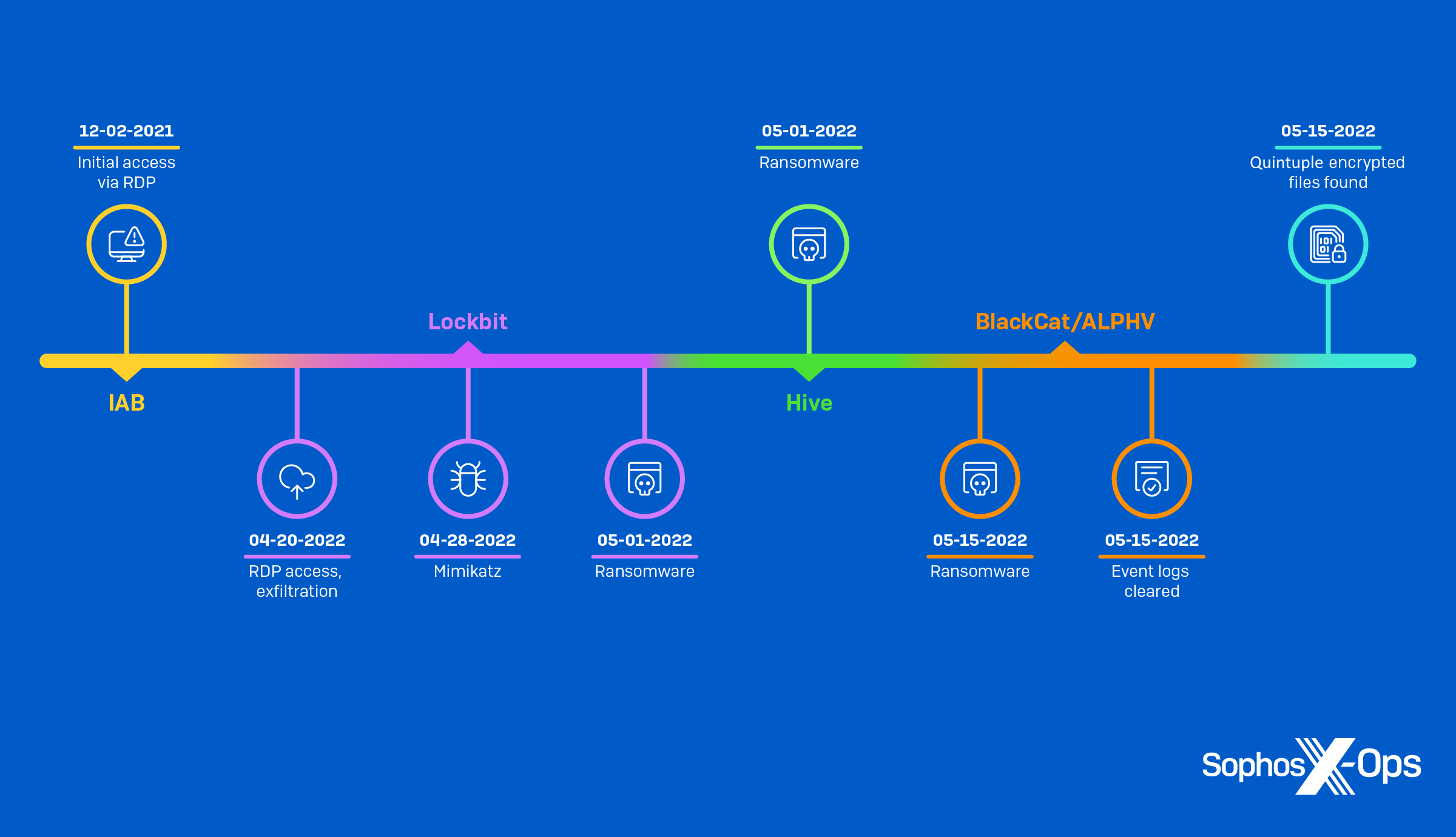
A timeline showing the attacks by the three ransomware groups

Figure 2: The multi-attacker timeline discovered by Sophos X-Ops

We’ve covered several dual ransomware attacks before – and recently investigated the phenomenon of multiple attacks more generally, as it’s something which appears to be increasingly common – but this is the first incident we’ve seen where three separate ransomware actors used the same point of entry to attack a single organization.

Locks, bees, and cats: The perfect storm

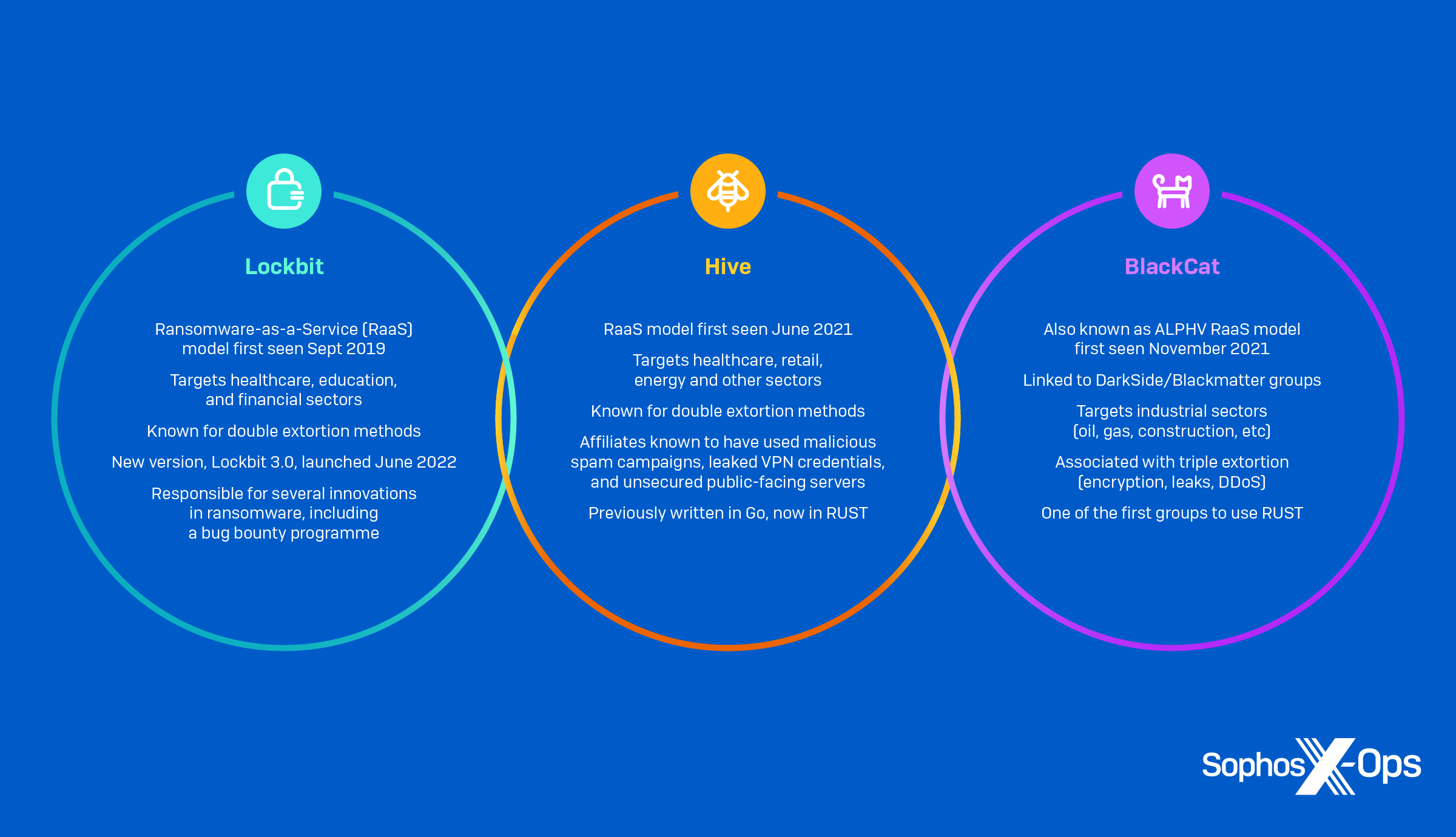
Profiles of the three ransomware groups

Figure 3: A brief overview of the three ransomware groups that consecutively attacked one organization

While the attacks took place in May, we discovered that a threat actor established an RDP session on the organization’s domain controller, way back in December 2021. This might have been an initial access broker (IAB) – an attacker who finds vulnerable systems and sells access to them on criminal marketplaces – or an early scouting mission by one of the three threat actors.

Either way, in mid-April 2022, a Lockbit affiliate gained RDP access to the organization’s corporate environment through an exposed management server.

Next, the threat actor moved laterally to a domain controller and other hosts, and began exfiltrating data to the Mega cloud storage service, as well as executing two PowerShell scripts: sharefinder.ps1 (to gather information about connected domain network shares) and invoke-mimikatz.ps1 (to extract passwords from LSASS, the Local Security Authority Subsystem Service).

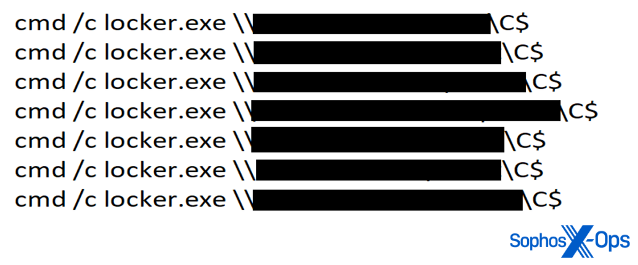
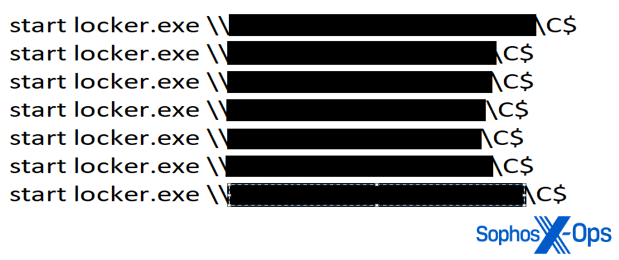
On May 1st, the Lockbit affiliate created two batch scripts (1.bat and 2.bat) to distribute the ransomware binaries LockBit_AF51C0A7004B80EA.exe and Locker.exe across the network, via PsExec.

A screenshot of a batch script, 1.bat, used by the attackers

Figure 4: 1.bat script

A screenshot of a batch script, 2.bat, used by the attackers

Figure 5: 2.bat script

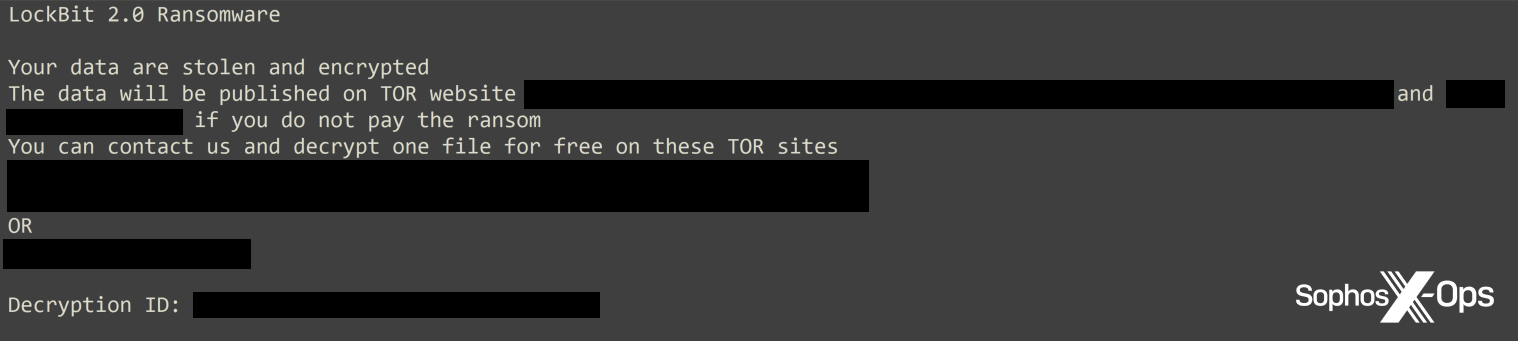
Upon execution, the ransomware encrypted files on nineteen hosts and dropped ransom notes entitled Restore-My-Files.txt.

A ransom note from the Lockbit ransomware group

Figure 6: The Lockbit ransom note

Two hours later, while the Lockbit threat actor was still encrypting files, a Hive ransomware affiliate gained access to the network via the same exposed RDP server and used RDP to move laterally to other hosts.

Hive used legitimate software (PDQ Deploy) already installed on the network to distribute its ransomware binary windows_x32_encrypt.exe. This tactic, known as ‘living off the land’, is popular among threat actors – particularly ransomware actors – as it has a small footprint and is less likely to be detected than downloading malicious tools.

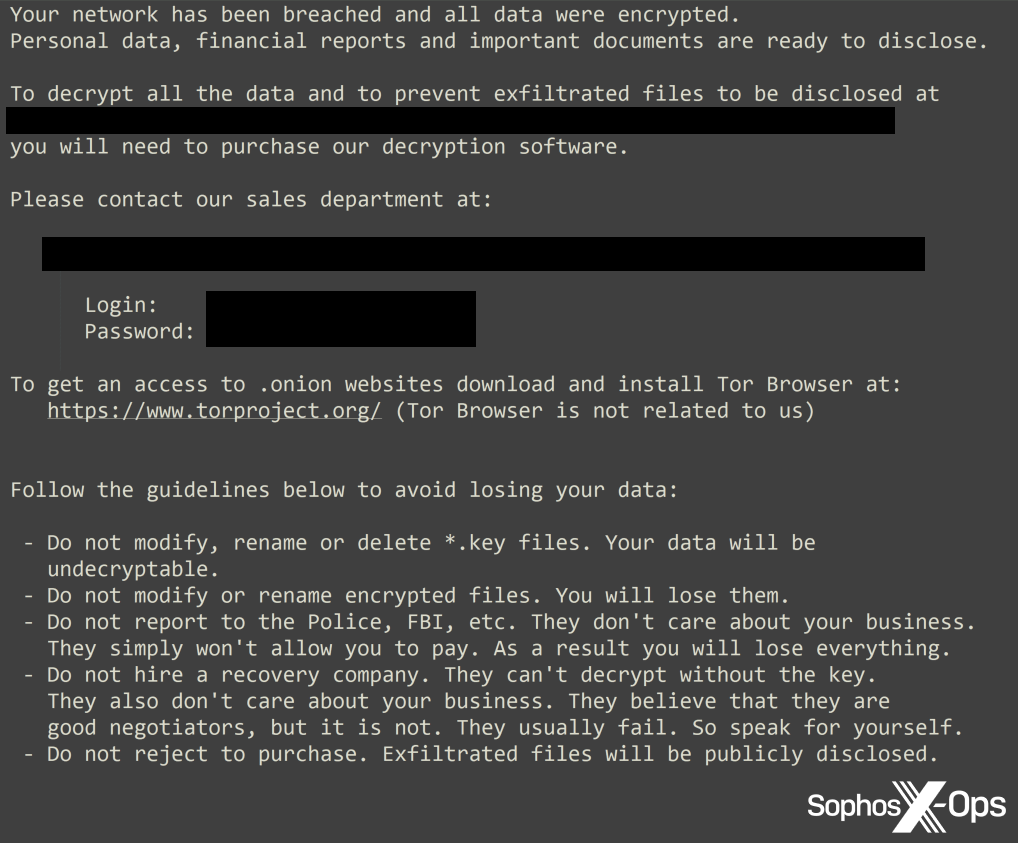
Hive’s ransomware binary encrypted files on sixteen hosts and dropped a further ransom note, HOW_TO_DECRYPT.txt, on impacted devices.

A ransom note from the Hive ransomware group

Figure 7: The Hive ransom note

At this point, the organization’s IT team restored most of the infected systems to April 30, the day before the Lockbit threat actor began to encrypt files. From an investigative perspective, this meant some crucial evidence was lost. But the attacks were not over yet.

Only a day after that system restore, an ALPHV/BlackCat affiliate arrived, making RDP connections to domain controllers, file servers, application servers, and other hosts – all from the same management server exploited by Lockbit and Hive.

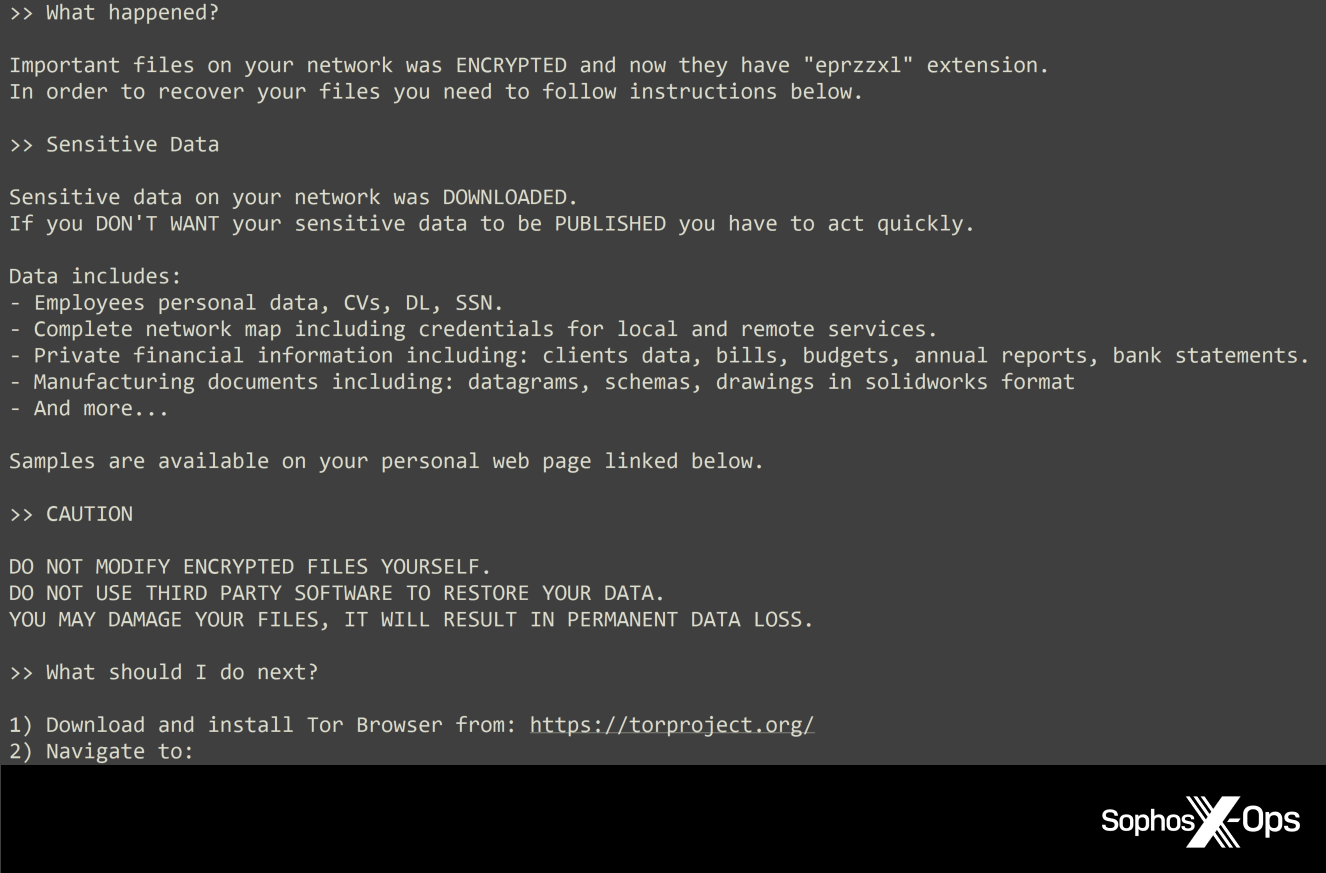
The ALPHV/BlackCat threat actor exfiltrated data to Mega over the course of a week, and established persistence by installing a backdoor: a legitimate remote access tool named Atera Agent. On May 15th – two weeks after the Lockbit and Hive attacks – the ALPHV/BlackCat affiliate used the credentials of a compromised user to drop ransomware binaries fXXX.exe and fXXXX.exe on six hosts, leaving a ransom note titled RECOVER-eprzzxl-FILES.txt in every folder.

A ransom note from the ALPHV/BlackCat ransomware group

Figure 8: The ALPHV/BlackCat ransom note

Based on analysis from SophosLabs researchers, these binaries not only encrypted files but also deleted volume shadow copies and Windows Event logs. This further complicated our subsequent investigation, as the ALPHV/BlackCat actor erased not only logs relating to their attack, but also those relating to the attacks by Lockbit and Hive.

It’s not clear why Lockbit and ALPHV/BlackCat deployed two ransomware binaries, but one possible reason is fault tolerance: If one executable is detected or blocked, or fails to encrypt, the second might act as a back-up.

Key features of the BlackCat ransomware binaries

The two BlackCat ransomware binaries, fXXX.exe and fXXXX.exe, have the following functionality:

  • Encrypt files and add the extension .eprzzxl
  • Collect Universally Unique IDs (UUIDs) from the impacted devices:
wmic csproduct get UUID
  • Enable Remote to Local and Remote to Remote symbolic link evaluations that allow easy access to files and folders in remote locations:
fsutil behavior set SymlinkEvaluation R2L:1
fsutil behavior set SymlinkEvaluation R2R:1
  • Modify a registry key to allow the maximum number of network requests by remote processes:
reg add HKEY_LOCAL_MACHINE\SYSTEM\CurrentControlSet\Services\LanmanServer\Parameters /v MaxMpxCt /d 65535 /t REG_DWORD /f
  • Delete Volume Shadow copies:
vssadmin.exe Delete Shadows /all /quiet
  • Disable Windows automatic repair on the impacted device
bcdedit /set {default} recoveryenabled No
  • Clear Windows Event logs
cmd.exe /c for /F \"tokens=*\" %1 in ('wevtutil.exe el') DO wevtutil.exe cl \"%1\"

The aftermath

After the dust had settled, Sophos’ RR team found files that had been encrypted by all three ransomware groups. In fact, as shown in the screenshot below, some files had even been encrypted five times! Because the Hive attack started 2 hours after Lockbit, the Lockbit ransomware was still running – so both groups kept finding files without the extension signifying that they were encrypted.

A screenshot showing quintuple-encrypted files

Figure 9: An example of quintuple-encrypted files

However, despite all three ransomware groups being known for ‘double extortion’ techniques (where, in addition to encrypting files, threat actors threaten to publish the victim’s data if the ransom is not paid), no information was published on any of the groups’ leak sites.

Several things complicated this investigation. The system restoration, BlackCat’s log-wiping, and a lack of DHCP logging all contrived to make piecing together the attacks extremely difficult. Despite these challenges, Sophos’ Rapid Response team was able to gather and analyze the evidence left behind.

When it comes to defense, there are two elements: proactive (following security best practices to minimize the risk of being attacked), and reactive (how to recover quickly and safely if an attack does happen).

On the proactive side, our white paper on multiple attackers includes several learning points and best-practice guidance, including:

  1. Patch and investigate. Keep Windows and other software up to date (and consider setting up some vulnerability alerts, and monitoring in-the-know sources, to get a head start on breaking news about new bugs). This also means double-checking that patches have been installed correctly and are in place for critical systems like internet-facing machines or domain controllers. Patching early is the best way to avoid being compromised in the future – but it doesn’t mean that you haven’t already been attacked. It’s always worth investigating to ensure that your organization wasn’t breached prior to patching. Threat actors may leave backdoors (which may include the installation of legitimate software) or introduce new vulnerabilities, either deliberately or inadvertently, so this is a key thing for responders to look for to reduce the likelihood of a second attack.
  2. Lock down accessible services. Perform scans of your organization’s network from the outside and identify and lock down the ports commonly used by VNC, RDP, or other remote-access tools. If a machine needs to be reachable using a remote management tool, put that tool behind a VPN or zero-trust network access solution that uses MFA as part of its login. It’s also worth remembering that attacks can happen more than once; if an access point remains open, other threat actors are likely to find and exploit it.
  3. Practice segmentation and zero-trust. Separate critical servers from each other and from workstations by putting them into separate VLANs as you work towards a zero-trust network model.
  4. Set and enforce strong passwords and multifactor authentication (MFA). Strong passwords serve as one of the first lines of defense. Passwords should be unique or complex and never re-used. This is easier to do if you provide staff with a password manager that can store their credentials. But even strong passwords can be compromised. Any form of multifactor authentication is better than none for securing access to critical resources such as e-mail, remote management tools, and network assets.
  5. Inventory your assets and accounts. Unprotected and unpatched devices in the network increase risk and create a situation where malicious activities could pass unnoticed. It is vital to have a current inventory of all connected computers and IoT devices. Use network scans and physical checks to locate and catalog them.
  6. Install layered protection to block attackers at as many points as possible. Extend that security to all endpoints that you allow onto your network.

But once threat actors are inside a network, there’s not much that can be done to ‘stop the bleeding’ without having comprehensive Incident Response and remediation plans, and taking immediate action. We’ve written a series of articles called ‘Hindsight security: Actions breach victims wish they had taken sooner’, which includes advice on securing RDP, enforcing MFA, setting up an incident response plan, and more. You can also request a copy of the Sophos Incident Response Guide here.

IOCs

Sophos X-Ops has posted IOCs relating to the Lockbit, Hive, and BlackCat attacks covered in this report on our Github repository.

Source :
https://news.sophos.com/en-us/2022/08/10/lockbit-hive-and-blackcat-attack-automotive-supplier-in-triple-ransomware-attack/

Open Port Vulnerabilities List

Insufficiently protected open ports can put your IT environment at serious risk. Threat actors often seek to exploit open ports and their applications through spoofing, credential sniffing and other techniques. For example, in 2017, cybercriminals spread WannaCry ransomware by exploiting an SMB vulnerability on port 445. Other examples include the ongoing campaigns targeting Microsoft’s Remote Desktop Protocol (RDP) service running on port 3389.

Handpicked related content:

Read on to learn more about the security risks linked to ports, vulnerable ports that need your attention and ways to enhance the security of open ports.

A Refresher on Ports

Ports are logical constructs that identify a specific type of network service. Each port is linked to a specific protocol, program or service, and has a port number for identification purposes. For instance, secured Hypertext Transfer Protocol (HTTPS) messages always go to port 443 on the server side, while port 1194 is exclusively for OpenVPN.

The most common transport protocols that have port numbers are Transmission Control Protocol (TCP) and User Datagram Protocol (UDP). TCP is a connection-oriented protocol with built-in re-transmission and error recovery. UDP is a connectionless protocol that doesn’t recover or correct errors in messages; it’s faster  and has less network overhead traffic than TCP. Both TCP and UDP sit at the transport layer of the TCP/IP stack and use the IP protocol to address and route data on the internet. Software and services are designed to use TCP or UDP, depending on their requirements.

TCP and UDP ports are in one of these three states:

  • Open — The port responds to connection requests.
  • Closed — The port is unreachable, indicating that there is no corresponding service running.
  • Filtered — The firewall is monitoring traffic and blocking certain connection requests to the port.

Security Risks Linked to Ports

Numerous incidents have demonstrated that open ports are most vulnerable to attack when the services listening to them are unpatched or insufficiently protected or misconfigured, which can lead to compromised systems and networks. In these cases, threat actors can use open ports to perform various cyberattacks that exploit the lack of authentication mechanisms in the TCP and UDP protocols. One common example is spoofing, where a malicious actor impersonates a system or a service and sends malicious packets, often in combination with IP spoofing and man-in-the-middle-attacks. The campaign against RDP Pipe Plumbing is one of the latest to employ such a tactic. In addition, ports that have been opened on purpose (for instance, on a web server) can be attacked via that port using application-layer attacks such as SQL injection, cross-site request forgery and directory traversal.

Another common technique is the denial of service (DoS) attack, most frequently used in the form of distributed denial of service (DDoS), where attackers send massive numbers of connection requests from various machine to the service on the target in order to deplete its resources.

Vulnerable Ports that Need Your Attention

Any port can be targeted by threat actors, but some are more likely to fall prey to cyberattacks because they commonly have serious shortcomings, such as application vulnerabilities, lack of two-factor authentication and weak credentials.

Here are the most vulnerable ports regularly used in attacks:

Ports 20 and 21 (FTP)

Port 20 and (mainly) port 21 are File Transfer Protocol (FTP) ports that let users send and receive files from servers.

FTP is known for being outdated and insecure. As such, attackers frequently exploit it through:

  • Brute-forcing passwords
  • Anonymous authentication (it’s possible to log into the FTP port with “anonymous” as the username and password)
  • Cross-site scripting
  • Directory traversal attacks

Port 22 (SSH)

Port 22 is for Secure Shell (SSH). It’s a TCP port for ensuring secure access to servers. Hackers can exploit port 22 by using leaked SSH keys or brute-forcing credentials.

Port 23 (Telnet)

Port 23 is a TCP protocol that connects users to remote computers. For the most part, Telnet has been superseded by SSH, but it’s still used by some websites. Since it’s outdated and insecure, it’s vulnerable to many attacks, including credential brute-forcing, spoofing and credential sniffing.

Port 25 (SMTP)

Port 25 is a Simple Mail Transfer Protocol (SMTP) port for receiving and sending emails. Without proper configuration and protection, this TCP port is vulnerable to spoofing and spamming.

Port 53 (DNS)

Port 53 is for Domain Name System (DNS). It’s a UDP and TCP port for queries and transfers, respectively. This port is particularly vulnerable to DDoS attacks.

Ports 137 and 139 (NetBIOS over TCP) and 445 (SMB)

Server Message Block (SMB) uses port 445 directly and ports 137 and 139 indirectly. Cybercriminals can exploit these ports through:

  • Using the EternalBlue exploit, which takes advantage of SMBv1 vulnerabilities in older versions of Microsoft computers (hackers used EternalBlue on the SMB port to spread WannaCry ransomware in 2017)
  • Capturing NTLM hashes
  • Brute-forcing SMB login credentials

Ports 80, 443, 8080 and 8443 (HTTP and HTTPS)

HTTP and HTTPS are the hottest protocols on the internet, so they’re often targeted by attackers. They’re especially vulnerable to cross-site scripting, SQL injections, cross-site request forgeries and DDoS attacks.

Ports 1433,1434 and 3306 (Used by Databases)

These are the default ports for SQL Server and MySQL. They are used to distribute malware or are directly attacked in DDoS scenarios. Quite often, attackers probe these ports to find unprotected database with exploitable default configurations.

Port 3389 (Remote Desktop)

This port is used in conjunction with various vulnerabilities in remote desktop protocols and to probe for leaked or weak user authentication. Remote desktop vulnerabilities are currently the most-used attack type; one example is the BlueKeep vulnerability.

Tips for Strengthening the Security of Open Ports

Luckily, there are ways to enhance the security of open ports. We highly recommend the following six strategies:

1. Patch firewalls regularly.

Your firewall is the gatekeeper to all the other systems and services in your network. Patching keeps your firewalls up to date and repairs vulnerabilities and flaws in your firewall system that cybercriminals could use to gain full access to your systems and data.

2. Check ports regularly.

You should also regularly scan and check your ports. There are three  main ways to do this:

  • Command-line tools — If you have the time to scan and check ports manually, use command-line tools to spot and scan open ports. Examples include Netstat and Network Mapper, both of which can be installed on a wide range of operating systems, including Windows and Linux.
  • Port scanners — If you want faster results, consider using a port scanner. It’s a computer program that checks if ports are open, closed or filtered. The process is simple: The scanner transmits a network request to connect to a specific port and captures the response.
  • Vulnerability scanning tools — Solutions of this type can also be used to discover ports that are open or configured with default passwords.
  1. Track service configuration changes.

Many services on your network connect to various ports, so it is important to monitor the running states of installed services and continuously track changes to service configuration settings. Services can be vulnerable when they are unpatched or misconfigured.

Using Netwrix Change Tracker, you can harden your systems by tracking unauthorized changes and other suspicious activities. In particular, it provides the following functionality:

  • Actionable alerting about configuration changes
  • Automatic recording, analyzing, validating and verifying of every change
  • Real-time change monitoring
  • Constant application vulnerability monitoring

4. Use IDP and IPS tools.

Intrusion detection systems (IDS) and intrusion prevention systems (IPS) can help you prevent attackers from exploiting your ports. They monitor your network, spot possible cybersecurity incidents, log information about them and report the incidents to security administrators. IPS complements your firewalls by identifying suspicious incoming traffic and logging and blocking the attack.

5. Use SSH Keys.

Another option is to use SSH keys. These access credentials are more secure than passwords because decrypting SSH is very difficult, if not impossible. There are two types of SSH keys:

  • Private or identity keys, which identify users and give them access
  • Public or authorized keys, which determine who can access your system

You can use public-key cryptographic algorithms and key generation tools to create SSH keys.

6. Conduct penetration tests and vulnerability assessments.

Consider conducting penetration tests and vulnerability assessments to protect your ports. Although both of these techniques are used to spot vulnerabilities in IT infrastructure, they are quite different. Vulnerability scans only identify and report vulnerabilities, while penetration tests exploit security gaps to determine how attackers can gain unauthorized access to your system.

FAQs

What is an open port vulnerability?

An open port vulnerability is a security gap caused by an open port. Without proper configuration and protection, attackers can use open ports to access your systems and data.

Which ports are most vulnerable?

Certain ports and their applications are more likely to be targeted because they often have weaker credentials and defenses. Common vulnerable ports include:

  • FTP (20, 21)
  • SSH (22)
  • Telnet (23)
  • SMTP (25)
  • DNS (53)
  • NetBIOS over TCP (137, 139)
  • SMB (445)
  • HTTP and HTTPS (80, 443, 8080, 8443)
  • Ports 1433, 1434 and 3306
  • Remote desktop (3389)

Is port 80 a security risk?

Port 80 isn’t inherently a security risk. However, if you leave it open and don’t have the proper configurations in place, attackers can easily use it to access your systems and data. Unlike port 443 (HTTPS), port 80 is unencrypted, making it easy for cybercriminals to access, leak and tamper with sensitive data.

Source :
https://blog.netwrix.com/2022/08/04/open-port-vulnerabilities-list/

Upselling vs. cross-selling: What’s the difference?

Upselling and cross-selling are tactics that you can use to sell more, with less—less time, less money, less resources. Simple as that. And both tactics can be applied to virtually every industry: software, retail, finance, telecom, manufacturing, real estate—you name it.

I run Tee Tweets, a clothing brand that lets you wear any tweet in the world, and cross-selling and upselling are two of the most important tactics in my business strategy. Both techniques are designed to get customers to buy more, and since there are hundreds of thousands of tweets generated every minute, I certainly have plenty of products for buyers to add to their cart.

Sell more and keep your customers happy

Automate your eCommerce

Upselling and cross-selling are often confused because, in some ways, they accomplish the same goal of increasing the amount that a customer will buy. But there are distinct differences between the two, and if you can master them, they can both be uniquely instrumental to your business’s success.

What’s the difference?

Both cross-selling and upselling involve convincing an existing customer to increase the amount they’re buying. But here’s the difference:

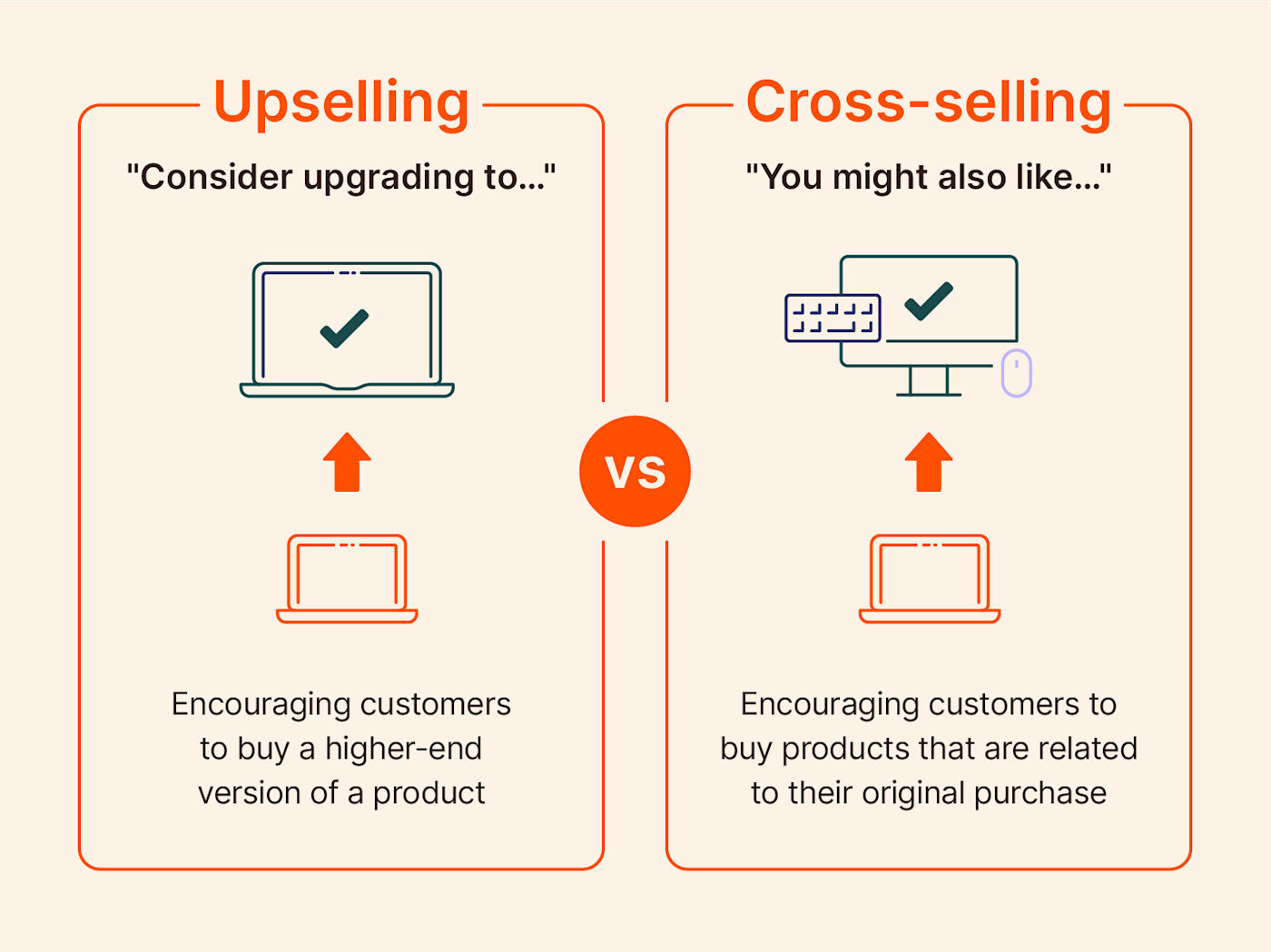
  • When you’re cross-selling, you’re working specifically to get the customer to make additional purchases that would go well with what they originally intended to buy. 
  • When you’re upselling, you’re not necessarily suggesting more items, but convincing the customer to buy the bigger, better, and more expensive version of their original purchase.

For example, when I send out marketing or confirmation emails to recent buyers, I make sure to include products that are similar to whatever that recipient bought. Often this results in a new sale, but even when it doesn’t, it still exposes the customer to other products they may not have known existed. That’s cross-selling.

There’s not as much upselling involved in TeeTweets, but I’ve come across plenty of upselling opportunities in my freelance consulting career at Swyftlight. I had one particular client who wanted me to build a simple marketing website, so they gave me their specs and budget and asked me to put together a proposal. I pitched the idea of adding eCommerce capabilities to their site, quoting them a rate that was still within their budget but was more than I would have quoted them for the simple site alone. They took me up on it—I effectively upsold them on a better version of their original product.

Those are two basic examples, but if you really want to make sure you’re capitalizing on every upselling and cross-selling opportunity you encounter, it’s important to understand both tactics in depth.

Graphic illustration visualizing cross-selling and upselling

What is upselling?

Upselling is about upgrading the customer to a bigger or better version of the product or service they’re already buying. Virtually every modern business does some form of upselling, but one of the most common examples can be seen in an industry we all know and love: food.

Think specifically of the fast food industry, where customers are always encouraged to “supersize” the size of an item. Ordering small fries? Make it a large for only an extra 25 cents. 

Upselling works in all industries, not just consumer-focused ones. If your business pays for software, for example, you’ve almost definitely seen upselling in action. Let’s take a look at Airtable.

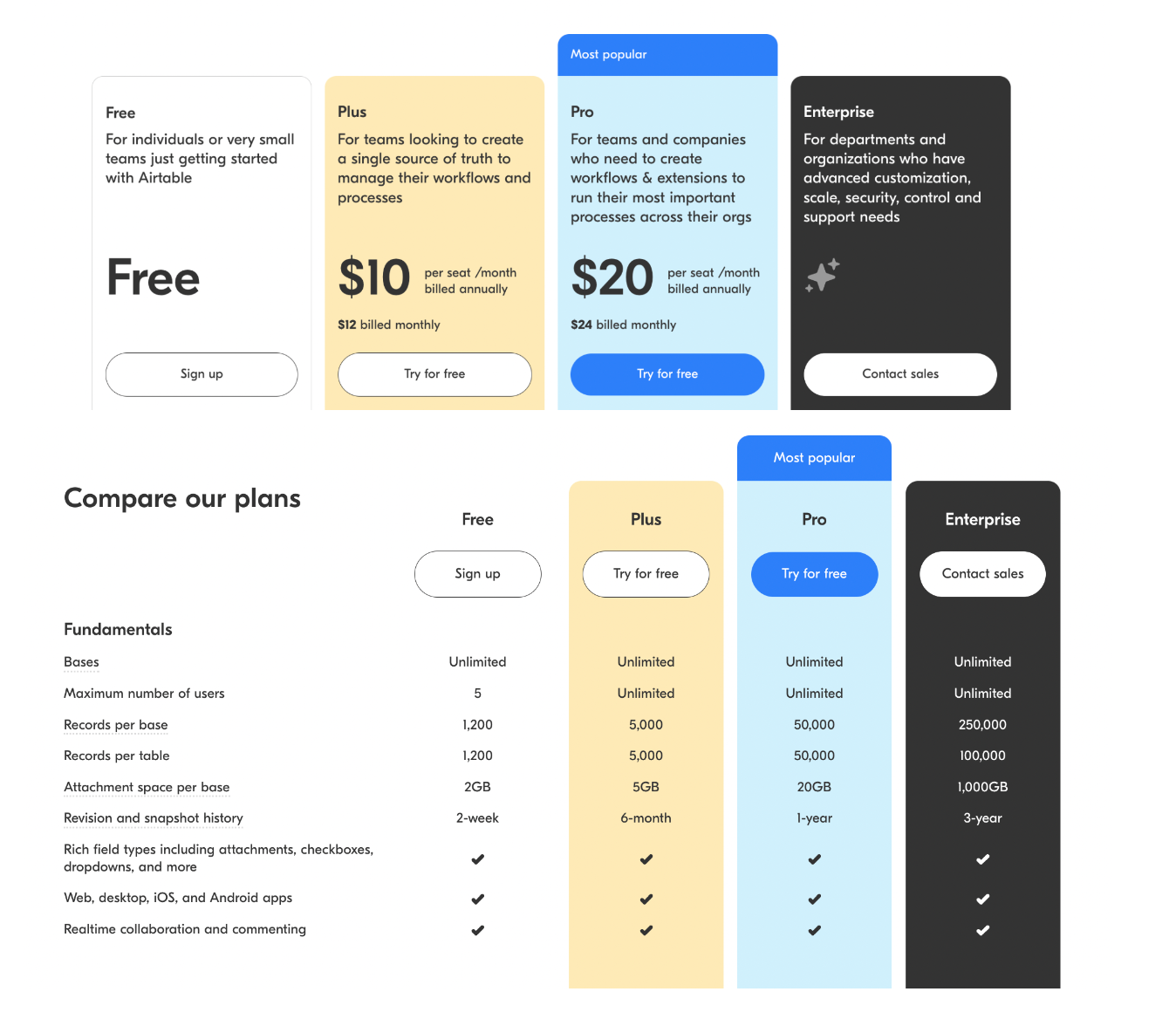
Screenshot of Airtable's pricing structure

Airtable’s pricing structure is laid out in such a way that you can see every plan’s capabilities all in one place. When you’re making your purchase, this page encourages you to stop and wonder: will 5,000 automation runs be enough? Will 5GB hold what I need?

As you’re contemplating how much you need, you’ll also notice that the prices don’t increase proportionately with the increase in services. The Pro plan costs twice as much as the Plus plan, but offers four times more attachment space and ten times more automation runs. When the higher overall price means a lower price-per-item, people are much more susceptible to being upsold.

Those are just two examples. Once you know what upselling looks like, you’ll start to notice it everywhere. More examples include:

  • Promoting a warranty when someone buys an appliance
  • Suggesting upgrading to a spa package when someone goes to book a massage
  • Offering more analytical accounting services in addition to your standard transitional bookkeeping services
  • When someone hires you to design their logo, proposing an entire branding package instead
  • Suggesting the fleece-lined version when someone’s about to buy leggings

What is cross-selling?

Cross-selling is about getting customers to buy different, related items in addition to what they’re already buying. The most effective cross-sellers pitch items that will enhance whatever the person is buying, or will make using that item much easier.

The most clear-cut example is Amazon. Whenever you’re looking at a product, if you scroll down, you’ll always see a “Customers also bought” section. Amazon also uses automated purchase history analysis to look at what you’ve bought in the past, find customers with similar buying habits, and suggest items that are popular among people who are looking for the same things you are.

Have a look at this small business in the candle game: 

Four candles with prices under the heading "You may also like"

In this case, when you buy a relaxing candle, the site is going to recognize more types of relaxing candles. But cross-selling isn’t just about getting customers to buy more similar items right this moment—it’s also about exposing your customers to new products they might not be familiar with. 

The most important thing to keep in mind is that while products you suggest don’t need to be extremely similar, they do need to be complementary. Cross-selling isn’t just about getting customers to buy more items right this moment—it’s about exposing your customers to new products and offerings they may not have seen before. When coupled with a purchase your customer is already set on buying, your brand exposure can have more significant weight than you might expect. You may not make the extra sale today, but you increase the likelihood that the customer comes back at some point down the line.

Upselling vs. cross-selling in action

One of the easiest ways to learn the difference between upselling and cross-selling is to look for examples of both within the same industry or even at the same company. 

Let’s say you buy a new desk chair for your home office. The upsell would be a better, fancier chair with ergonomic features and fancy wheels. The cross-sell would be an under-desk mat, which you’ll need to keep those fancy wheels from tearing up the hardwood.

Applying upselling and cross-selling to your business 

Upselling and cross-selling are both an art and a science. You need to think creatively about your offerings (and potential offerings) and how they might complement existing purchases. But you also need to dive into your analytics and make some data-driven decisions about what your customers are buying, when they’re buying them, and why. After all, upselling and cross-selling won’t do anything for you if no one actually buys what you’re promoting.

I’ve found that the most effective strategy when it comes to using upselling and cross-selling well is to reverse engineer what makes the most sense for your customers. What adds the most value for them? What questions do they have when buying from you? What products or services do they ask you about that you don’t yet offer? Talking directly to existing customers or clients about what they might want is a great place to start.

And remember: there’s always room to experiment. If people who buy product X often also buy product Y, you should absolutely be trying to sell product Y to everyone who buys product X. But don’t stop there. Try promoting product Z to those same people, or try upselling them to a higher quality version. Think outside the box, and you’ll find some creative ways to sell more—and better.

This article was originally published in March 2021 and was most recently updated in August 2022 with contributions from Amanda Pell.

Source :
https://zapier.com/blog/cross-selling-vs-upselling/